Emotron VS Series Quick Start Guide
- 40 -
4.1.2 Keypad Indicators
There are 2 Indicators on the keypad, whose descriptions are as shown in Table 4-2.
Table 4-2 Description of indicators
ON: the drive is power on
OFF: the drive is power off
OFF: Stopped state
Green ON: Running state
Green Flash: In process of stop
Red ON: Fault state
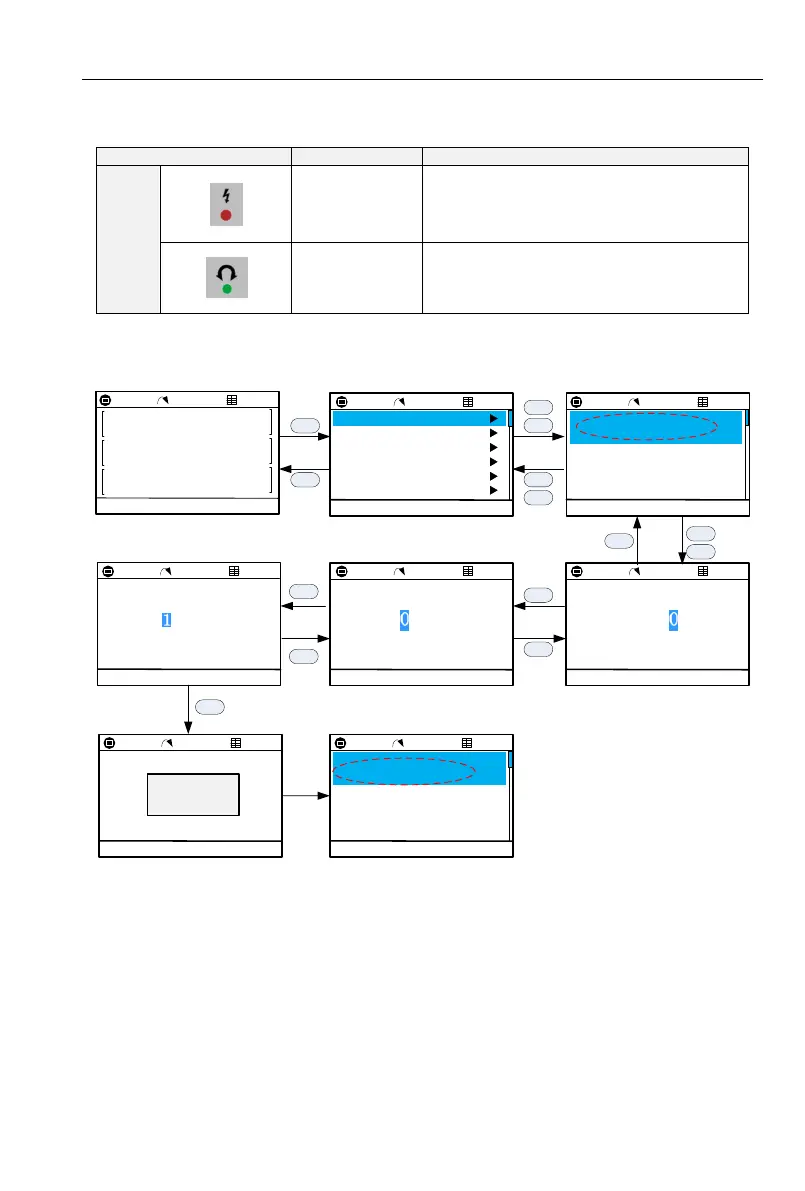
4.1.3 Parameters Setting Process
Set User password A0.00 (00000->10000):
Set Freq
U0.01 Hz
50.00
PARAM FUNC
Bus Volt
U0.06 V
450
AI1 Input
U0.15 %
0.0
A0:System Parameters
b0:Freq Given
b1:Start/Stop Ctrl
BACK SELECT
b2:Ramp Time Set
C1:DO Function Set
C0:DI Function Set
A0.00:User password
BACK OK
00000
Info:
0
65535Min:
Max:
A0.00:User password
BACK OK
00000
Info:
0
65535Min:
Max:
A0.00:User password
BACK OK
Info:
0
65535Min:
Max:
A0.00:User password
BACK EDIT
10000
A0.01:Parameters display
0:Show all parameters
A0.02:Parameters protection
0:All codes modifiable
ESC
ESC
ENT
ESC
LOCAL
RDY
P0
LOCAL
RDY
P0
A0.00:User password
BACK EDIT
0
A0.01:Parameters display
0:Show all parameters
A0.02:Parameters protection
0:All codes modifiable
ENT
>
ESC
<
LOCAL
RDY
P0
LOCAL
RDY
P0
A0.00:User password
BACK OK
10000
Info:
0
65535Min:
Max:
10000
LOCAL
RDY
P0
LOCAL
RDY
P0
LOCAL
RDY
P0
LOCAL
RDY
P0
Successfully
>
>
<
+
-
ENT



 To Next Page