Emotron VS Series Quick Start Guide
- 44 -
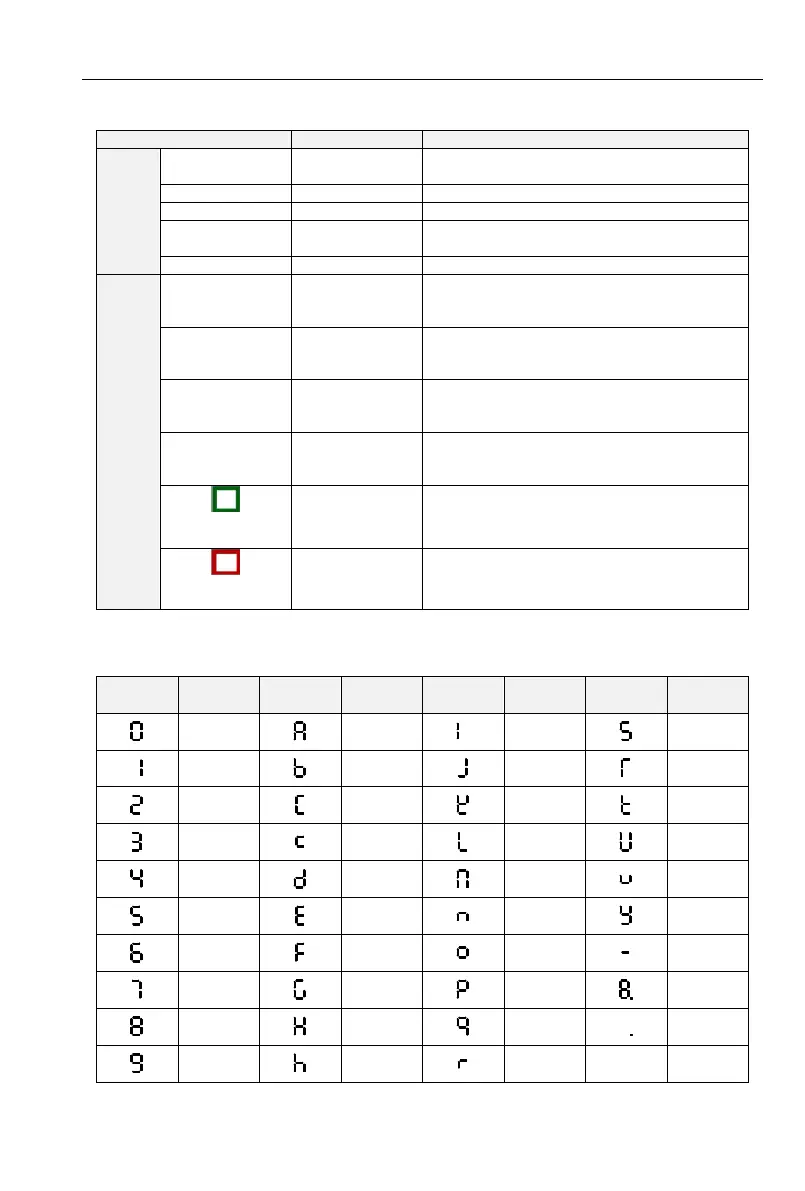
4.2.2 Keypad Indicators
There are 8 Indicators on the keypad, whose descriptions are as shown in Table 4-2.
Table 4-2 Description of indicators
ON: currently displayed parameter is
frequency
ON: currently displayed parameter is voltage
ON: currently displayed parameter is current
ON: currently displayed parameter is
percentage
ON: the drive is running reverse
OFF: the drive is running forward
Flash: dormant state
Keypad,
terminals or
communication
ON: Terminal control
OFF: Keypad control
Flash: Communication control
ON: Running state
OFF: Stopped state
Flash: In process of stop
ON: Fault state
OFF: Normal state
Flash: Warning state
ON: Running state
OFF: Stopped state
Flash: In process of stop
ON: Fault state
OFF: Normal state
Flash: Warning state
4.2.3 Keypad digital display
. Table 4-3 shows meanings of the characters displayed on Keypad.
Table 4-3 Meanings of displayed characters



 To Next Page