4.0 CONFIGURATION MENU
Cheetah Xi Programming Manual 4-15
P/N: 06-651 Rev 1, 09/2013
4.2.2.3 HOW TO SET NAC SYNC PROTOCOL
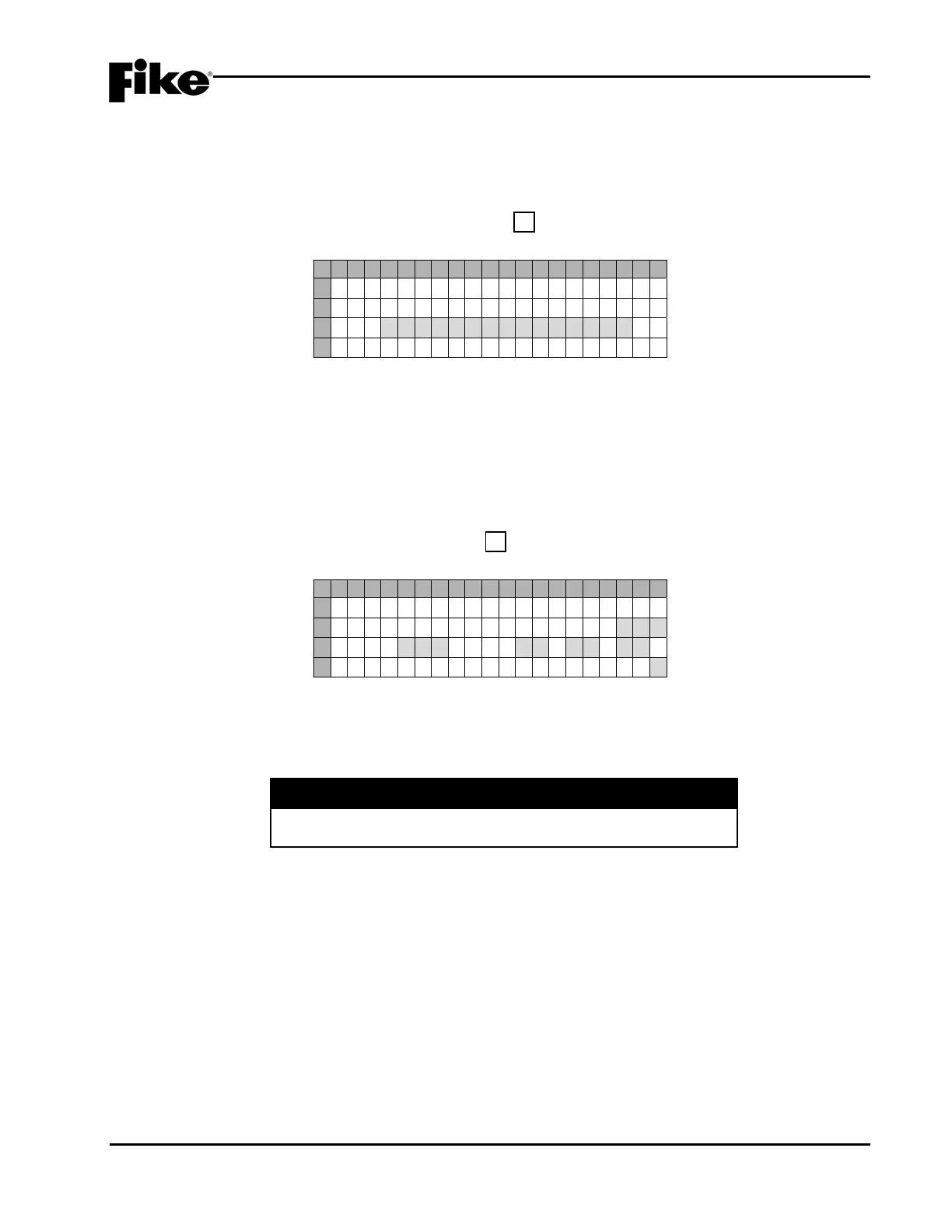
The NAC Protocol screen allows you to configure which synchronization protocol (i.e. Gentex or System
Sensor) will be used by the Cheetah Xi’s notification appliance circuits (see 4.2.2.1). The selected sync
protocol applies to both NAC circuits.
From the “NAC Configuration Menu” screen, press the F3 key to access the “NAC Protocol” screen, as
shown below:
1 2 3 4 5 6 7 8 9 0 1 2 3 4 5 6 7 8 9 0
A
S E L E C T N A C P R O T O C O L
B
FOR PANEL:
C
G E N T E X
D
Exhibit 4-20: NAC Sync Protocol Screen
• Row C - This field allows you to set the SYNC protocol assignment for both notification appliance
circuits #1 & #2 (P8 & P9). Use +/- keys to toggle through the allowable Sync protocols (Gentex,
System Sensor).
4.2.3 HOW TO CHANGE SLC SUPERVISION
The SLC screen lets you change the supervision options of the available signaling line circuits.
From the “Configuration Menu 1” screen, press the F3 key to access the “SLC Configuration” screen, as
shown below:
1 2 3 4 5 6 7 8 9 0 1 2 3 4 5 6 7 8 9 0
A
A U X I L I A R Y L O O P S
B
M O D ULE PRESENT : N O
C
P A S : N O ACK : 1 5 0 0/0 0
D
L O O P W I R I N G S T Y L E : 4
Exhibit 4-21: SLC Configuration Screen
• Row B (SLM:)- This field allows you to turn on Supplemental Loop Module supervision (Yes/No). If
Yes is selected, the panel will begin supervising SLC 3 and 4 on the SLM. Use the +/- keys to
change the field.
I CAUTION
Having a SLM installed on the panel and not changing this field
to Yes could result in delayed SLC communication.
• Row C (PAS:) - This field allows you to turn on Positive Alarm Sequencing function on the detection
circuits (Yes/No). Use the +/- keys to change the field.
LNote: This feature is enabled or disabled for all sensors present on the panel. Refer to Cheetah
Xi Operations Manual for full description of this feature.
• Row C (ACK:) - This field allows you to adjust the time frame in which the Alarm event must be
Acknowledged in order to initiate the panel’s Positive Alarm Sequence. The timer can be set
between 15 and 30 seconds. Use the ◄► arrow keys to move cursor under the field; then use the
+/- keys to increment or decrement the field.


 To Next Page