28
RGU-10A , RGU-100A
Instruction Manual
7. CONFIGURATION
To enter the configuration menu, we must display the Events screen and press the key .
Note: If the device is locked, , the menu cannot be accessed.
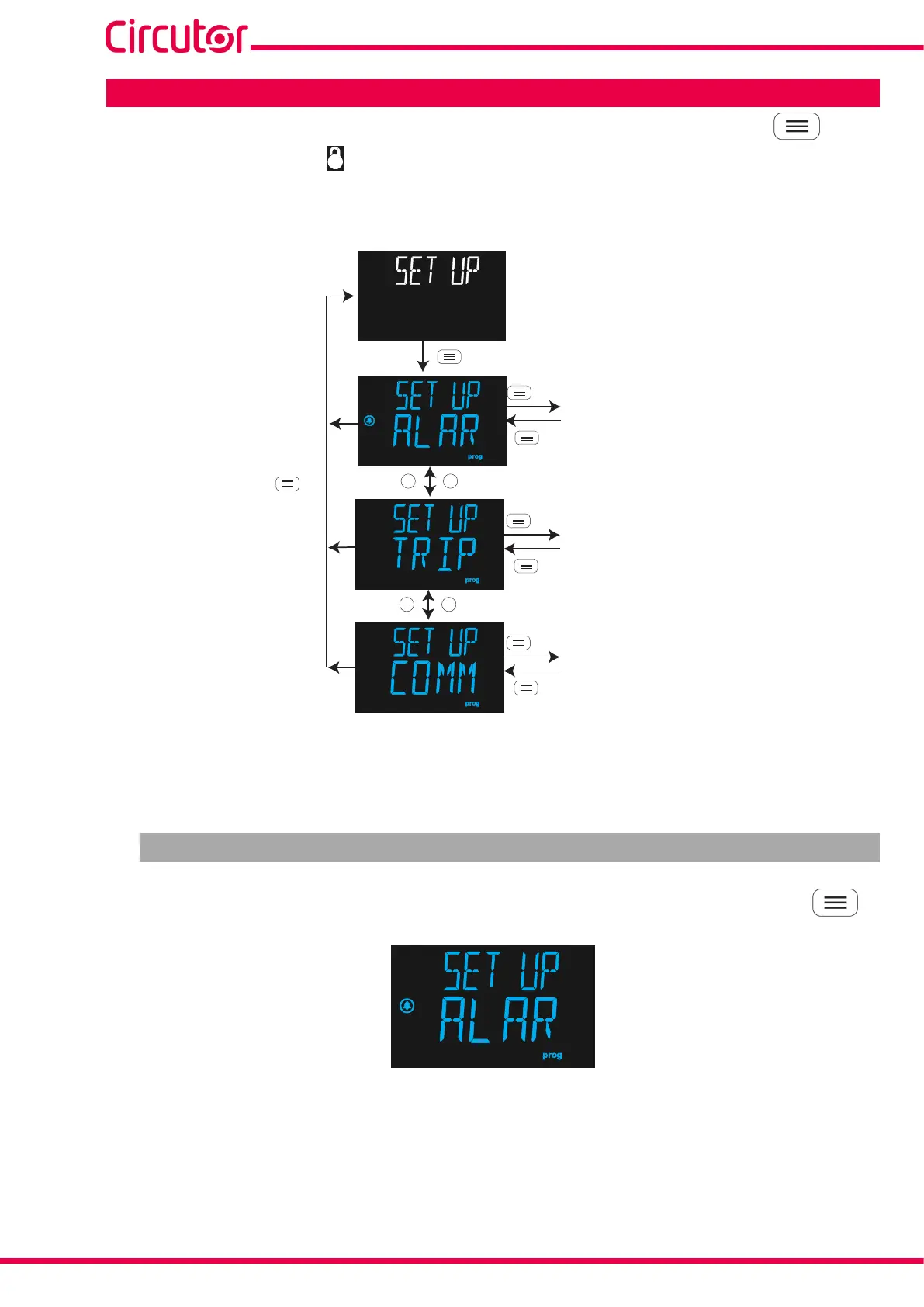
The device configuration on the RGU-10A /RGU-100A is organised into 2 or 3 menus, Figure 29.
> 3s
Pre-alarm Relay
Trip Relay
Communications
Model RGU-100A
><
> 3s
> 3s
><
> 3s
Figure 29: Configuration menu.
Note: In “ANNEX B. CONFIGURATION MENU” we can see the configuration tree.
7.1 - PRE-ALARM RELAY
Figure 30 shows the home screen of the pre-alarm relay configuration menu. Press the key to
access the menu.
Figure 30: Pre-alarm menu.
Figure 31 shows the configuration menu of the pre-alarm relay.


 To Next Page