EasyManua.ls Logo

Cirris CH2 - Page 19

Cirris CH2
64 pages
Print Icon
To Next Page IconTo Next Page
To Previous Page IconTo Previous Page
Loading...
Checking the System 16
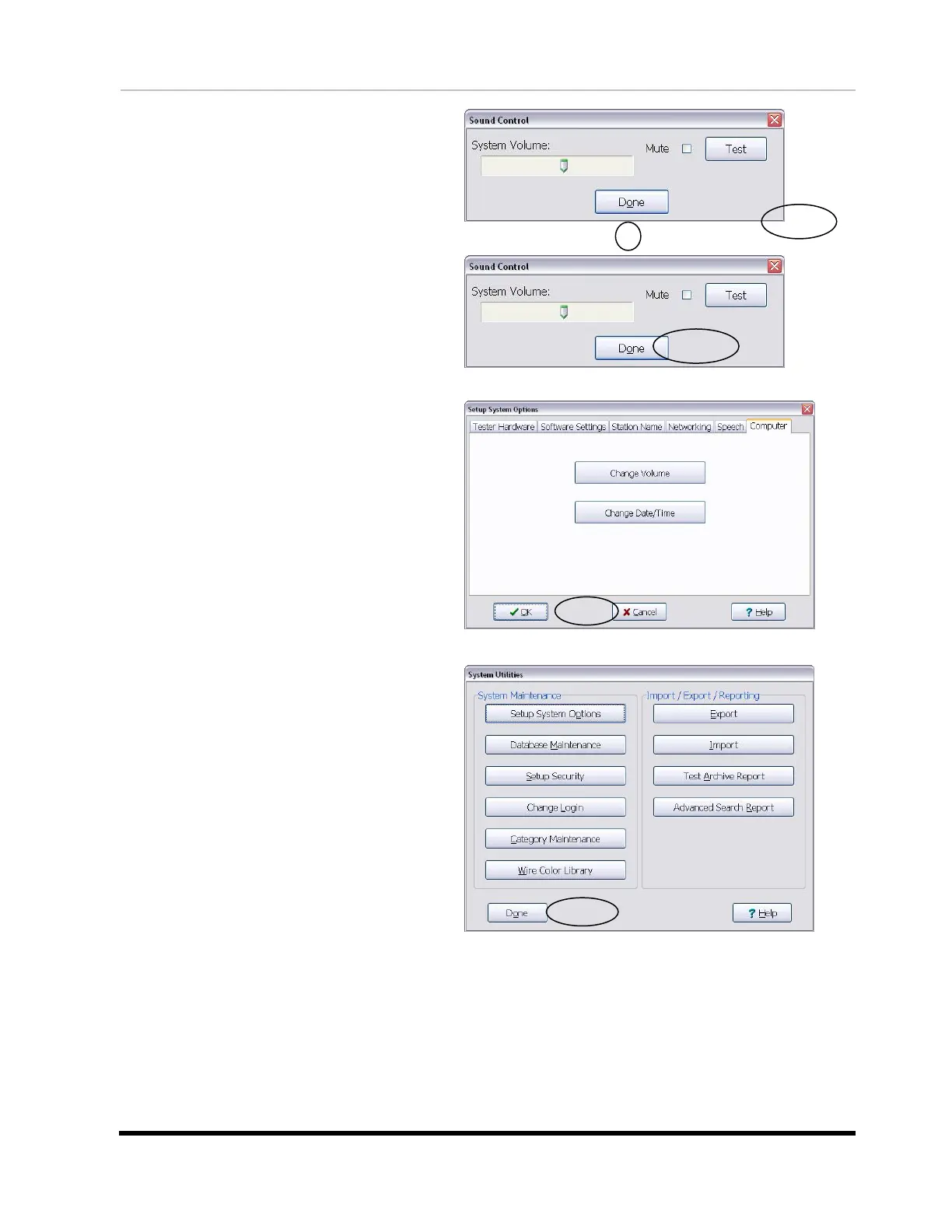
6. Adjust the volume slider and
click Test to try out the setting.
7. When the volume is at the desired
level, click Done.
8. The “Setup System Options” window
will be open. Click OK.
9. The “System Utilities” window will
be open. Click Done to return to the
main menu.
10. If you are still having sound problems, try the following:
Verify that speakers are connected to the PC and have power.
Verify that the speakers are on and that the volume is turned up.
Verify that the volume on your PC is turned up (the PC volume
control can be found on your Windows task bar).
If the sound problem persists, call Cirris for assistance.


Other manuals for Cirris CH2

Related product manuals