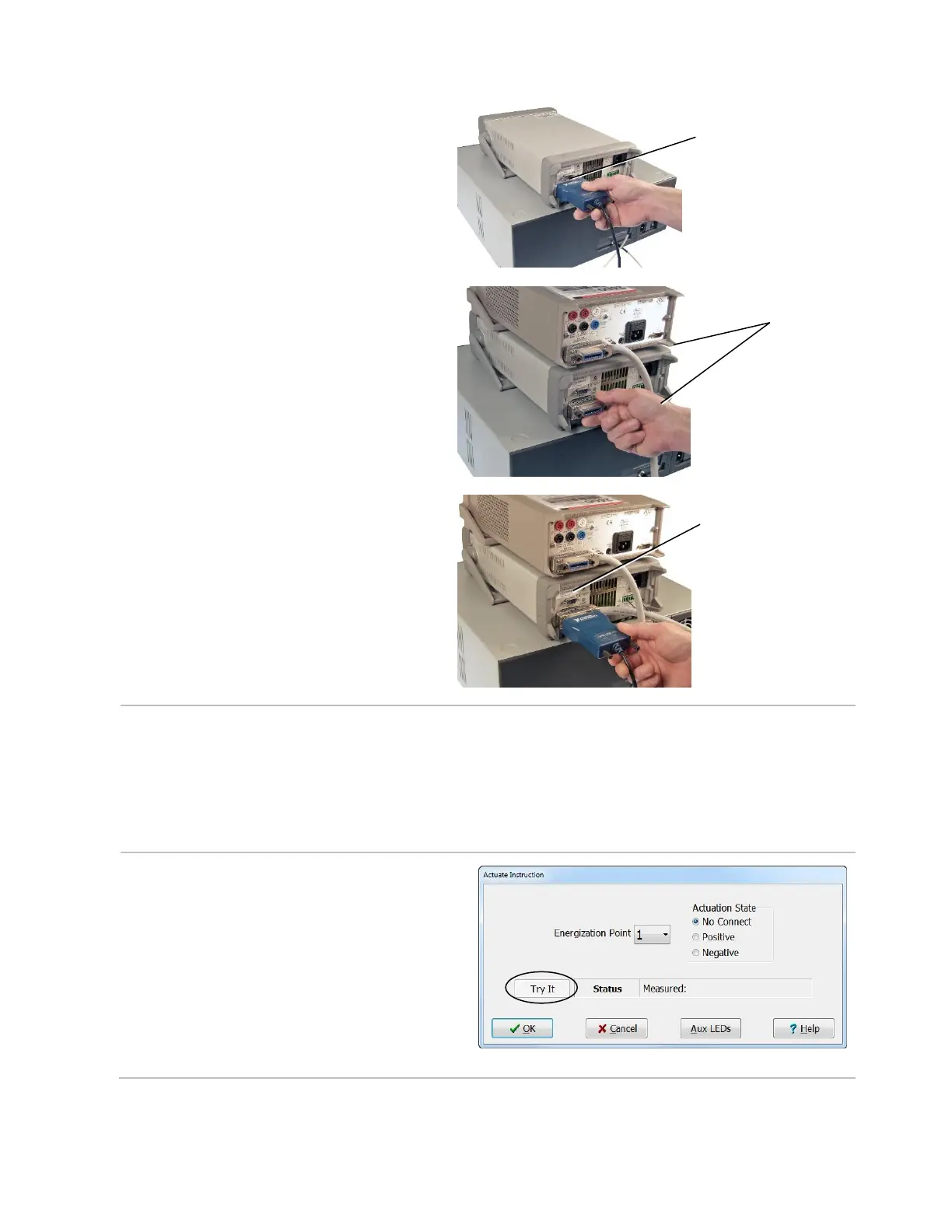
6. If you have one variable power
supply, plug the GPIB Converter or
RS-232 Serial Cable into the
connector on the back of the variable
power supply. Plug the other end into
a USB port on your PC.
If you have multiple variable
power supplies, plug each end of
the extension cable(s) into each
variable power supply.
Then plug the GPIB Converter into
the extension cable connector on
the back of the variable power
supply. Plug the other end into a
USB port on your PC.
7. Plug one end of the power cord into
the back of the variable power
supply and plug the other end into
a grounded outlet.
EBox Instructions
Relay energization is accomplished by attaching test points on the CH2 base to energization
points on the EBox using instructions. The EBox Instructions include: Actuate and Energize.
Energization points are selected in a test program using the “Actuate” instruction in the Easy-
Wire software. Energization points are powered on and off using the “Energize” instruction.
The EBox Custom Instructions include: Attach to EBox, Set Voltage, and User Defined Power.
Actuate Instruction
After you add the “Actuate” instruction,
you can select an Actuation Point and
connect it to the positive or negative side
of the energization supply.
Note: When you see a Try It button, you
can click on it to execute that instruction.
This can be useful for debugging test
programs.



 To Next Page