Introduction
Custom Instructions are designed to accommodate specific or unique testing needs to extend
Easy-Wire’s capability. These testing needs can accommodate a wide range of external
instruments. These instructions have all the benefits of the standard Easy-Wire commands:
measured values, custom reporting, import/export, and Easy-Wire editor and test interfaces.
In order to use Custom Instructions, Easy-Wire software version 2009.2.0 or higher must be
installed and a license file is required (see below).
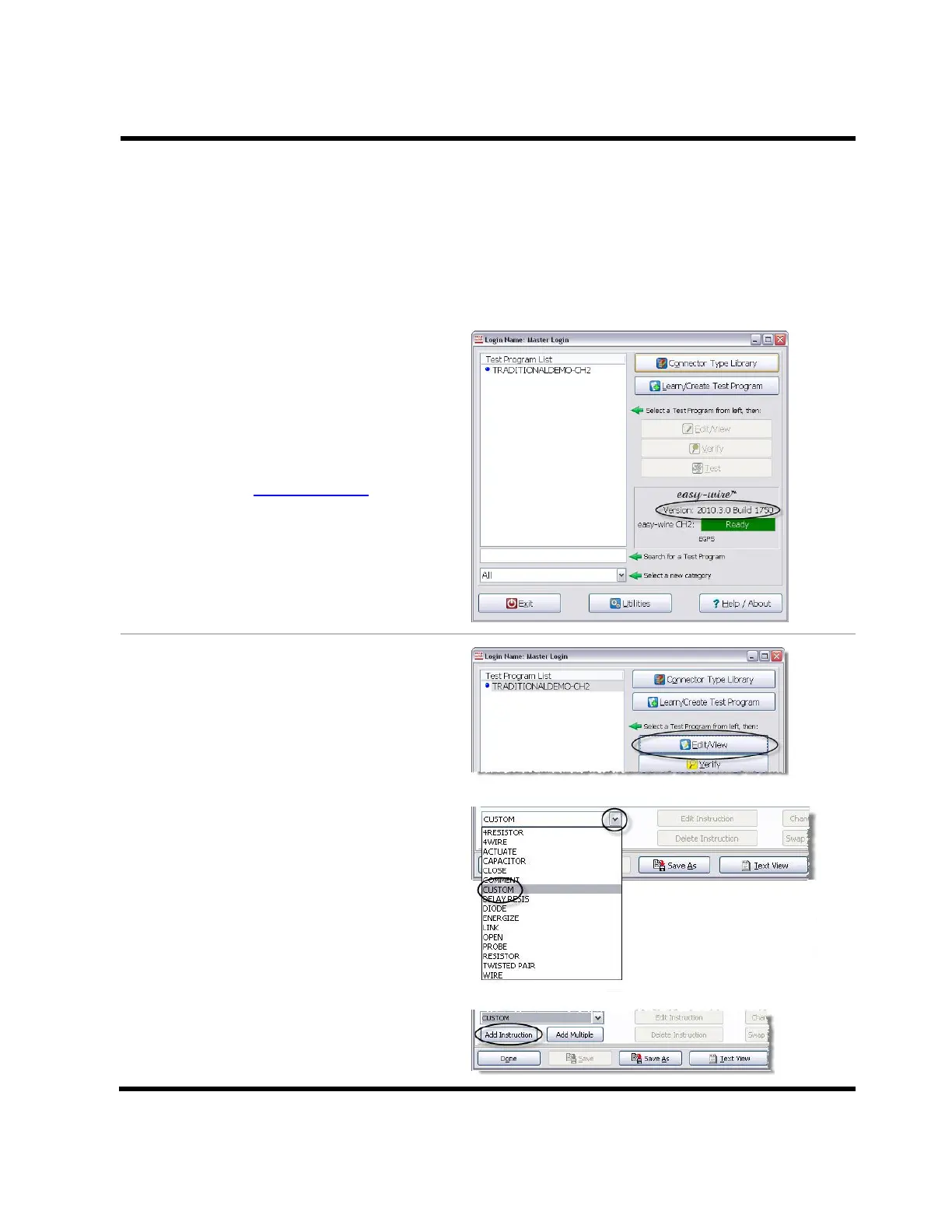
The version of your Easy-Wire software is
found in the Easy-Wire Main Menu.
If you have a newer version of Easy-Wire,
call your Cirris sales representative to
get your license file.
If you do not have a newer version of
Easy-Wire, go to www.cirris.com. A
password will be needed to access the
Easy-Wire software download. Call your
Cirris sales representative to obtain the
password and get the license file.
Adding a Custom Instruction
1. In the Easy-Wire main menu,
highlight the test program you
wish to add an instruction to, and
then click Edit/View.
2. Open the “Define Instructions” tab in
the “Test Program Editor.” Click on the
drop down box in the bottom left
corner, and select Custom.
3. Click Add Instruction.



 To Next Page