High Voltage Test Parameters
When you install the xHV Power Supply, Easy-Wire’s High Voltage Test Parameters will have
new capabilities. The Dielectric Withstand Voltage Test (DWV) can deliver up to 1500 VAC
RMS, the “total current” and “real current” limits can deliver up to 22mA RMS and 5mA RMS
respectively, and Ramp Up/ Ramp Down setting options are now available. Setting these
options correctly maximizes operator safety.
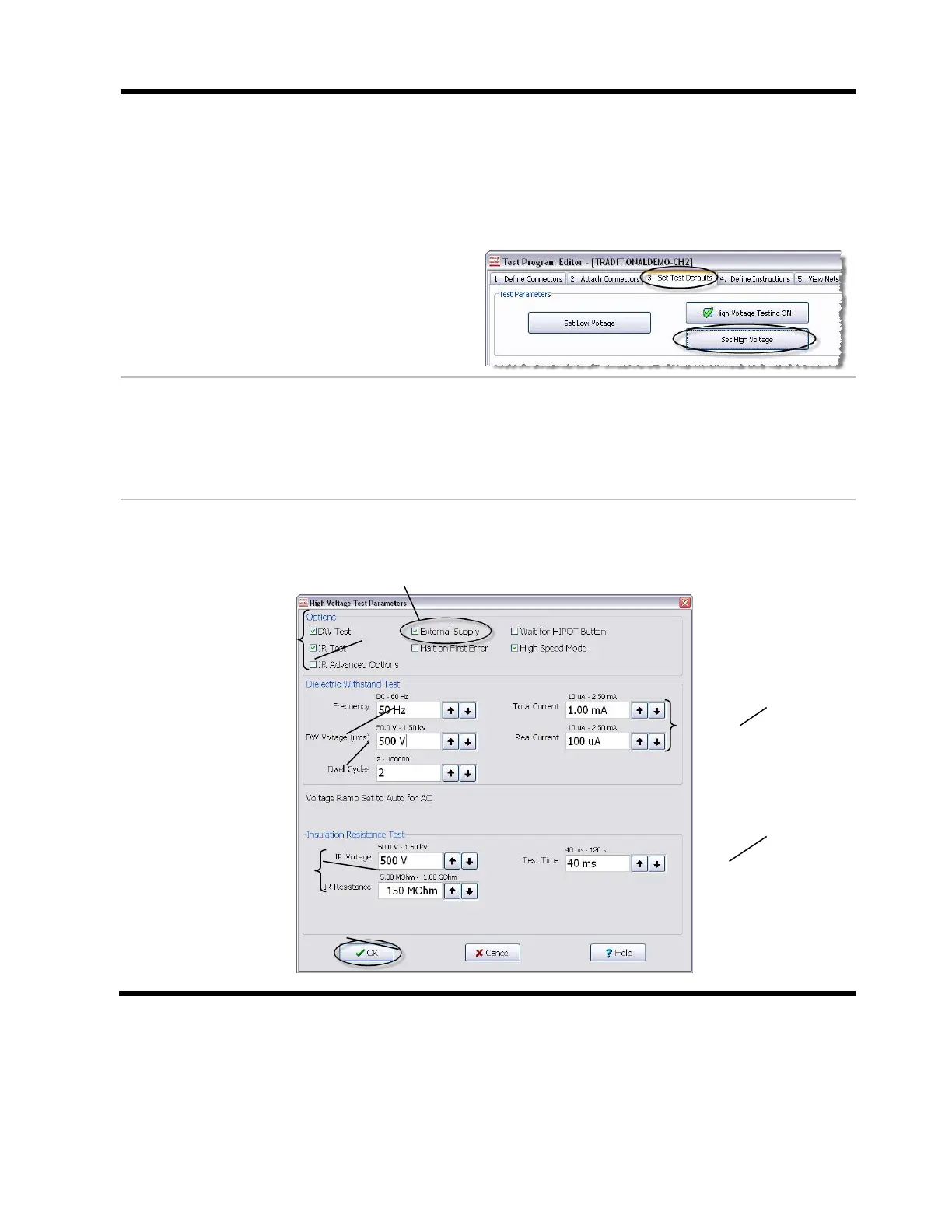
When you are editing a test in Easy-Wire,
click on the “Set Test Defaults tab” (tab 3),
then click Set High Voltage.
High Voltage Test Parameters
In the “High Voltage Test Parameters” window, you can verify that the xHV Power Supply
is working if “External Supply” is available in the “Options” section. If “External Supply” is
unavailable, go through the set up steps again to correct errors that may have occurred.
If needed, call Cirris for assistance at 1-800-441-9910.
Setting the HV Test Parameters for the xHV Power Supply:
To run the xHV Power Supply, the “External Supply” option
must be enabled.
Ensure that the options
External Supply, DW Test,
and IR Test are selected in
the “Options” section.
Set the “Total Current” high
enough to withstand the
capacitance of your cable,
and set the “Real Current”
as low as your specification
allows.
In the “Dielectric Withstand
Test” section, set the
“Frequency” to 50 or 60 Hz
to enable the AC option,
and set the “DW Voltage” to
the value your test requires.
Set the “Test Time”
to 20ms or more.
Set the “IR Voltage” and “IR
Resistance” to the values
that your test requires.
When the “High Voltage
Test Parameters are set,
click OK, and save the test.



 To Next Page