ESIGNO_SYSTEM_USER_MANUAL_101.DOCX 63/71
N
NN
NETWORKING
ETWORKING ETWORKING
ETWORKING H
HH
HARDWARE
ARDWAREARDWARE
ARDWARE
(3)
(3)(3)
(3)
TIP
TIPTIP
TIP
To perform wireless field analysis before
executing installation and to discover the
wireless channels to be associated to a group of
eSIGNO Wireless locks in relation with the
Wireless Coordinator, a special tool named
Wireless Analyser is available.
C
CC
CONNECTIONS
ONNECTIONSONNECTIONS
ONNECTIONS
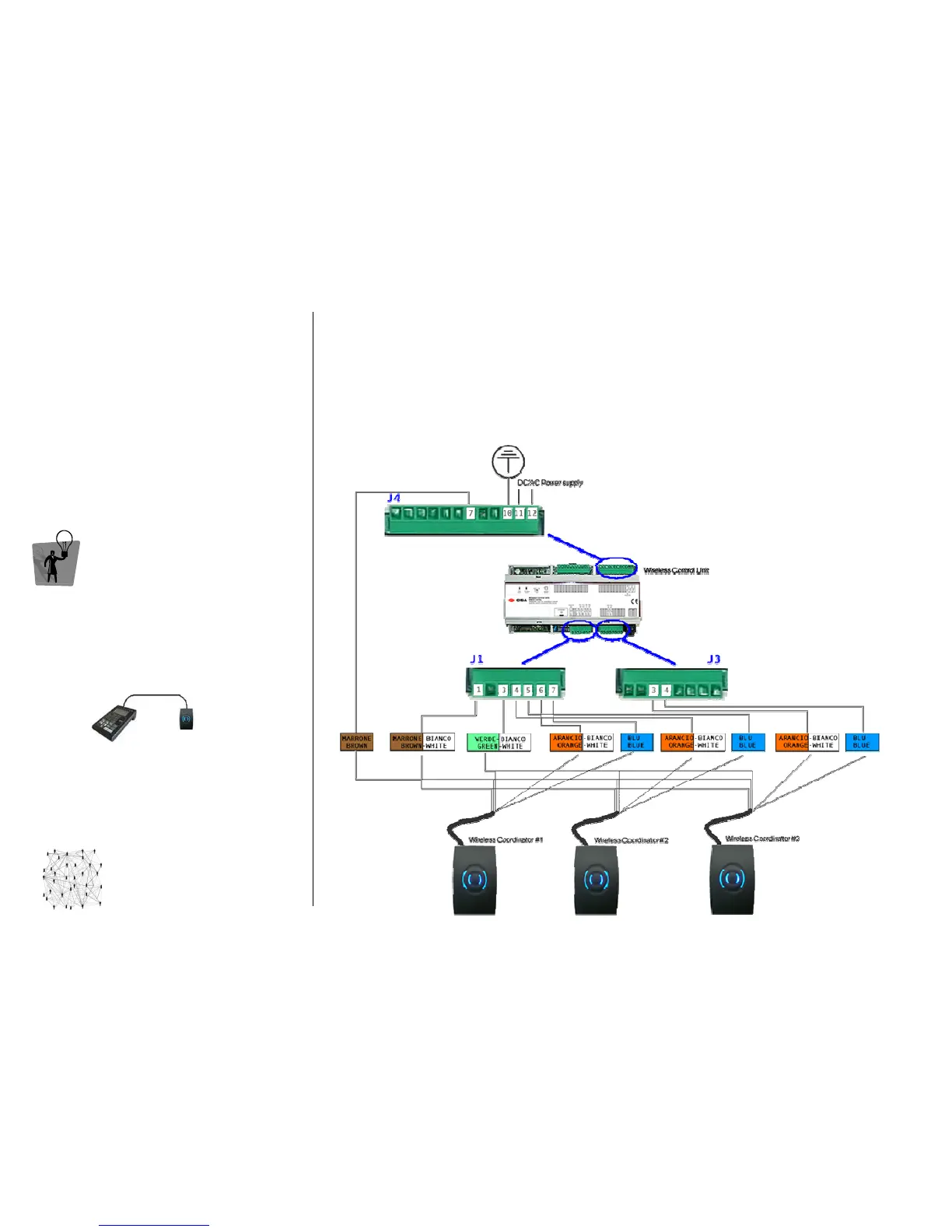
It links the central station to the eSIGNO Wireless locks (up to 30) and provides the physical
connection with up to 3 Wireless Coordinators. It is connected via Ethernet to the LAN network.
W
WW
W
IRELESS
IRELESS IRELESS
IRELESS
C
CC
C
OORDINATOR
OORDINATOROORDINATOR
OORDINATOR
It provides the radio connection through ZigBee between Wireless Control Unit and the
corresponding eSIGNO Wireless locks (up to 10). It is connected to the Wireless Control Unit through
a maximum 25 m long cable. Note: Wireless Coordinator is supplied with 10m cable length.



 To Next Page