C002332_02_CR3 User Manual - 7
Save Settings
1.6 - Cabled Operation
1.6.1 - Introduction
The CR3 is available with USB, RS232 and PS2 cables. All of the cables are connected to the CR3 with a
8-pin DIN connector. Different cables may be required for different hosts.
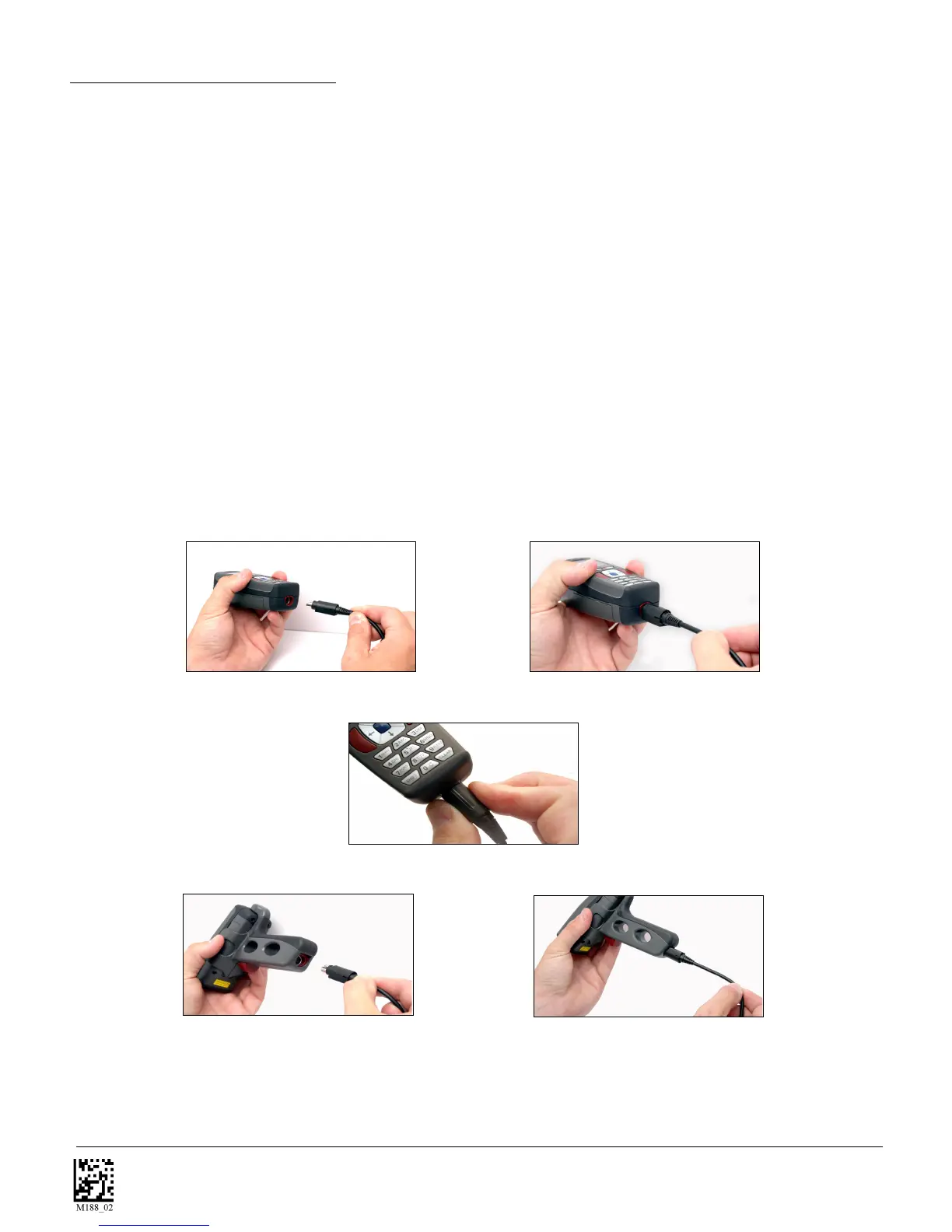
Hand Held CR3 - To install a cable on the standard palm-held unit, correctly line up the 8-pin DIN connec-
tor into back end of the unit. The arrows on the connector should be facing down (Figure 1.2). When they
are lined up, firmly push the cable in. The cable has a locking mechanism that will firmly hold the cable in
place (Figure 1.3). To unattach the cable from the reader, YOU MUST pinch the plastic on the 8-pin din
(Figure 1.4) and pull back to disengage the connector.
CR3 with Attachable Handle - If you purchased the attachable handle accessory, the 8-pin DIN
connection is at the botton of the handle (Figure 1.5). Insert the 8-pin connector and firmly push cable
into the handle. The cable has a locking mechanism that will firmly hold the cale in place (Figure 1.6). To
unattach the cable from the reader, YOU MUST pinch the plastic on the 8-pin din (Figure 1.4) and pull back
to disengage the connector.
Figure 1.2
Figure 1.3
Figure 1.4
Figure 1.5
Figure 1.6



 To Next Page