C002332_02_CR3 User Manual - 10
Save Settings
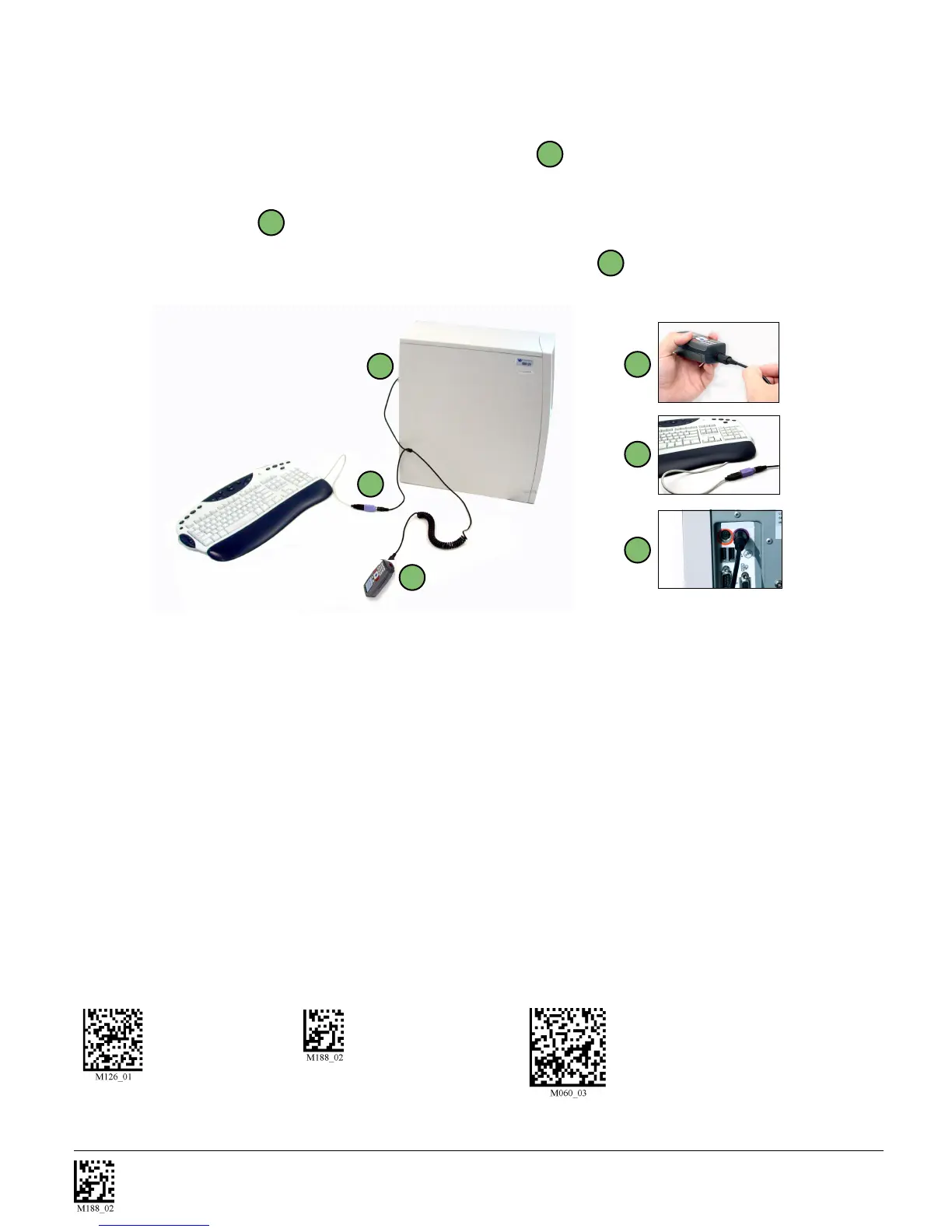
1.6.3 - PS2 Cable Installation Guide
1. Power off the host computer.
2. Attach the end of the PS2 cable with the single connector
A
to the CR3.
3. If external keyboard exists, unattach your keyboard from the host and connect the appropriate connec-
tor to the PS2 cable
B
.
4. Connect the other connector to host computer into keyboard port
C
. The CR3 is powered by the
PS2 port and does not require a power supply.
5. Set the CR3 to PS2 mode by scanning the PS2 Mode code below.
6. Scan the Save Settings code.
7. Your CR3 unit is now ready. Open the appropriate application and begin scanning data.
WARNING: Code does not recommend using Batch or Bluetooth Radio modes with the PS2 interface.
You may need to disconnect the CR3 and the keyboard which may result in the host computer freezing.
1.6.3.1 - PS2 Communication Settings
Scan the following codes to set the reader to the PS2 communication setting:
PS2 Mode Save Settings Reset to PS2 Factory Defaults
A
B
C
A
C
B
Code does not guarantee compatibility
with all models of laptops.



 To Next Page