C002332_02_CR3 User Manual - 18
Save Settings
1.8 - Reader Feedback Guide
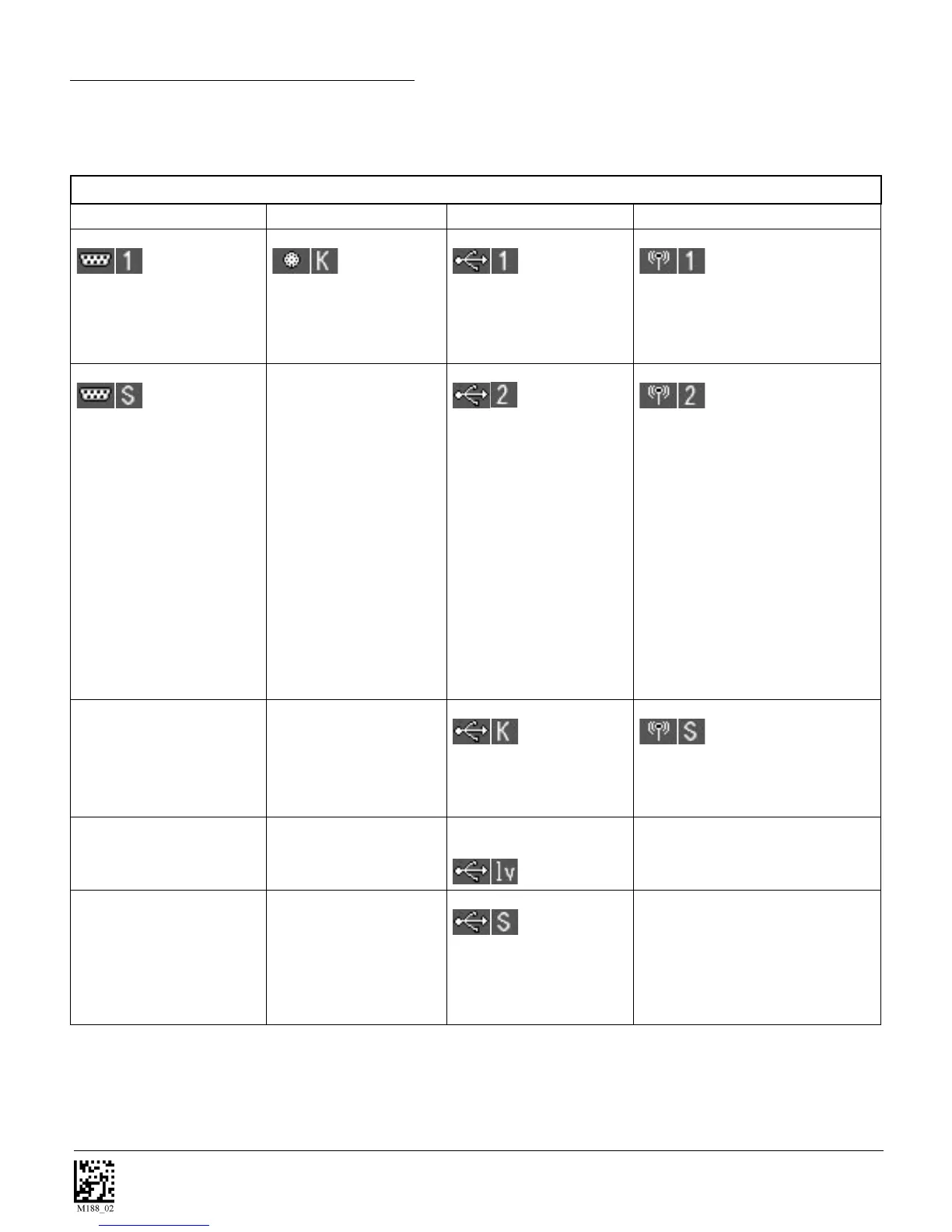
The chart below shows all of the potential icon combinations in CodeViewer™ software. Consult the
chart to verify a conguration.
Possible CR3 Configurations
RS232 PS2 USB Bluetooth Radio
RS232 One Way Mode
This mode is the standard
way of transferring unfor-
matted, unpacketized data
through the serial/RS232
port.
PS2 Keyboard Mode
This mode is the standard
mode for transferring data
from the CR3 through a
PS2 port.
USB One Way Mode
This mode is the standard
way of transferring unfor-
matted, unpacketized data
through a USB port.
Bluetooth One Way Mode
This mode is a way of transferring
unformatted, unpacketized data by
radio frequency (Bluetooth).
RS232 Secure Mode
This mode is utilized for
transferring data in an en-
crypted format from the CR3
to a host computer through
the serial/RS232 port.
USB Two Way Mode
This mode is utilized when
there is a need for pack-
etized, bidirectional commu-
nication between the CR3
and an application through
a USB port.
Bluetooth Two Way Mode
This mode is utilized when there is
a need for packetized, bidirectional
communication between the CR3
and an application by radio frequency
(Bluetooth). This requires implemen-
tation of software at the application
level. The reader receives confirma-
tion via packet protocol verification
and is 100% reliable. Code offers
a Windows or PocketPC version of
software called CodeXML Router
Bluetooth Edition (BE) that automati-
cally provides packet protocol verifi-
cation. CodeXML Router BE allows
for end-to-end Bluetooth handshakes
that eliminate issues with out-of-range
data loss.
USB Keyboard Mode
This mode emulates the
transfer of data from the
CR3 to a host computer via
a keyboard interface.
Bluetooth Secure Mode
This mode is utilized for transferring
data in an encrypted format from the
CR3 to a host computer through a
Bluetooth connection.
USB Virtual COM Port 1
Mode
USB Secure Mode
This mode is utilized for
transferring data in an
encrypted format from the
CR3 to a host computer
through a USB port.



 To Next Page