C002332_02_CR3 User Manual - 17
Save Settings
1.7.3 - Bluetooth Radio Auto Disconnect
Auto Disconnect: This feature is used when multiple CR3 units are connecting to the same Bluetooth
Radio. By enabling Auto Disconnect the CR3 radio disconnects after each data transmission, allowing
other radios to connect.
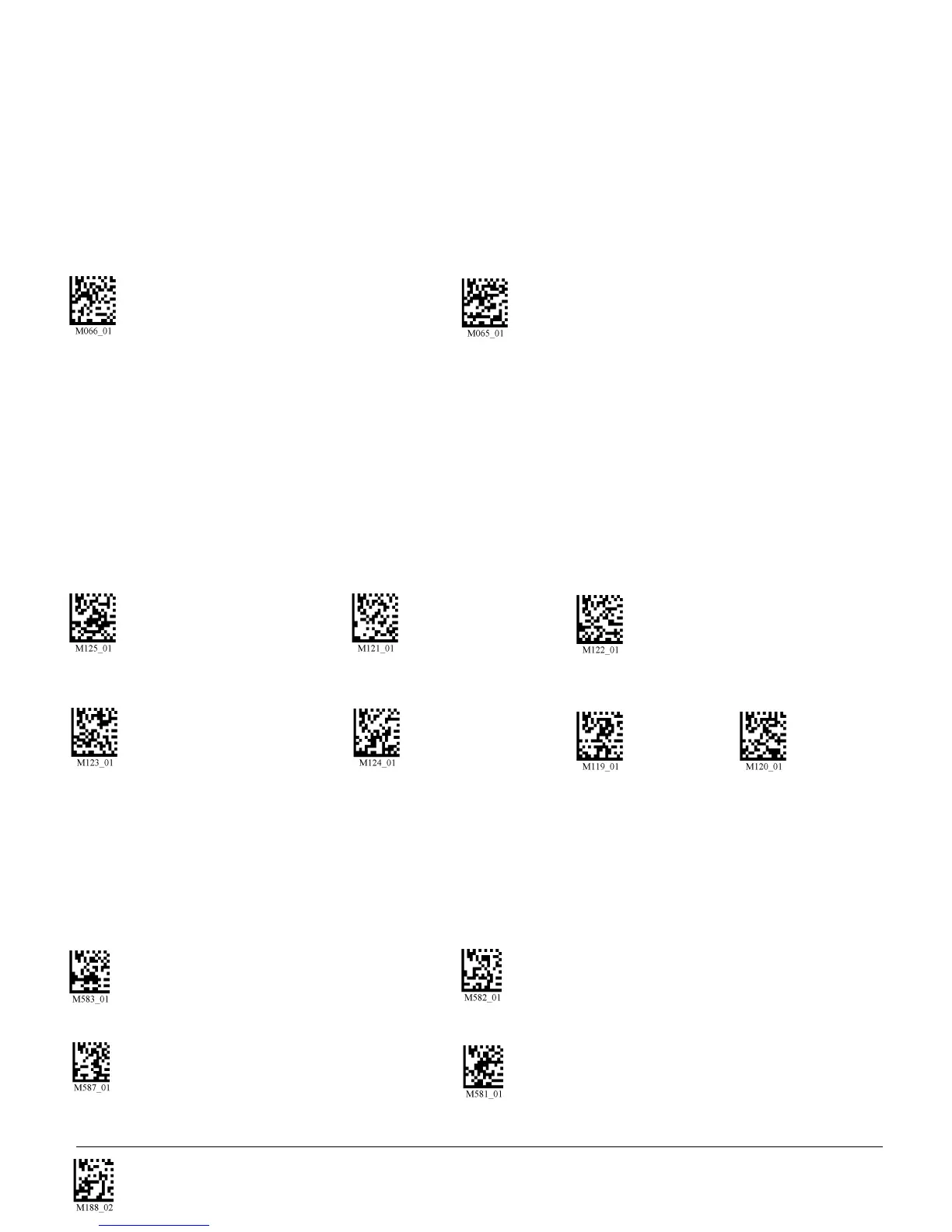
Scan the following codes to enable or disable Auto Disconnect feature for the Bluetooth radio:
Bluetooth Radio Auto Disconnect On Bluetooth Radio Auto Disconnect Off (Default)
1.7.4 - Bluetooth Radio Time Out Settings (Uncabled Operations)
Scan the following codes to set the period of time before the Bluetooth Radio will go into sleep mode from
inactivity:
Note: Increasing the time before the unit will time out will decrease battery life. If the unit has power (USB
cable, power cable, etc.), it will disconnect based on cable time out settings.
90 Seconds (Default) 5 Minutes 10 Minutes
15 Minutes 30 Minutes 1 Hour 2 Hours
1.7.5 - Bluetooth Radio Out of Range Notification Settings
Scan the following codes to enable a beep or vibrate notification when the radio goes out of range:
Enable Out of Range Notify with Beep Enable Out of Range Notify with Vibrate
Enable Out of Range Vibrate & Beep Disable Out of Range Vibrate or Beep (Default)



 To Next Page