C002332_02_CR3 User Manual - 25
Save Settings
2.1 - Introduction
The CR3 comes pre-configured with DOT (Dynamic Optimization Technology), a revolutionary adaptive
read technique that eliminates the need to manually set most individual parameters. From the moment you
turn on your CR3, you are taking full advantage of the dual path 1.3 megapixel imager the 400 MHz pro-
cessor and Dynamic Optimization Technology.
Dynamic Optimization Technology continuously adapts the resolution, illumination, and image field for the
fastest automatic symbology identification. DOT achieves decoding speeds for 2D codes that is similar
to speeds usually only seen in 1D readers. And achieving this with the widest range of symbology types,
sizes, printing media and ambient lighting.
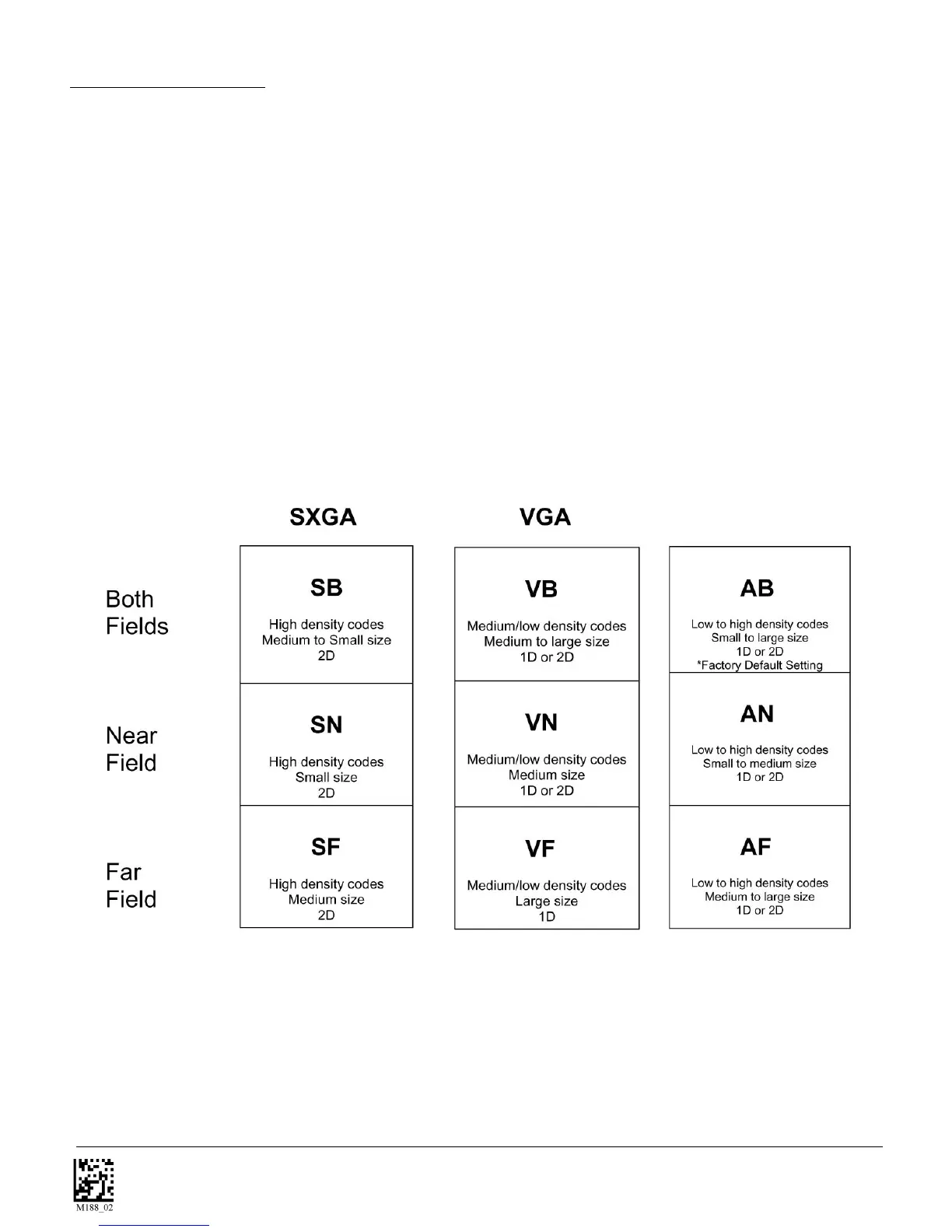
By defining if you are scanning large, small, or different sizes of multiple types of codes, type of
symbology(s), 1D or 2D and density of the data embedded in the code, the CR3 offers options for set up
that will produce lightening fast decodes.
The chart below shows options that will improve performance based on parameters listed in each box.
The CR3 is easily customizable; each trigger can be independently programmed for different behavior. With
DOT, optimizing the CR3 is as simple as deciding which Field of View is best and what type and size of
symbologies are being scanned.
Near Field (NF): The nearest field of the CR3’s two image fields. The Near Field has the highest resolution
(1024 x 640 DPI). It has an optimal focal point of 4” (101.6 mm) away from the lens of the reader. It has a
size of 8.5” long (215.9 mm) by 4” wide (101.6 mm). It has an overall viewing angle of 21 deg. By 12 deg.
DOT



 To Next Page