USER SETUP
33
CONTENTS
ambiente 1
ambiente 2
ambiente 3
ambiente 4
0/4
0/4
0/4
0/3
OOn
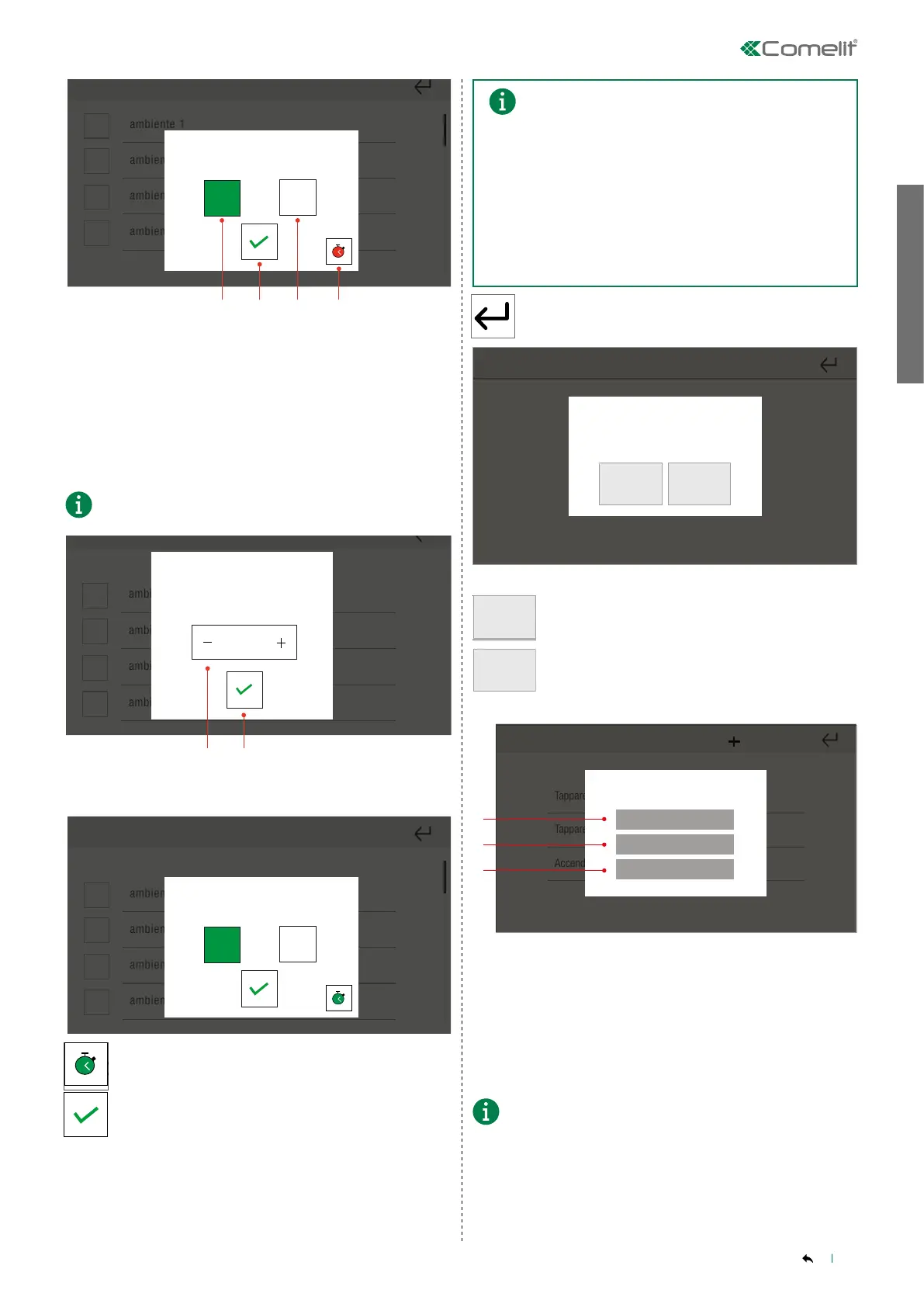
1. ON
2. Confirm
3. OFF
4. Scenario action delay
Scenario action delay
By setting a time delay, you can delay the execution of the commands
in the scenario. For example, you can switch on the outdoor lights
along a driveway in sequence, one every 5 seconds.
The delay time should refer to the previous action.
ambiente 1
ambiente 2
ambiente 3
ambiente 4
00:00
1. Delay time
2. Confirm
ambiente 1
ambiente 2
ambiente 3
ambiente 4
0/4
0/4
0/4
0/3
OOn
ambiente 1
ambiente 2
ambiente 3
ambiente 4
0/4
0/4
0/4
0/3
OOn
» The icon has changed colour.
Set the desired status, then confirm.
• You can select multiple functions to add to the scenario.
• In the case of ROLLER BLINDS and AUTOMATIONS, the On
and Off icons are replaced by direction arrows.
• In the case of RGB and DIMMER LIGHTS, the colour adjustment
and brightness control icons are also shown.
• In the case of the ALARM function, it is necessary to ENTER
THE ALARM CODE in order to be able to activate the desired
alarm function.
• For a detailed description of each function, please refer to the
relevant chapters in the manual.
Press to exit.
Confermare?
Confirm exit from creating
scenario?
YES NO
YES
Press to end scenario creation.
NO
Press to continue with scenario creation.
Tapparelle apri
Tapparelle chiudi
Accendi tutte le luci
Do you want to save the scenario?
Remote
Local
Cancel
1. Press to make the scenario available to the other system managers
and the app.
2. Press to make the scenario available only on the device.
3. Cancel the procedure.
• ADVANCED FUNCTIONS
The scenarios created using Comelit Hub and via system
managers other than Maxi Manager cannot be edited!



 To Next Page