Chapter 7:Protecting & monitoring your Wi-Fi network
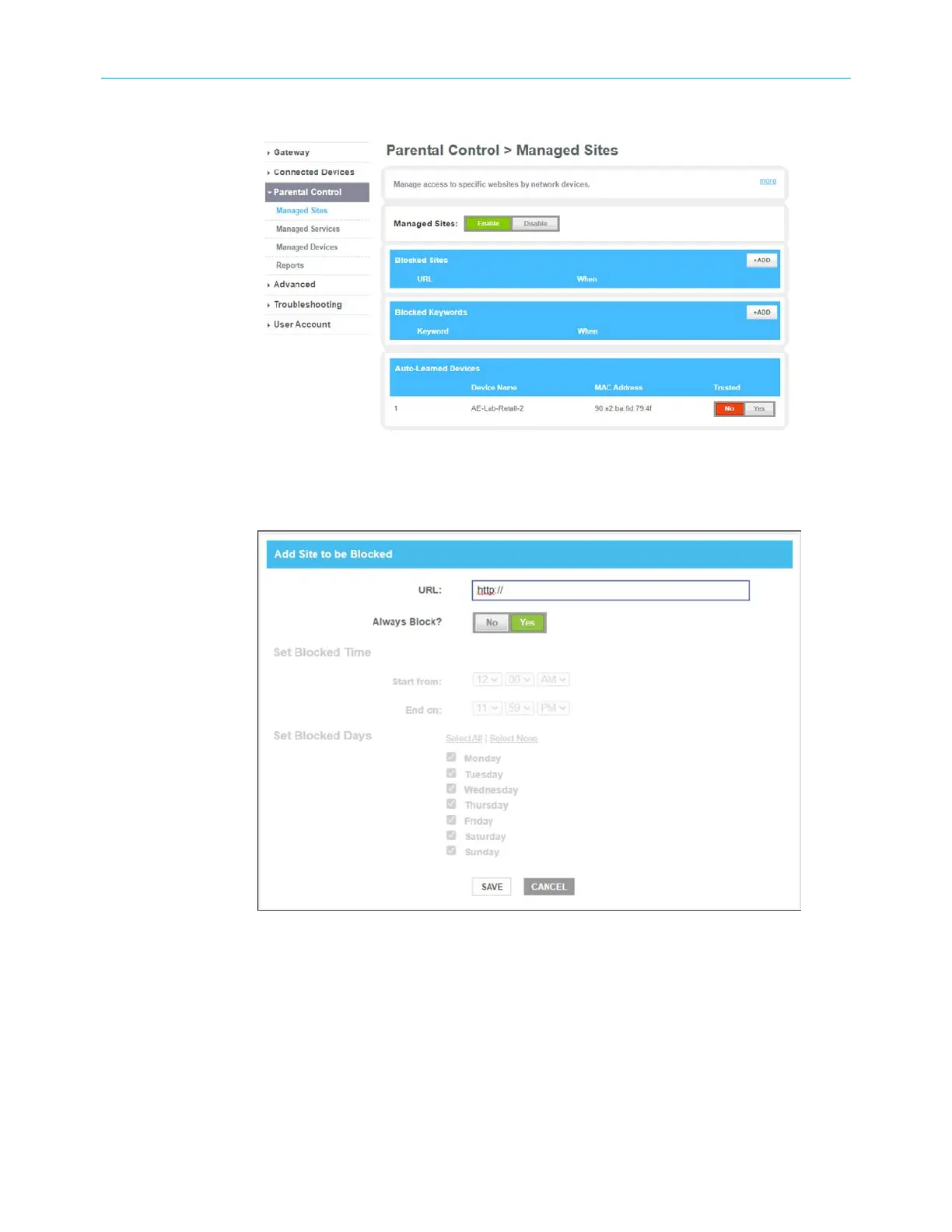
3. Click the Managed Sites Enable button to turn ON website and keyword blocking.
Figure 40: Parental Control Managed Sites screen
4. Click +ADD button in the Blocked Sites section to open the Add Site to be Blocked
screen.
Figure 41: Add Site to be Blocked screen
5. To fully block a website, enter the website address in the URL field and then click the
Yes Always Block? button.
6. Click SAVE.
7. Repeat steps 5 and 6 for each website that you want to block.
8. To block a website for specific days and times, enter the website address in the URL field
and then click the No Always Block? button.
9. Select the Start from and End on times of the day in the Set Block Time section.
SURFboard
®
G34/G36 DOCSIS
®
3.1 Wi-Fi
®
Cable Modem User Guide STANDARD Revision x.3 51













 To Next Page