Era
™
Medium Power Carrier Access Point Installation Guide M0201AJB
Page 32 © October 2018 CommScope, Inc.
Installing CAP Ms
3 Referto"DeterminetheMountingSite”onpage16todeterminethemountinglocation,whichmustbe
abletosupporttheweightanddimensionsoftheCAPM.
4 Referto"MountingOrientation”onpage24todeterminethemountingorientationoftheCAPM.
5 Refertoandobserveallcautionslistedin"GeneralMountingCautions”onpage23.
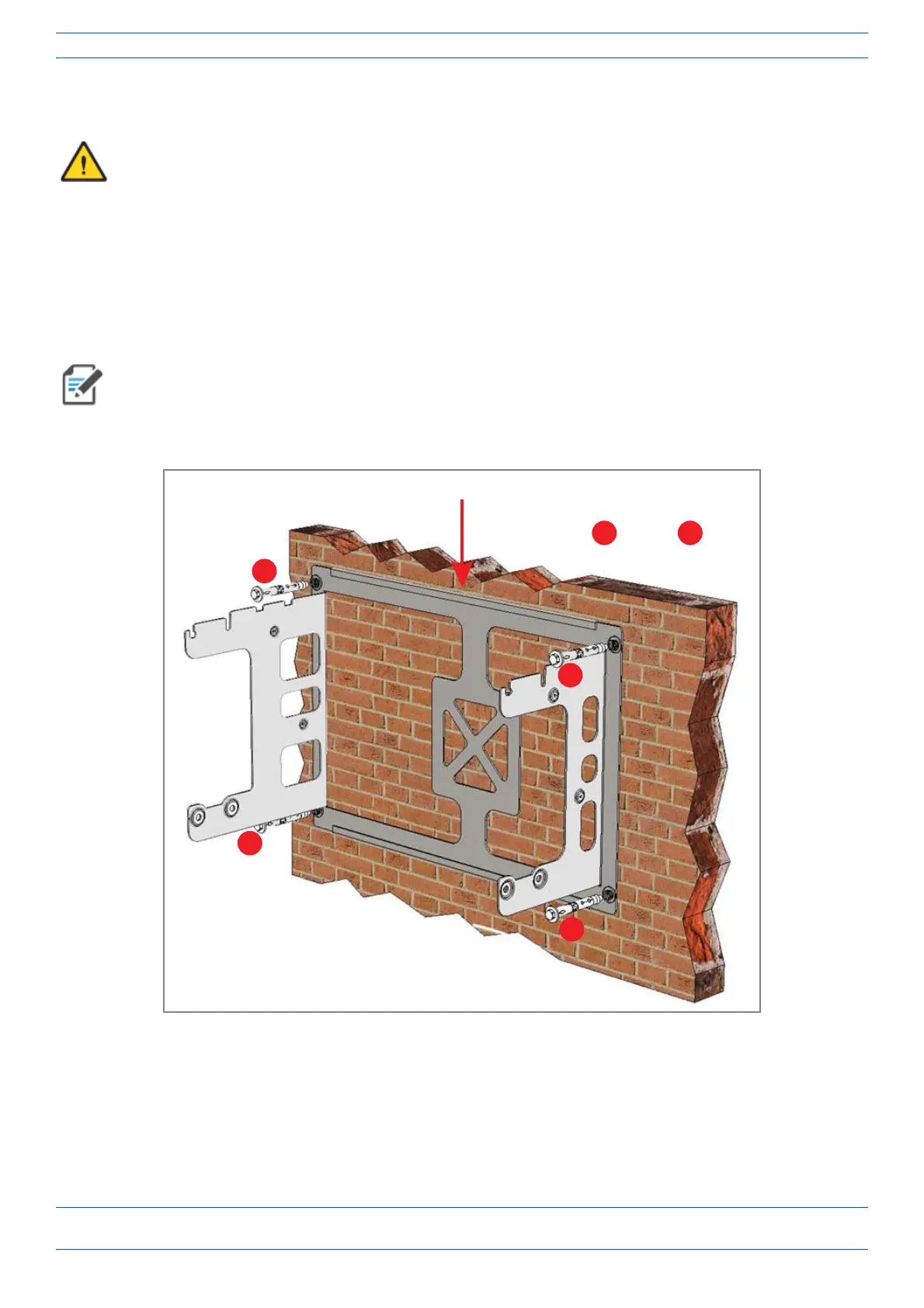
6 SecuretheMountingBrackettothewall(orothersuitableverticalsurface)asshownbelow.
a Installthemountingbracketusing4M6screwanchors(notincluded)orsuitablelagboltsaccording
tothedrillinglayout.
b Confirmthatthebracketissecurelyfastenedtothewall.
Installer must verify that the mounting surface will safely support the combined load of the electronic
equipment and all attached hardware and components.
The M6 screw anchors do not ship with the CAP M as the anchor type is dependent on the on-site
conditions (wall structure and materials). Use screw anchors that are rated for the mounting surface.
Dual Mounng Bracket
1
2
3
4
1
through
4
are the four screw anchors










 To Next Page