Era
™
Medium Power Carrier Access Point Installation Guide M0201AJB
Page 46 © October 2018 CommScope, Inc.
Installing CAP Ms
Grounding the CAP M
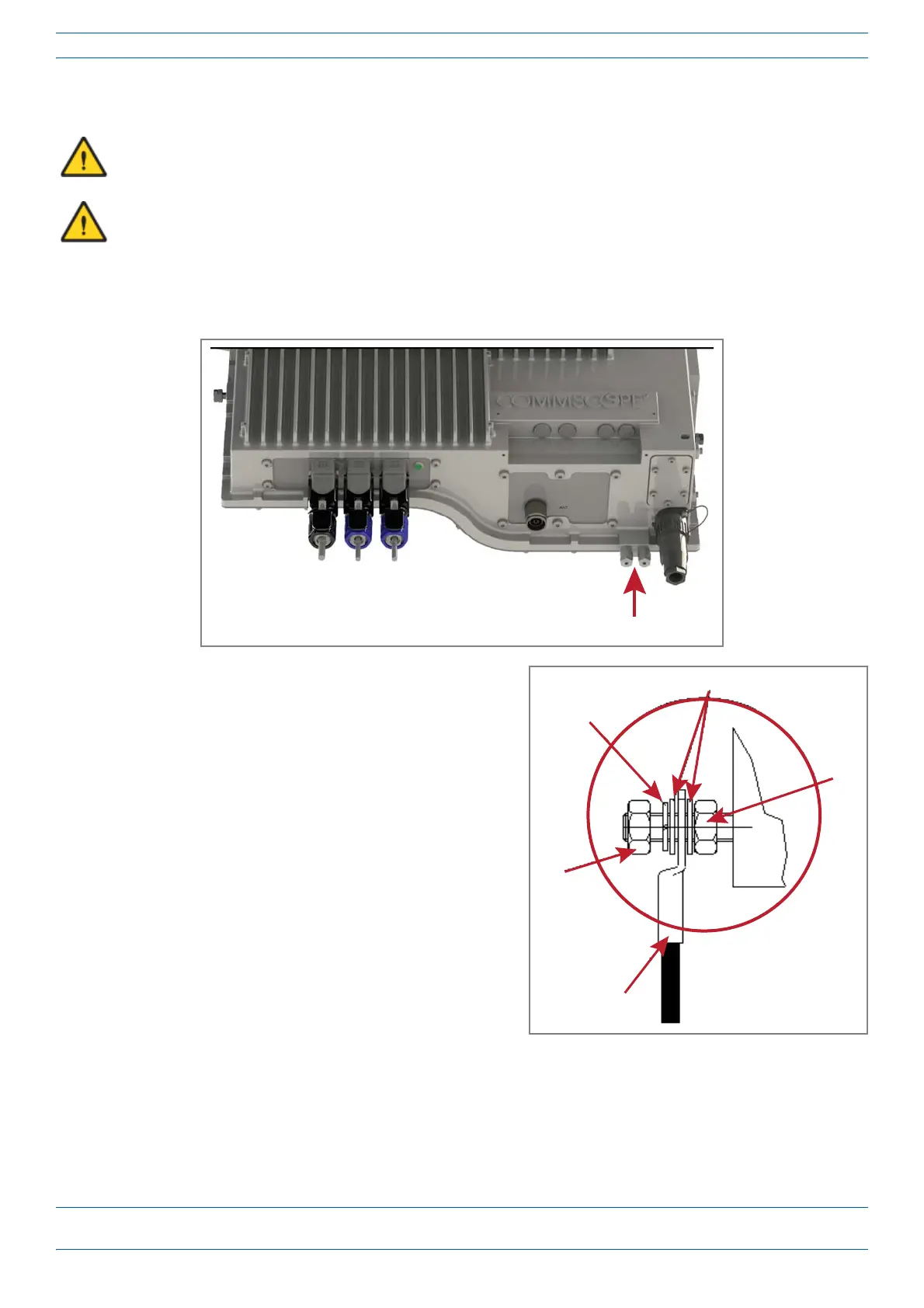
1 Connectanearth-bondingcabletothegroundingboltconnectionsontheoutsideoftheCAPMchassis,as
shownbelow.
2 LoosentheM6hexnut(s),andthenconnectthe
earth-bondingcablebetweenthetwowashersas
showntotheright.
3 Securetheearth-bondingcablebytighteningthe
M6hexnut(s)thatyouloosenedintheprecedingstep.
4 Connecttheotherendoftheearth-bondingcabletoa
suitablepermanentgroundperlocalelectricalcode
practices.
5 Followthestepsin"ConnecttheCAPMCables”on
page47.
The CAP M must be grounded.
Do not use the grounding bolts to connect an external device.
Plain washers
M6
hex
nut
Locking
ring
M6
hex
nut
Earth-Bounding
cable










 To Next Page