57
DEEP LEARNING PLUS USER MANUAL
NVR/DVR EVENT ACTIONS (UNIVERSAL MODE)
NVR/DVR Event Actions can be configured when using DL PLUS in Universal Mode to transmit
event metadata to a supported Concept Pro network video recorder or digital video recorder
product. Once connected, events configured via DL PLUS web interface can trigger Live Event
thumbnail timeline population, DL/Alarm recording, and DL events from the NVR/DVR user
interface. Additionally, detected events can be searched/filtered from the NVR/DVR search menu.
Supported Concept Pro recorders include:
• VUHDIP-4/8/16 with firmware v. 103137.28A or later.
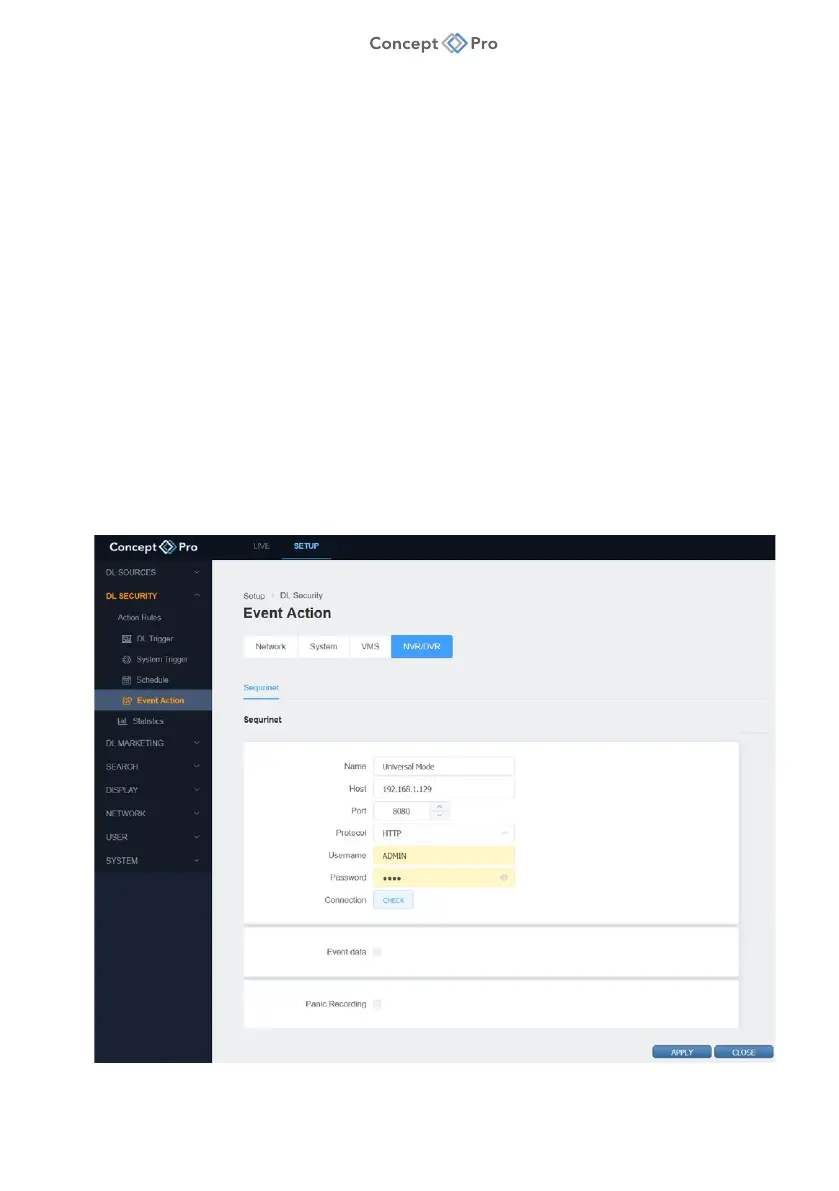
SEQURINET (UNIVERSAL MODE)
A Sequrinet NVR/DVR event action transmits event metadata to a supported Concept Pro
network video recorder or digital video recorder product. Once connected, events configured
via DL PLUS web interface can trigger Live Event thumbnail timeline population, DL/Alarm
recording, and DL events from the NVR/DVR user interface. Additionally, detected events can
be searched/filtered from the NVR/DVR search menu.
To configure a Sequrinet Event Action, please follow the steps below:
1. From the <SETUP> tab, navigate to <DL SECURITY> - <EVENT ACTION> menu.
2. Select the <NVR/DVR> - <SEQURINET> tab.



 To Next Page