Genus G2 User Manual
UM3000-1
Revision E November 2017 34
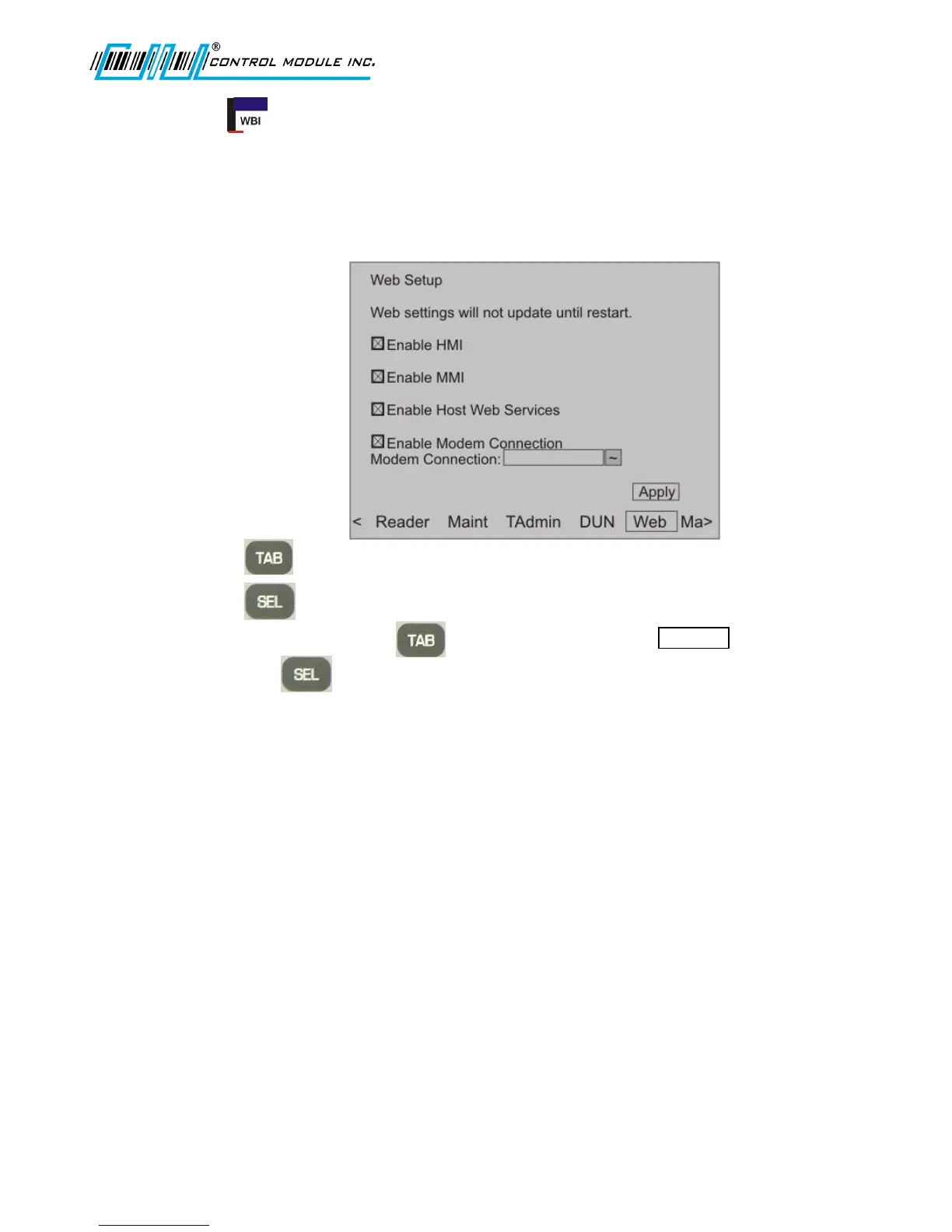
Web Setup
Web Setup enables communication for Web Services on the Terminal, and between the host system
and the Terminal.
Note: Settings for the Web Browser Interface can be configured in Offline Setup at the terminal or
through the Web Browser to the terminal IP.
1. Press to advance to the Web Settings.
2. Press to check to Enable or uncheck to Disable the settings.
3. To accept changes press to advance to and highlight
4. and press to save settings.
Enable Web Pages (HMI) - This option enables the terminal's web configuration interface allowing an
individual to remotely manage a number of options in the terminal via a web page. For more details
on using the web configuration interface, please see the Web Browser Interface section of this
document.
Enable Web Services (MMI) - This option enables the terminal's web services functionality. When
enabled, the terminal will allow the use of built-in web services functions called by a host.
Enable Host Web Services - This option enables the terminal's ability to use web services on a host
computer. When this is enabled, the terminal will attempt to connect to the configured URLs to send
and receive data, including transactions. While this enables the feature at the terminal level, the
terminal application must utilize these features.



 To Next Page