Genus G2 User Manual
UM3000-1
Revision E November 2017 46
Loading A Customer-Defined Java Application
This application runs on the terminal and handles both a user interface and any backend processing
or communication. This is created by the user of the terminal, a value-added Reseller, or CMI.
tftp -i <ip address> PUT <myapp.jar> \flashdisk\App.jar
where <myapp.jar> is the local name of the user-created Java application.
Important Note: The terminal will reboot after sending the file above.
Refer to the Genus Software Development Kit (SDK) for more information on creating terminal
applications.
Loader Mode
This application is available as of version V2.02.04 of the Genus Terminal firmware and provides
access to terminal network settings when communication to the Terminal has been compromised.
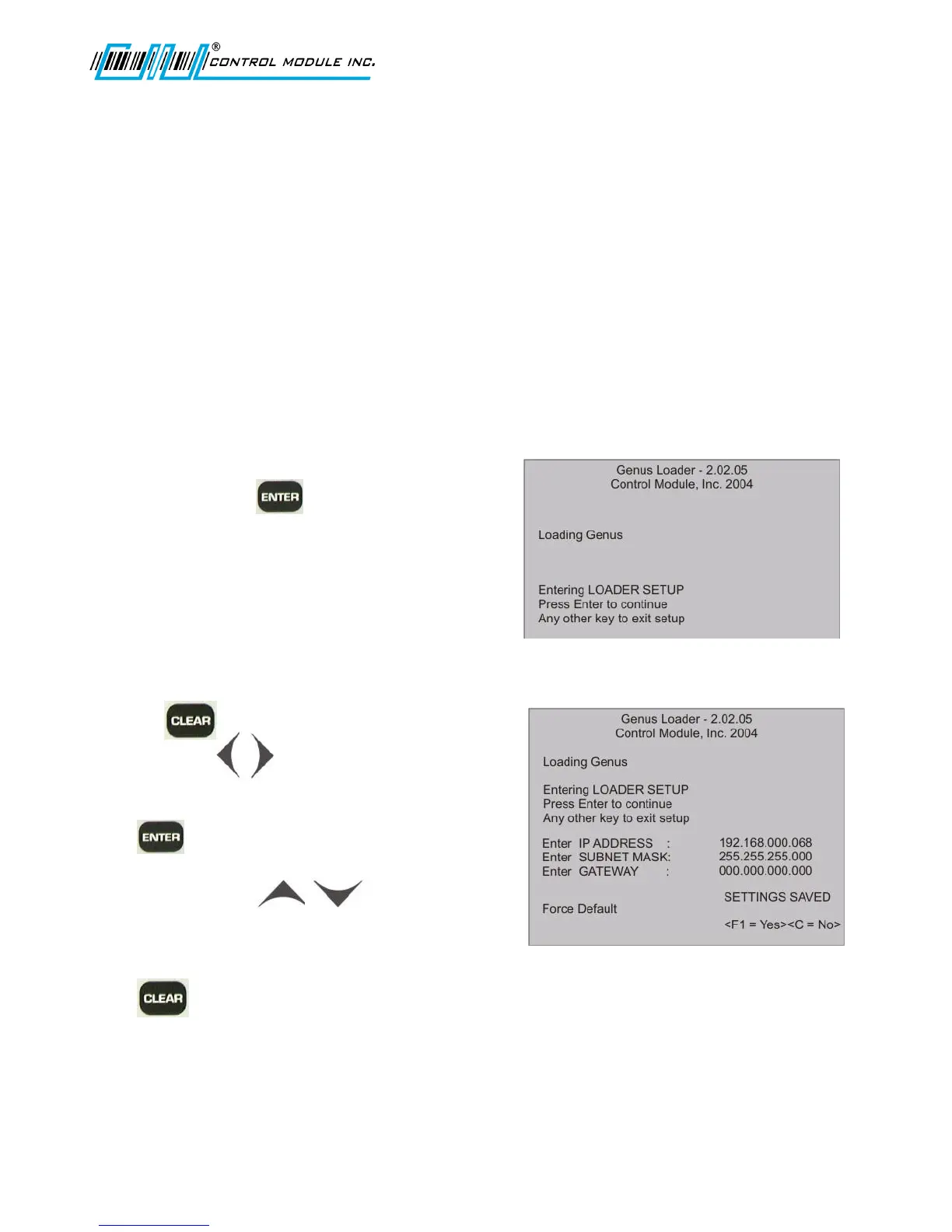
To access the Loader Mode as the terminal
powers on, press the key when the
Terminal displays the LOADER SETUP screen
as shown. The Loader network settings will follow.
The Terminal retains the IP address that was
stored and will display this in Loader Mode.
If DHCP had been set, the IP address would
display as all zeros in the octets.
Pressing will zero out the octets.
Use 0-9 and the keys to advance
and return between octets.
Press to advance to the next network setting.
Subnet mask requires to keys to advance to
the next octet.
Press F1 (Yes) to force the default to load.
Press (No) to cancel.
If the server cannot be found, the Terminal will display the Server not found message, followed
by the prompt to enter a new TFTP server IP.



 To Next Page