Genus G2 User Manual
UM3000-1
Revision E November 2017 29
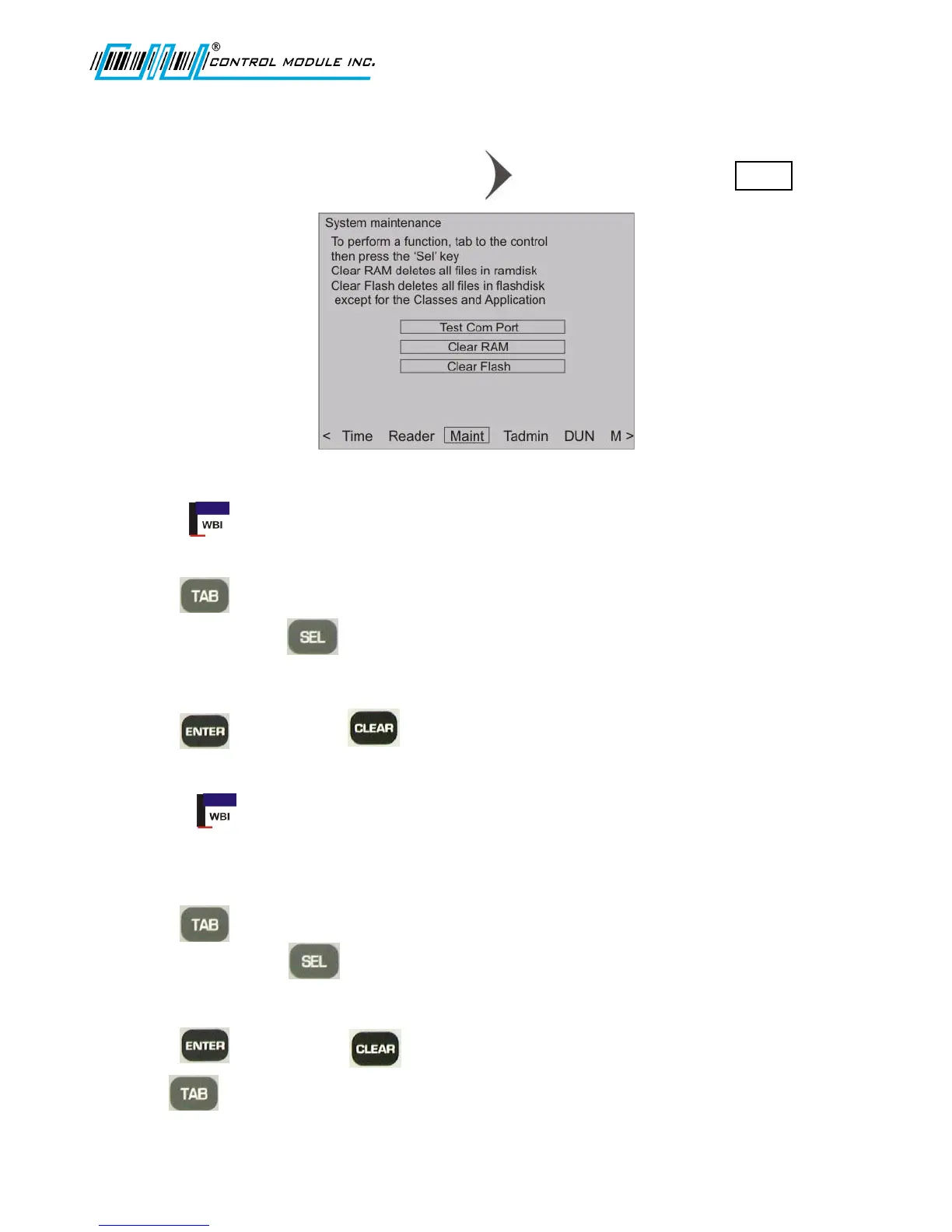
System Maintenance
From the options at the bottom of the display press to advance to and highlight Maint .
Note: Test Com Port is not used at this time.
Clear RAM
Clear RAM will clear the ‘\ramdisk’ transaction files currently residing in the terminal.
1. Press to highlight Clear RAM.
2. To clear RAM press .
Note: A WARNING screen displays confirming that all data will be lost.
3. Press to continue or to cancel.
Note: Clear RAM requires a reboot to erase the contents of the \ramdisk.
Clear Flash
Clear Flash will clear the ‘\flashdisk’ on the terminal erasing everything except Classes.jar,
App.jar, Lib1.jar, Lib2.jar, Lib3.jar, and Genus App.
1. Press to highlight Clear Flash.
2. To clear Flash press .
Note: A WARNING screen will show confirming that all data will be lost.
3. Press to continue or t cancel.
Use to return to Main Menu at the bottom of the screen.



 To Next Page