Genus G2 User Manual
UM3000-1
Revision E November 2017 6
Genus G2 Terminal
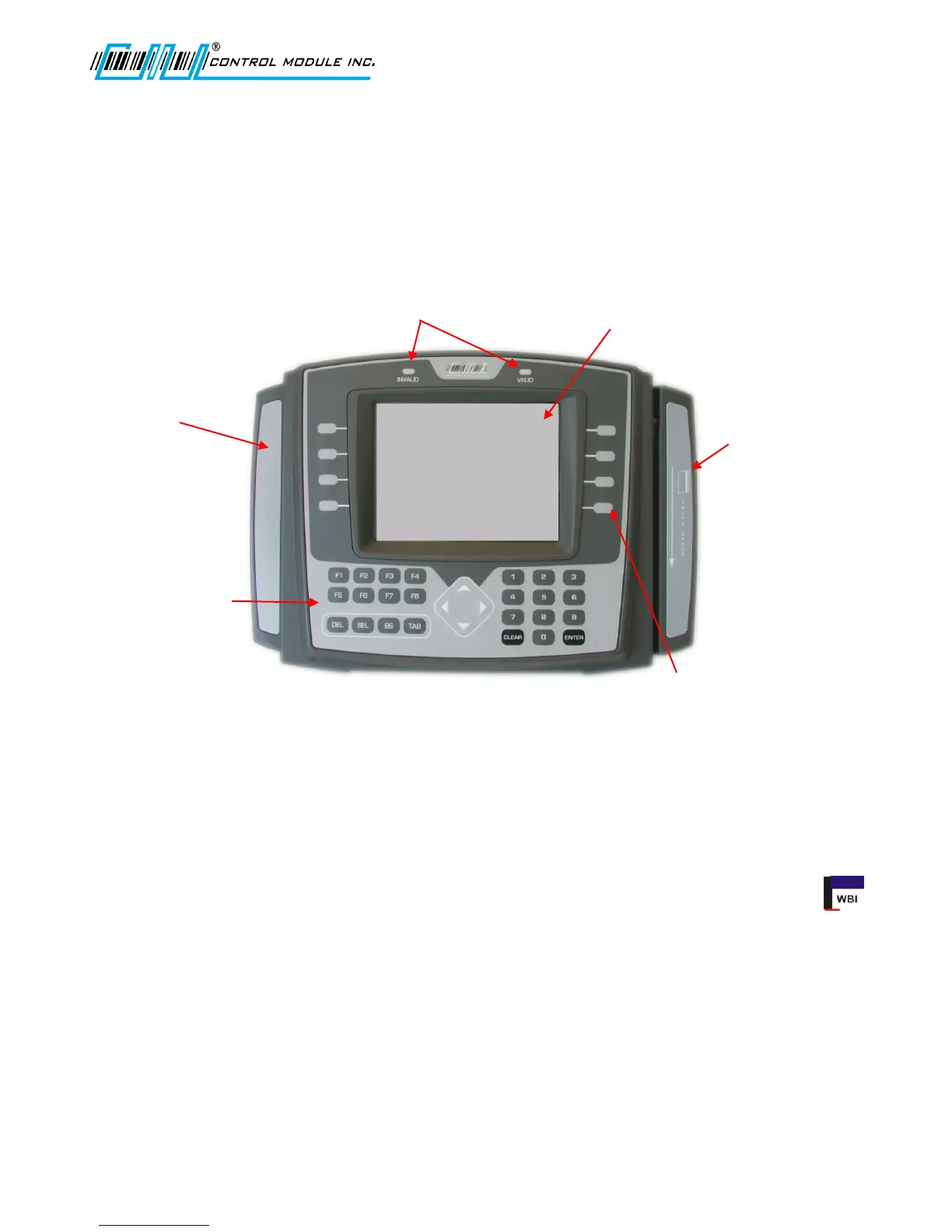
Terminal features are labeled in the picture below for reference. Explanations of terminal features,
user interface, hardware specifications and connections follow. Items discussed in this user manual
apply to the Genus G2 Mark II Terminal.
Terminal Front
The User Interface
The user interface offers options for data entry into the Genus G2 Terminal through the 36-key ATM
style membrane keypad, softkey, function, navigation and user programmable function keys, and/or
internal card readers. User output is via a 320X240 backlit blue graphic LCD display. The terminal
also has the capability to produce multiple sound tones to help guide the user.
A Web Browser Interface is integrated with the Genus G2 Terminal to allow changes to configuration
files, data viewing and development interface updates. Some items overlap between the Offline setup
and the Web Browser Interface. Individual settings that do overlap are indicated by the WBI icon
within this document.
End Bell designed for
Proximity or Smartcard
readers
Reader 1
End Bell designed
for Barcode or
Magnetic slot
readers and/or
Biometric Fingerprint
Readers
Reader 0
320X240 Backlit Monochrome
Graphics Display
Invalid and Valid LED
Card Read Indication
Tactile Feedback
keypad includes user
programmable function
keys, numeric keypad,
direction keys and
parameter specific
function keys.
Softkeys align with software
screen prompts



 To Next Page