Check the box and then select the corresponding audio file from the dropdown
list. System plays the audio file when the alarm occurs.
Refer to "1.17.1 File Manage" to add audio file first.
Step 5 Click Apply.
1.8.4 Alarm Control
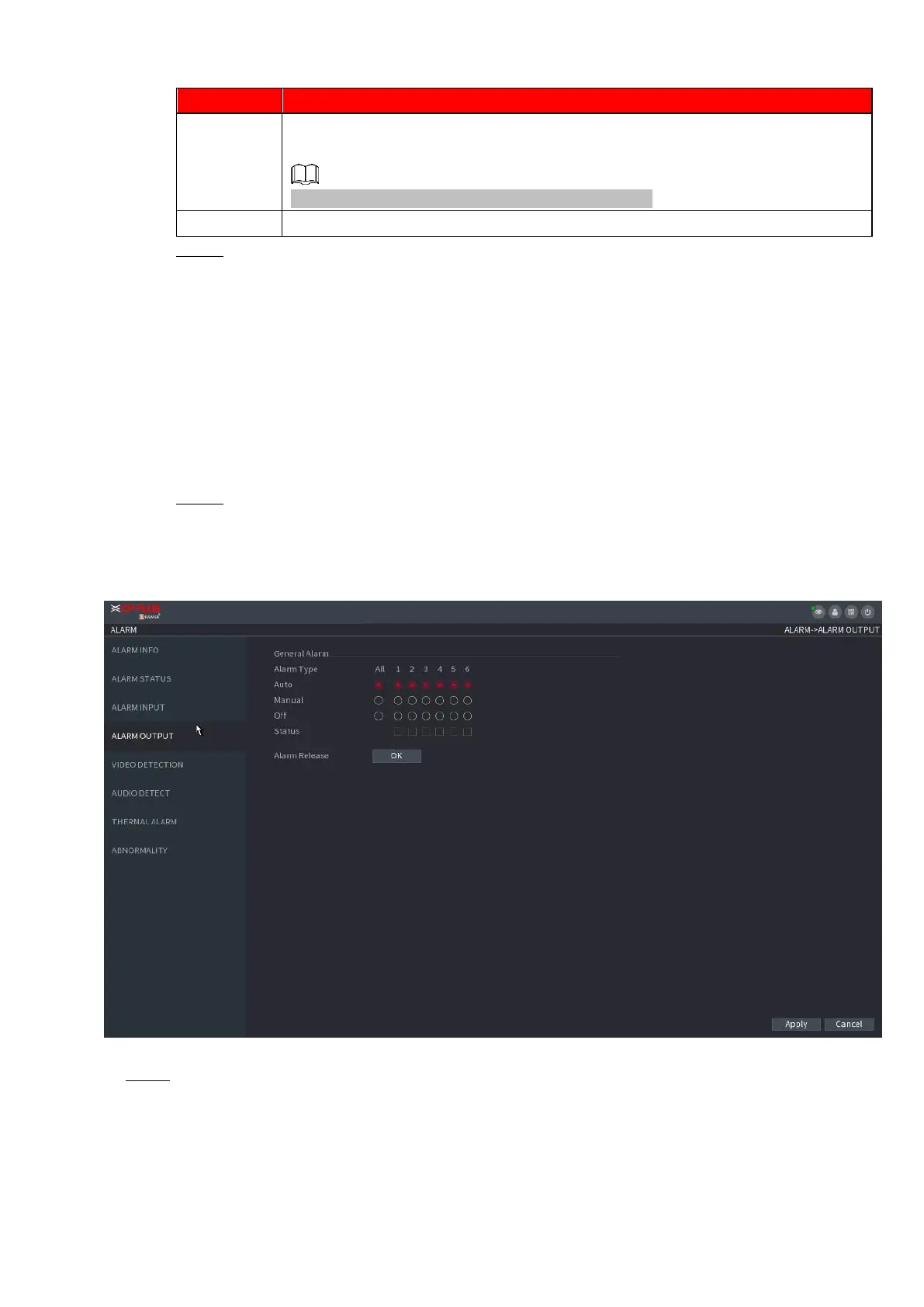
⚫ You can set proper alarm output (Auto/manual/off). Connect the alarm device to the system alarm output
port, and set the mode as auto, system can trigger the corresponding operations when an alarm occurs.
⚫ Auto: Once an alarm event occurs, system can generate an alarm.
⚫ Manual: Alarm device is always on the alarming mode.
⚫ Off: Disable alarm output function.
Step 1 Select Main Menu > ALARM > ALARM OUTPUT.
The ALARM OUTPUT interface is displayed. See Figure 1-166.
⚫ Figure 1-166
⚫ Step 2 Select the alarm mode of the alarm output channel.
⚫ Click OK button of the Alarm Release, you can clear all alarm output statuses.
⚫ View the alarm output status on the Status column.



 To Next Page