Step 3 Click Apply.
1.8.5 Video Detection
⚫ The video detection adopts the computer image and graphics process technology. It can analyze the
video and check there is considerable changing or not. Once video has changed considerably (such as
there is any moving object, video is distorted), system can trigger the corresponding alarm activation
operations.
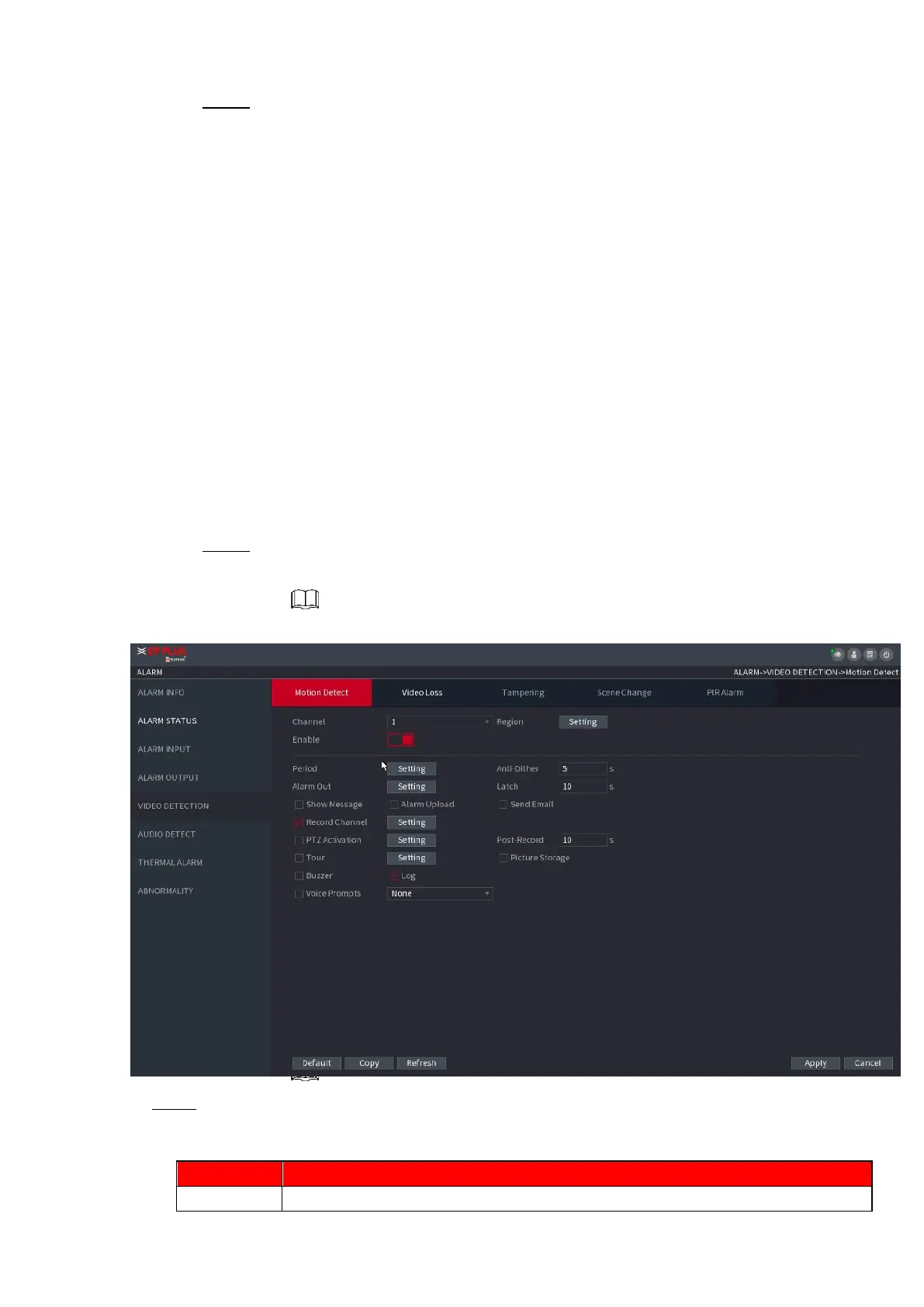
Select Main menu > ALARM > VIDEO DETECTION >MOTION DETECT, you can see motion
detect interface. See Figure 1-169. There are five detection types: motion detection, video
loss, tampering, scene changing and PIR alarm.
1.8.5.1 Motion Detect
⚫ When the moving object appears and moves fast enough to reach the preset sensitivity value, the
system activates the alarm.
Step 1 Select Main Menu > ALARM > VIDIEO DETECTION > Motion Detect.
The Motion Detect interface is displayed. See Figure 1-167X.
⚫ Figure 1-167
⚫ Step 2 Configure the settings for the motion detection parameters. See Table 1-45.
⚫ Table 1-45



 To Next Page