Product Manual — Doc. 7750C TST-902 • 103
During a microphone test, the built-in microphone records sound for five seconds and then plays
the sound back to confirm it is functioning. When the playback is finished, the display
automatically returns to the Diagnostics screen.
Wi-Fi Test
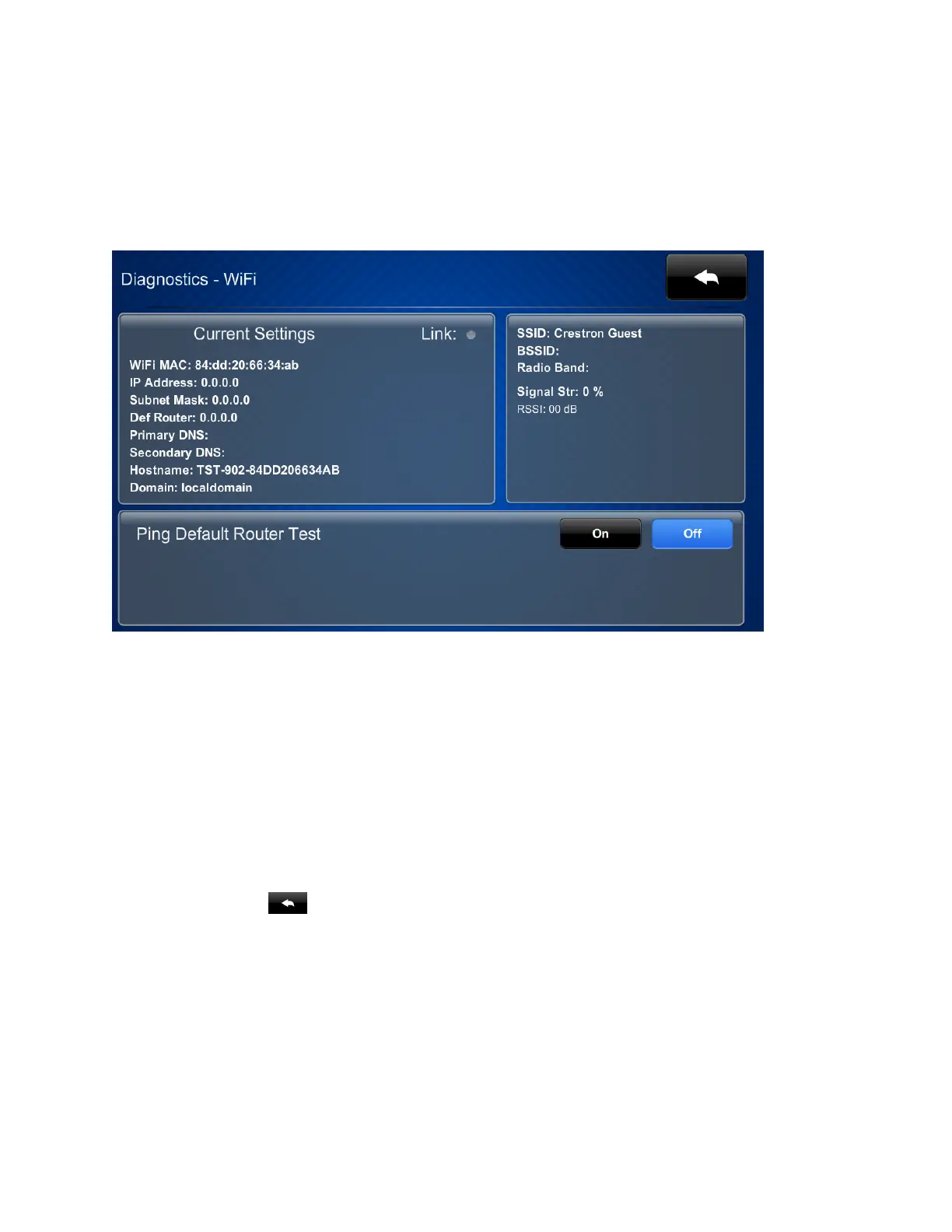
Tap Wi-Fi Test on the Diagnostics screen to display the Diagnostics - Wi-Fi screen.
Use the Diagnostics - Wi-Fi screen to view and test the Wi-Fi network connection. The
Diagnostics - Wi-Fi screen displays the Wi-Fi network MAC and IP addresses, subnet mask
address, default router address, primary and secondary DNS addresses, host name, and domain
name. A Link indicator is provided to indicate the status of the Wi-Fi network connection. (Green
indicates that the Wi-Fi network connection is active.)
The Diagnostics - Wi-Fi screen also provides controls to test the connection to the default
router. Tap On to begin the test and Off to end the test.
During the router test, the touch screen pings the default router. If the router is communicating
with the touch screen, connection data is displayed below the ping test controls within five
seconds. The connection data updates after every successive ping.
Tap the back button to return to the Diagnostics screen.











 To Next Page