Product Manual — Doc. 7750C TST-902 • 87
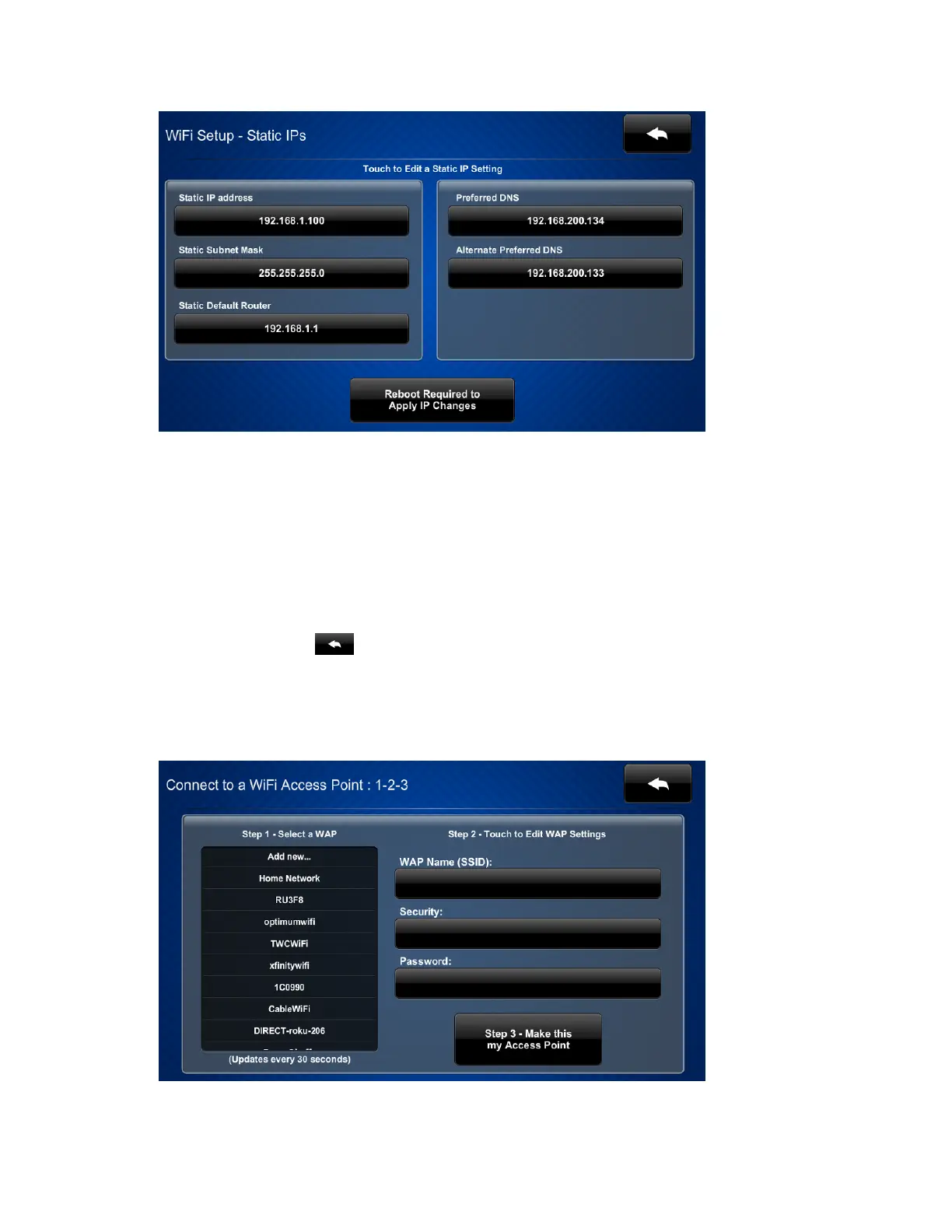
4. Tap the following fields to display on-screen keypads for inputting static IP addresses:
l
Static IPaddress:Enter a static IPaddress for the TST-902.
l
Static Subnet Mask:Enter a static subnet mask address.
l
Static Default Router:Enter a static address for the default gateway router.
l
Preferred DNS:Enter a static address for the preferred DNS(Domain Name
Server).
l
Alternate Preferred DNS:Enter a static address for the secondary DNS.
5.
Tap the back button to return to the Wi-Fi Setup screen.
6. Tap Apply Changes, and then tap Reboot to restart the touch screen with the new static
IP address settings.
7. Return to the Wi-Fi Setup screen, and then tap Select a Wi-Fi Access Point. The Connect
to a Wi-Fi Access Point:1-2-3 screen is displayed.











 To Next Page