46 © 2021 All rights reserved. Data subject to change without notice.
FCS - Installation Manual Rev. C | 2021.12
The maximum length of time each test can be set to last is 1 hour. The range that can be set
is 0 seconds to 60 minutes.
When the test starts, it will continue as long as the time was set. You can exit the Test menu
without affecting the time. If you want to end the test before the time is up, you must re-enter
the Test menu and enter a value of “0” for the test length of that function.
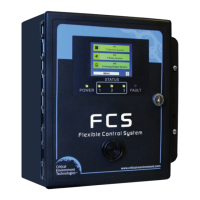
The + and - buttons on all the Test screens function like this:
+.1 will increase the time by six seconds each time it is pressed
+ 1 will increase the time by one minute each time it is pressed
- 1 will decrease the time by one minute each time it is pressed
- .1 will decrease the time by six seconds each time it is pressed
Or you can enter the desired number by pressing on the yellow eld and using the keypad to
enter the number.
7.6.1 Test Audible (Buzzer)
NOTE: Before testing the audible alarm, warn people in the vicinity of where the sound will be
heard so it does not cause unnecessary distress or response.
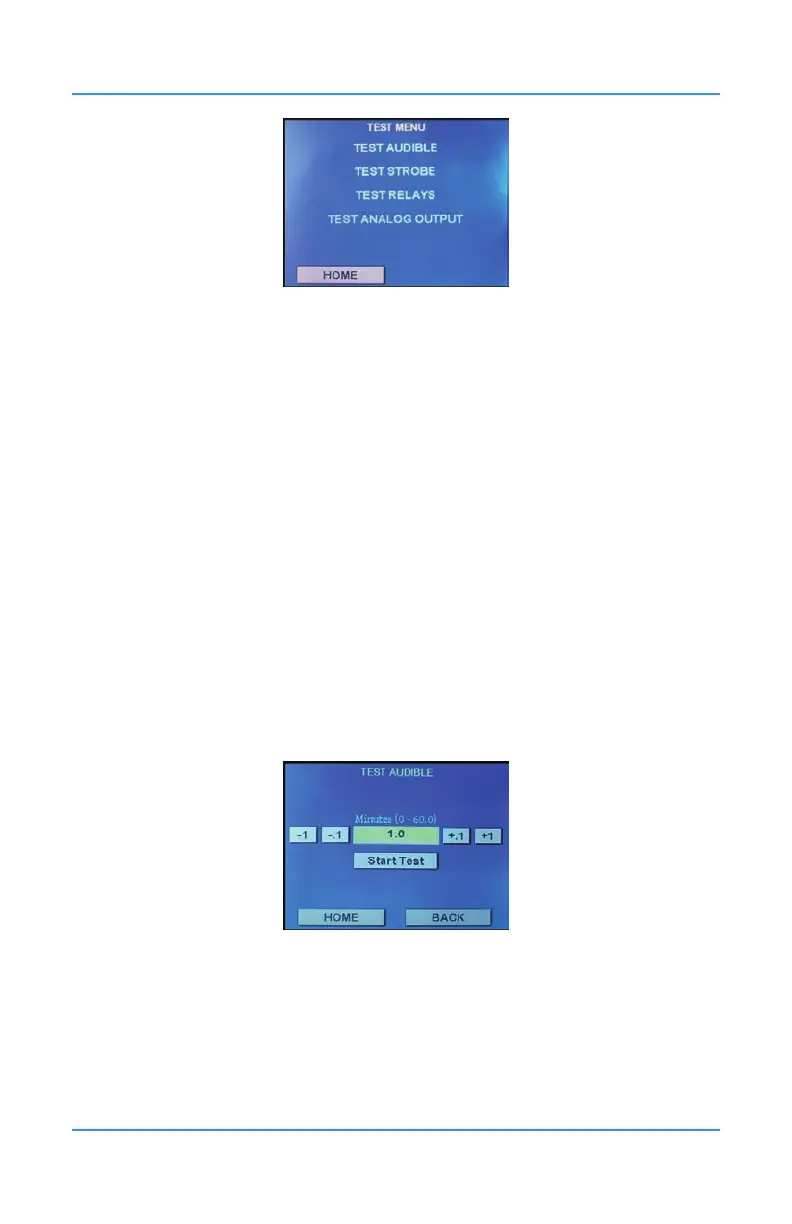
In Test menu (passcode 1), press on Test Audible.
Enter the length of time you want to test the audible for. Press Start Test to begin the test.
To cancel the test, go back into the Test menu, open the Test Audible screen and enter 0 in
the Minutes eld and press Start Test.


 To Next Page