36 © 2021 All rights reserved. Data subject to change without notice.
FCS - Installation Manual Rev. C | 2021.12
7 BASIC SYSTEM OPERATION
7.1 Navigating the Menu Structure
The FCS has a 1/4 VGA full colour resistive touch LCD display. A certain amount of pressure
is required to engage the buttons, as is a certain length of time. To indicate the button has
acknowledged the pressure, it will turn colour as you press it and upon release will return to
normal. Press rmly and purposefully using your ngernail or a dull pointed instrument such
as a stylus to navigate through the menu. If the expected change doesn’t occur, reduce the
speed at which you are pressing.
After entering a menu item, the BACK button will return you one screen previous to where you
were. The HOME button will return you to the normal display screen, logging you out of the
password protected menu items.
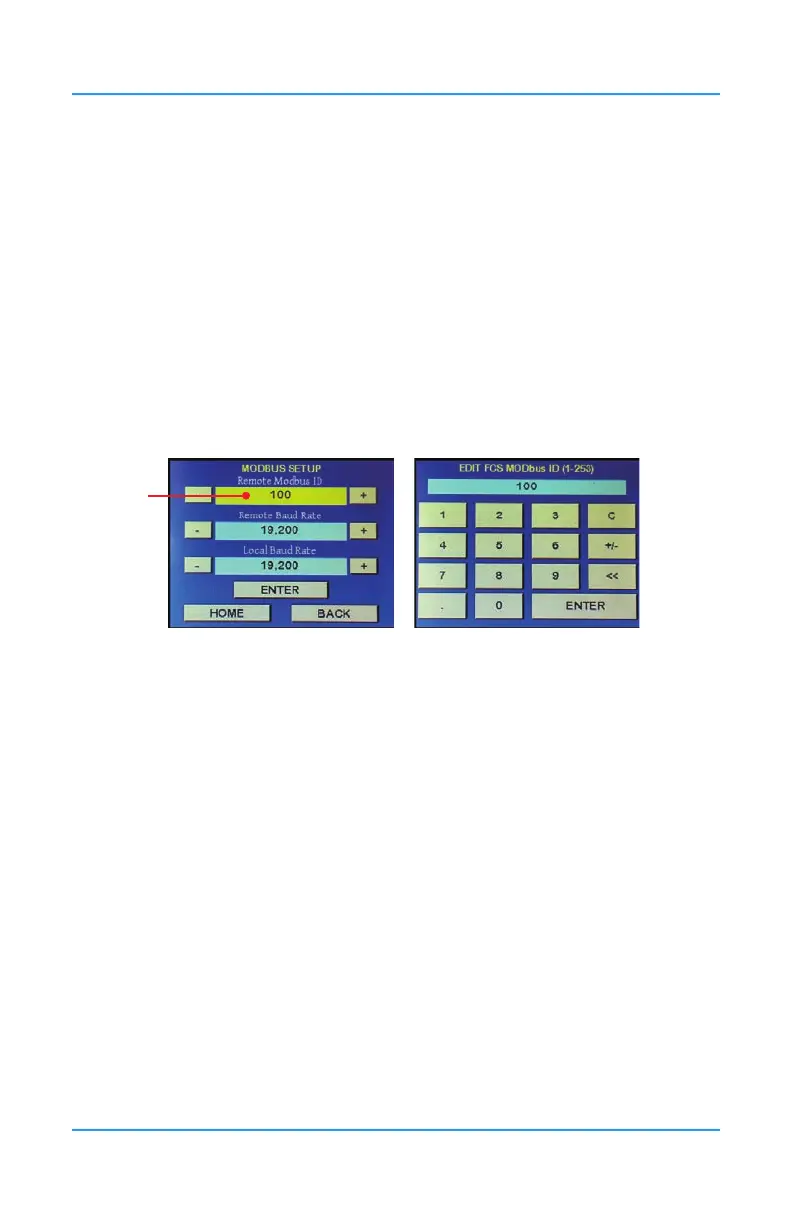
Some screens have data elds that are yellow. If you press on the yellow data eld, a numeric
(or alphanumeric) key pad will appear, allowing you to enter a value more easily than using
the + or - buttons.
Yellow eld
If you enter the numeric key pad and change a value but you don’t want to save that value, to
exit without saving changes, press the C to clear. The ENTER button will change to CANCEL.
Press CANCEL to exit.
When a value is changed, the ENTER or SAVE button will turn green, indicating a change
has been made and pressing the green button will commit the change. If you change the
value back to its preceding value, the ENTER or SAVE button will change from green, back to
standard colour.
Many of the channel, relay and priority set up screens have an autosave function. If you are
going through more channels (or relays or priorities) on the same screen, the system will
autosave when you press the + or - to proceed or return to the next channel (relay, priority)
number. If you press Home or Back, the changes will not be saved. The Save button will turn
green after a change has been made and you can choose to press Save if in doubt.
7.2 Accessing the Menu with Passcodes
The main menu structure is broken down by the passcode access entry. Press on the MENU
button to access the Enter Password screen.


 To Next Page