44 © 2021 All rights reserved. Data subject to change without notice.
FCS - Installation Manual Rev. C | 2021.12
NOTE: You can temporarily view the details of the FCS (model number, device type, serial
number, rmware revision, etc.) and the date and time of day by pressing on the “i” button on
the home screen display.
7.4.2 Channel, Scrolling Display
The Channel view of the home screen display shows and scrolls through the Channel Status
Bars for each channel. The scroll rate is user dened.
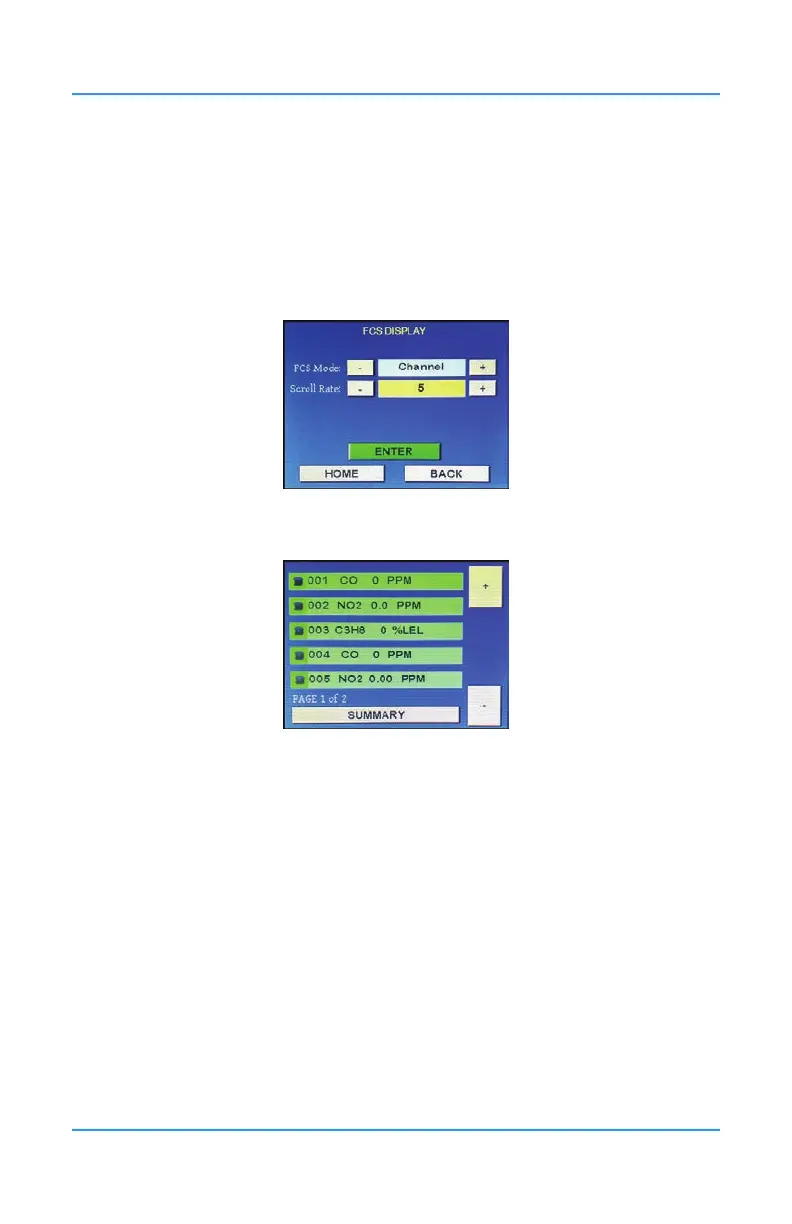
Press Menu and enter passcode “1014” to enter the Display Menu and select FCS Display.
Press the - or the + to change the FCS Mode from Summary to Channel.
Choose the scroll rate by pressing the _ or + or entering the number in the eld.
To save the conguration, press ENTER. Press HOME to return to the home screen.
To view more details about the channels, press on the icon on the left side of the Channel
Status Bar.
If you press the SUMMARY button you can view all the other system information that
is available in the Summary view of the home screen as well as access the various
conguration menus. To return to the Channel view, press MENU and then HOME or leave the
menu untouched for 5 minutes.
7.5 Silencing the Internal Audible Alarm, Terminal Connected and/or
Remote Horns and Strobes
The FCS comes with a door mounted, audible alarm. This alarm and any remote strobe/horn
devices connected to the Remote Strobe/Horn Terminal and/or the relays (if congured to
do so) will sound when the high alarm is reached. Upon sounding, the Silence? screen will
appear, giving you the ability to silence all the alarms for a predetermined amount of time.
You will also be able to see how many alarms have been previously silenced and how many
are currently sounding.


 To Next Page