48 © 2021 All rights reserved. Data subject to change without notice.
FCS - Installation Manual Rev. C | 2021.12
7.6.4 Test Analog Outputs
The purpose of this test is to make sure the wiring is correct and the connected devices
operate as expected.
NOTE: Before testing the analog outputs notify the appropriate people so unnecessary
distress or response is not caused.
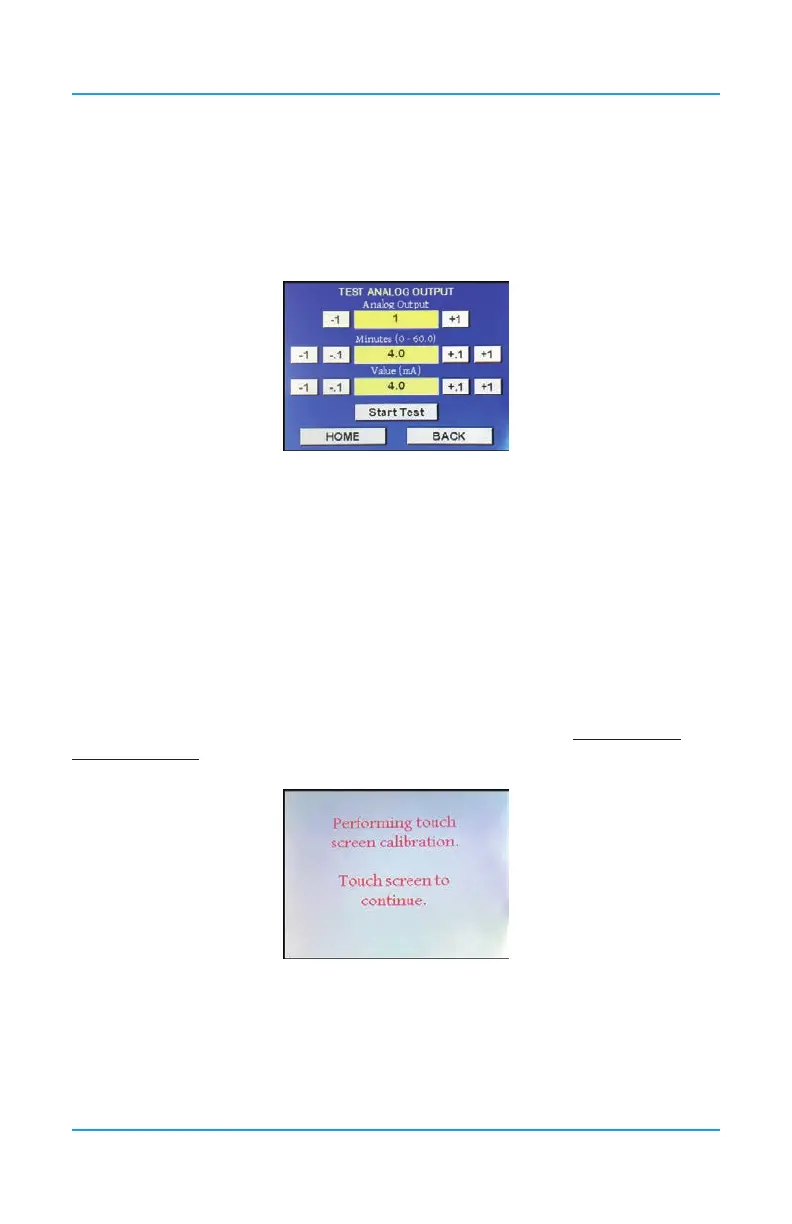
In Test menu (passcode 1), press on Test Analog Output.
Enter the corresponding number for the analog output that you want to test and enter the
length of time you want to test the test to last. Enter the output value in mA that you want
tested. Press Start Test to begin the test.
To cancel the test, go back into the Test menu, open the Test Analog Output screen and enter
0 in the Minutes eld and press Start Test.
7.7 Recalibrating the Display to Improve Response
The FCS has a 1/4 VGA full colour resistive touch LCD display. A certain amount of pressure
is required to engage the buttons, as is a certain length of time. If the touch response is not
working as well as it used to, you can recalibrate the display.
Hold the Reset/Restart button for approximately 15 seconds and let go. As soon as the
screen goes blank immediately touch and hold the display anywhere on the screen until you
see the performing touch screen calibration message.
Touch the screen to continue.


 To Next Page