54 © 2021 All rights reserved. Data subject to change without notice.
FCS - Installation Manual Rev. C | 2021.12
8.7 Enable / Disable Relays, Audible, Horns and Strobes
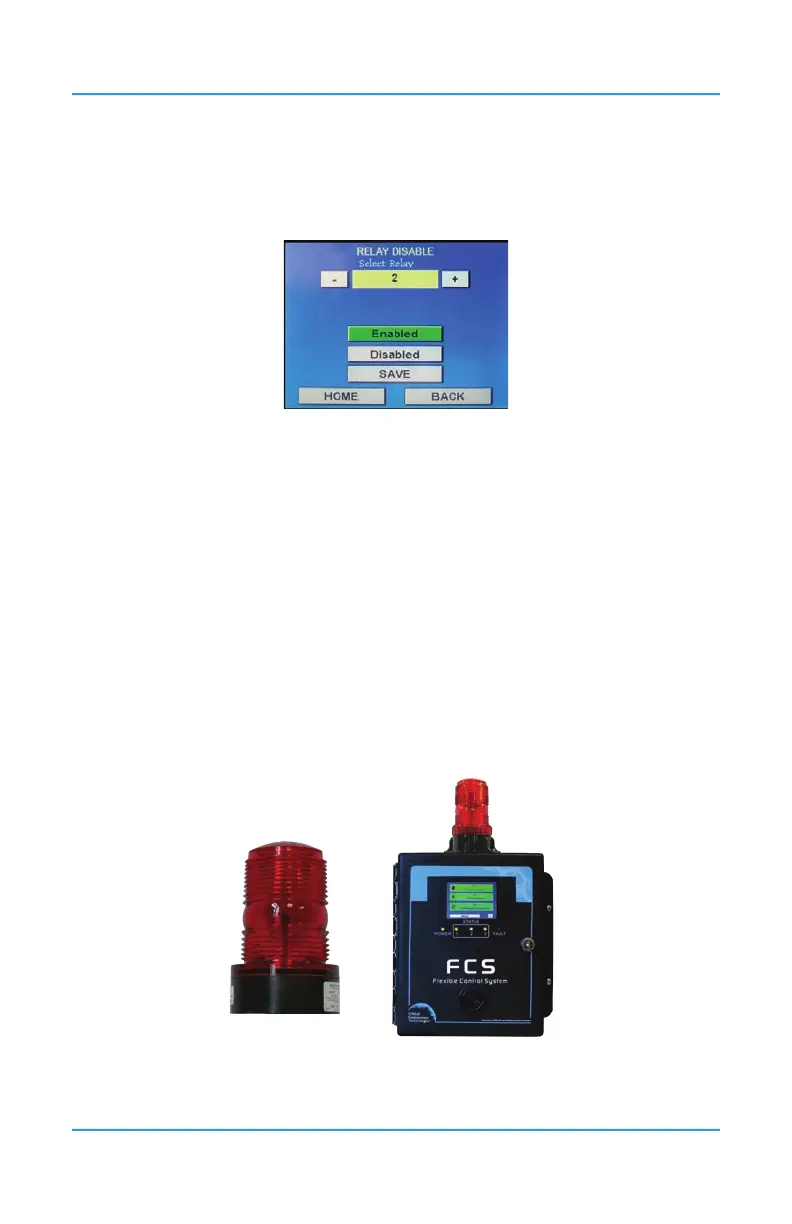
This setting allows you to enable or disable the relays, the strobe, horn and/or internal
audible.
Press Menu and enter passcode “2012” to enter the Set Alarm menu and select Relay
Disable.
Use the + and - buttons or enter the specic relay number by pressing the yellow eld and
using the keypad to choose the relay number, Audible, Strobe or Horn you want to disable.
Press Enabled or Disabled. The Save button will turn green after a change has been made.
If you are going through more relays on the same screen, the system will auto save when you
press the + or - to proceed or return to the next relay number. If you press Home or Back, the
change will not be saved. You can choose to press Save if in doubt.
9 OPTIONS AND ACCESSORIES
9.1 Top Mounted Strobe (Option -L)
High powered, red LED ashing beacon factory installed on the top of the FCS enclosure.
Offers excellent ash intensity, durable vibration resistant construction and a long life
100,000 hour LED technology. Made of tough Lexan welded to the base to completely seal
out moisture. NEMA 4X and UL recognized.


 To Next Page