© 2021 All rights reserved. Data subject to change without notice. 51
Rev. C | 2021.12 FCS - Installation Manual
using Microsoft® Excel® or any program that works with .csv les. The les are stored in
directories organized by months and years.
The default logging interval is every 5 minutes and the value recorded is the value at each 5
minute mark. An alarm condition and a large change between the current and last value will
also create a log. A log le is created every 24 hours at midnight local time and every time the
FCS is powered up/restarted.
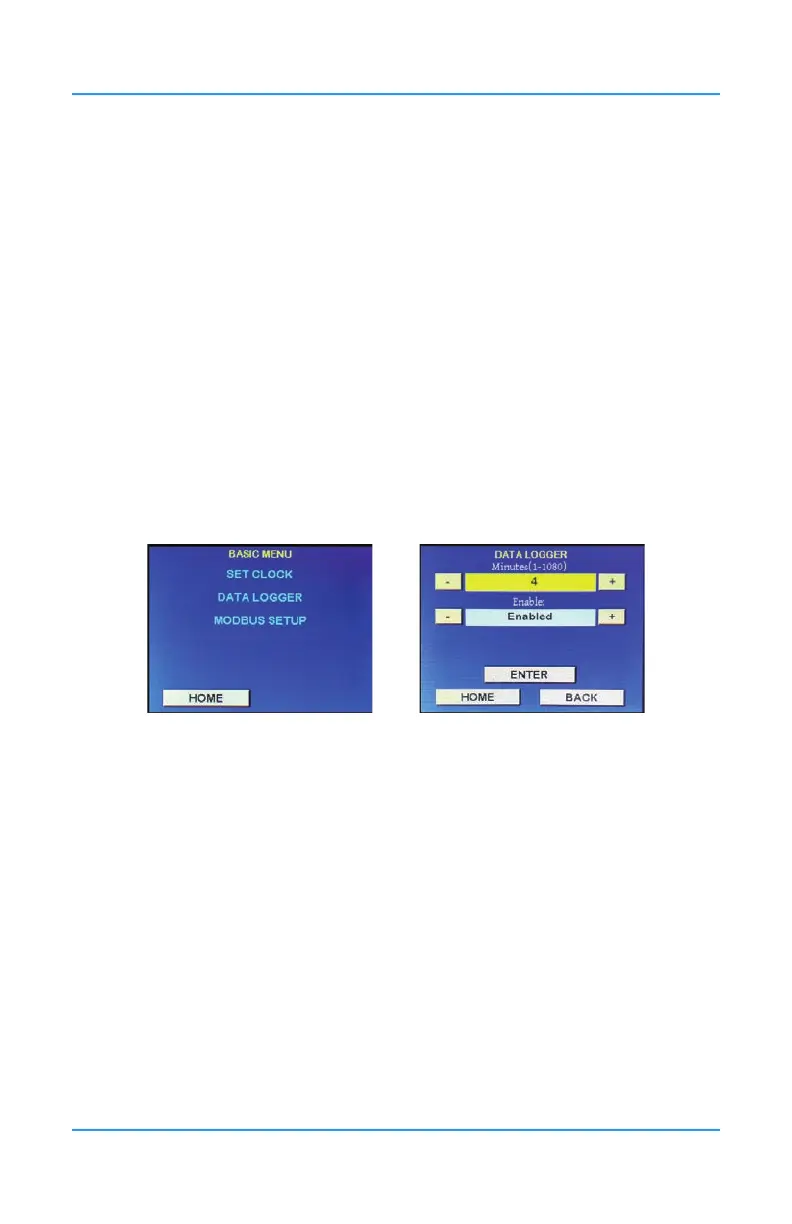
Press Menu and enter passcode “1001” to enter the Basic menu and select Data Logger. Use
the + or - button to increase or decrease the sampling rate (in minutes), or press the yellow
eld and use the keypad.
Minutes: Enter the logging interval you want to set. Factory default is 5 minutes. The
system will log the value at each 5 minute mark. Minimum is 1 minute, maximum is 1080
minutes (18 hours).
Enable/Disable: Use the + or - buttons to choose to enable or disable the data logging
functionality.
Data logging is enabled by default and can be disabled by using the + or - to change Enabled
to Disabled.
NOTE: If the message “SD Card Not Present” shows on the display, check to make sure
the SD card is properly installed. If the SD card is missing or dislodged, UNPOWER the FCS
before gently depressing the card slot door and slide up to open. Put in the SD card or x
the position of the card and close the slot door. Power the FCS back on and make sure data
logigng is Enabled.
8.4 How to Clear a Data Logging Failure Fault
The system will display a Data Log Failure fault on the home display if the card becomes
corrupt or full or dislodged. Data logging will become disabled and the process will latch until
data logging is re-enabled.
To clear the fault, x the SD card issue and go into the Basic Menu using passcode 1001 and
enable data logging in the Data Logger menu.
For more information on data logging congurations and les, refer to the FCS Operation
Manual.


 To Next Page