52 © 2021 All rights reserved. Data subject to change without notice.
FCS - Installation Manual Rev. C | 2021.12
8.5 Congure RDM Remote Display(s)
The RDM Remote Display is designed to communicate with the FCS and provide convenient
viewing of the gas readings, channel status and faults from an alternate and relevant location
to the Controller, such as a refrigeration application where there are two entrances to the
chiller room. This setting allows you to tell the FCS how many RDMs are connected to it,
choose the display mode and a scroll rate.
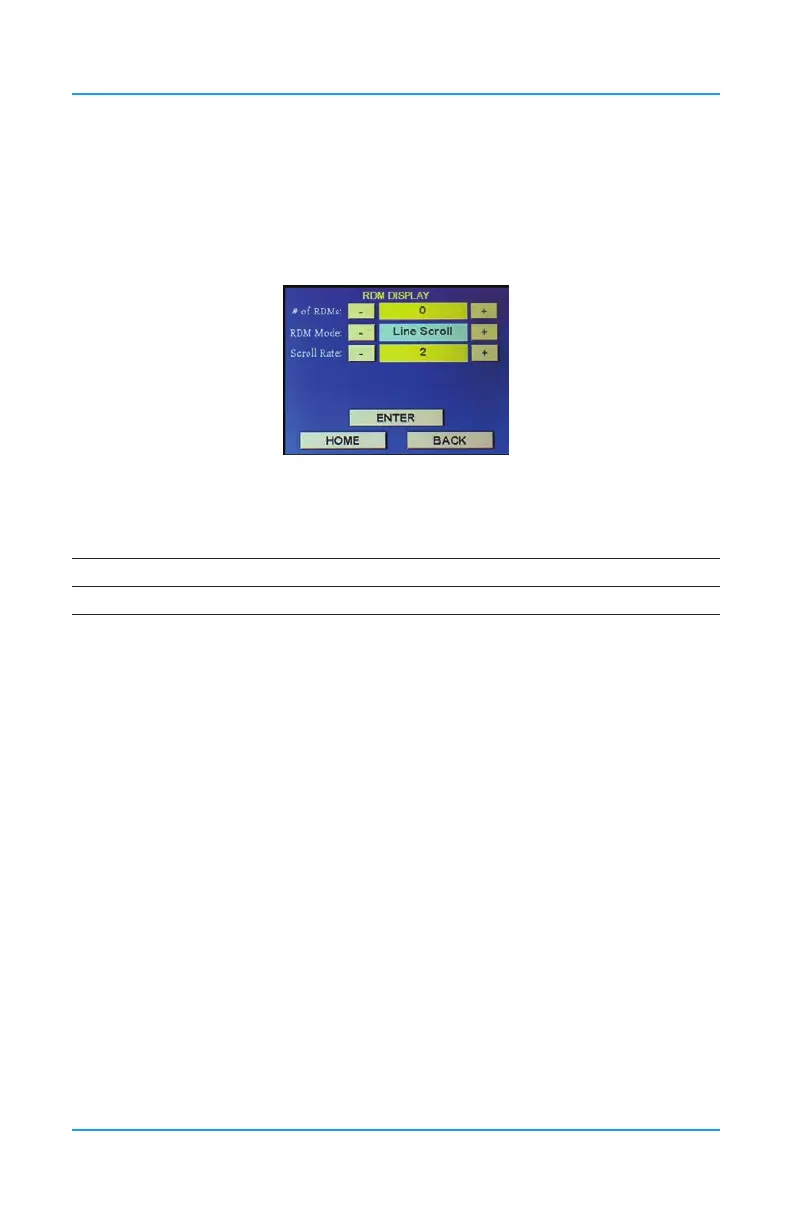
Press Menu and enter passcode “1014” to enter the Display menu and select RDM Display.
# of RDMs: Use the + or - buttons or press the yellow eld to use the keypad to enter the
number of remote displays connected to the FCS.
Maximum number of RDM Remote Displays by FCS model:
FCS-4 FCS-8 FCS-32 FCS 128
4 max 4 max 20 max 20 max
RDM Mode: Choose from these display modes:
• Line Scroll - ALL channels in the system will be displayed and the four line display
will scroll up by one line at a time
• Page Scroll - ALL channels in the system will be displayed and the four line
display will scroll up page by page (four lines at a time)
• High Channels - the four line display will show the FOUR channels with the
current highest gas readings in order of highest to lowest (based on percentage
of range, not measure of unit). This display setting is primarily used with the FCS-
4, because the display will only show a maximum of four channels.
• Selected Page - SELECTED channels will be displayed and the four line display
will scroll by page.
• Selected Line - SELECTED channels will be displayed and the four line display will
scroll by line
NOTE: Because the DM has a four line display, the scrolling feature (line or page) only applies
if there are more than 4 channels to display. If desired, any of the four lines can be hidden.
Refer to the RDM Operation Manual for more information.
Scroll Rate: Enter how fast (in seconds) you want the display to scroll through the


 To Next Page