© 2021 All rights reserved. Data subject to change without notice. 55
Rev. C | 2021.12 FCS - Installation Manual
Voltage 10 - 30 VDC
Power 0.3 W
Size 6.1 cm dia x 13 cm H / 2.4 in dia x 5.2 in H
Lens Colour Red (other colours may be available upon request)
Enclosure PC cover and base
# of Flash Patterns 4
Operating Temperature -20°C to 65°C (-4°F to 149°F)
Certication IP65 rated
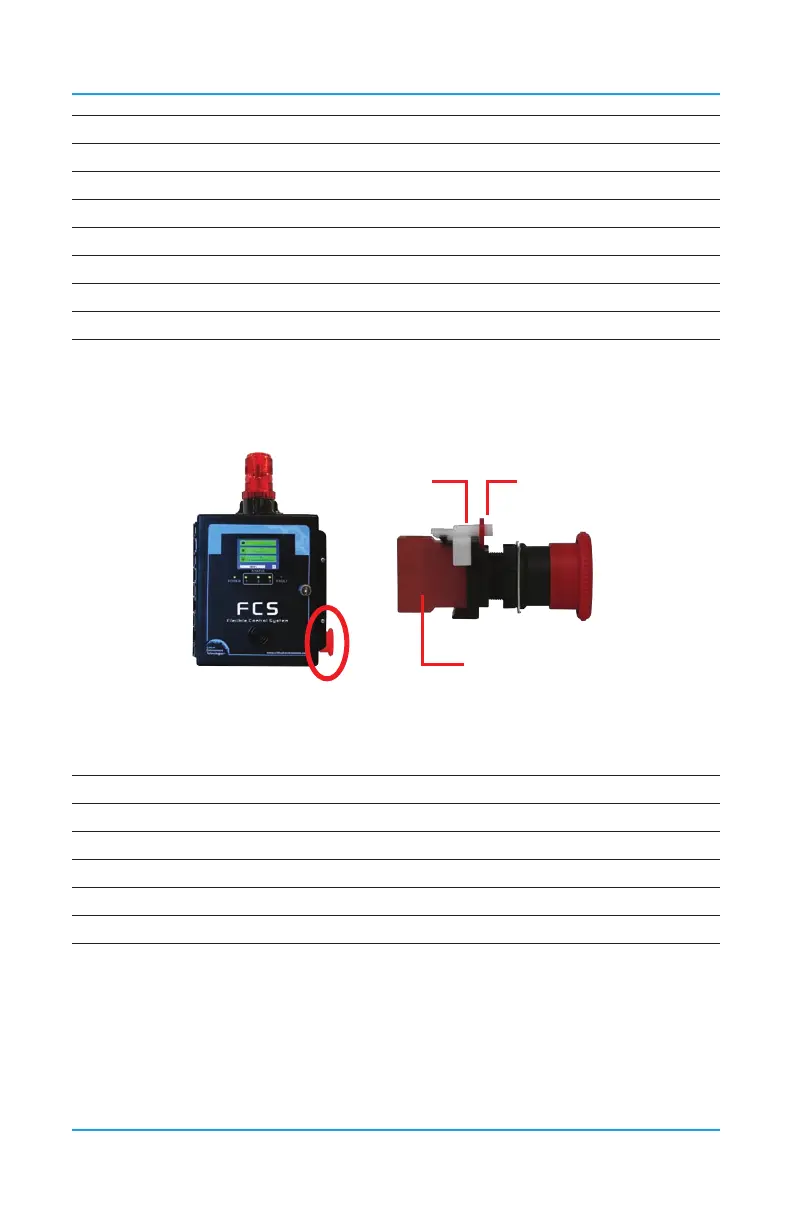
9.2 Manual Shutoff Switch (Option -SW)
An optional emergency stop, push button switch that is factory installed on the side of the
FCS enclosure.
Locking
Clip
Lever
Switch Block
*
Allows manual control of the ventilation system or manual shutdown of equipment in
the event of an emergency such as a gas leak. Ideal for refrigeration applications; when
combined with the Top Mounted Strobe, meets B52 code requirements
Voltage Rating 110 VAC, 24 VDC
Current Rating 10A (AC/DC)
Button Size 40 mm (1.57 in) dia
Mode of Operation 1 NC contact, SPST-NC
Switch Function ON-OFF
Features Push-Lock, Turn-Reset
To Remove For Wiring:
Remove the white locking clip by pulling up gently on the bottom clip part (see * in diagram
on previous page) and twist slightly to remove. Rotate the red lever and remove the switch
block. Connect the wires. Put the switch block back on, rotate the lever back in place and
replace the locking clip.
For more information and detailed instructions, refer to the Manual Shutoff Switch
Datasheet.


 To Next Page