50 © 2021 All rights reserved. Data subject to change without notice.
FCS - Installation Manual Rev. C | 2021.12
WAN Modbus®
Baud Rate
Modbus ID
19,200
100
Refer to Section 8.4 for list of baud
rates
1 to 127
WAN BACnet®
Baud Rate
Base Address
MAC Address
Instance ID
76,800
270
100
270100
Refer to Section 8.4 for list of baud
rates
1 to 999
1 to 127
Base Address x 1000 + MAC
Address
Analog Input Calibration 4 - 20 mA 0 - 20 mA
Analog Output Calibration 4 - 20 mA 0 - 20 mA
STEL/TWA
Display
Channel Alarm
Global Alarm
Off
Disabled
Disabled
On, Off
Disable, Enable
Disable, Enable
The Basic menu allows you to set parameters such as the date and time, data logging
sample rate, Modbus
® ID and baud rates (or BACnet® ID and baud rate if an FCS-B model).
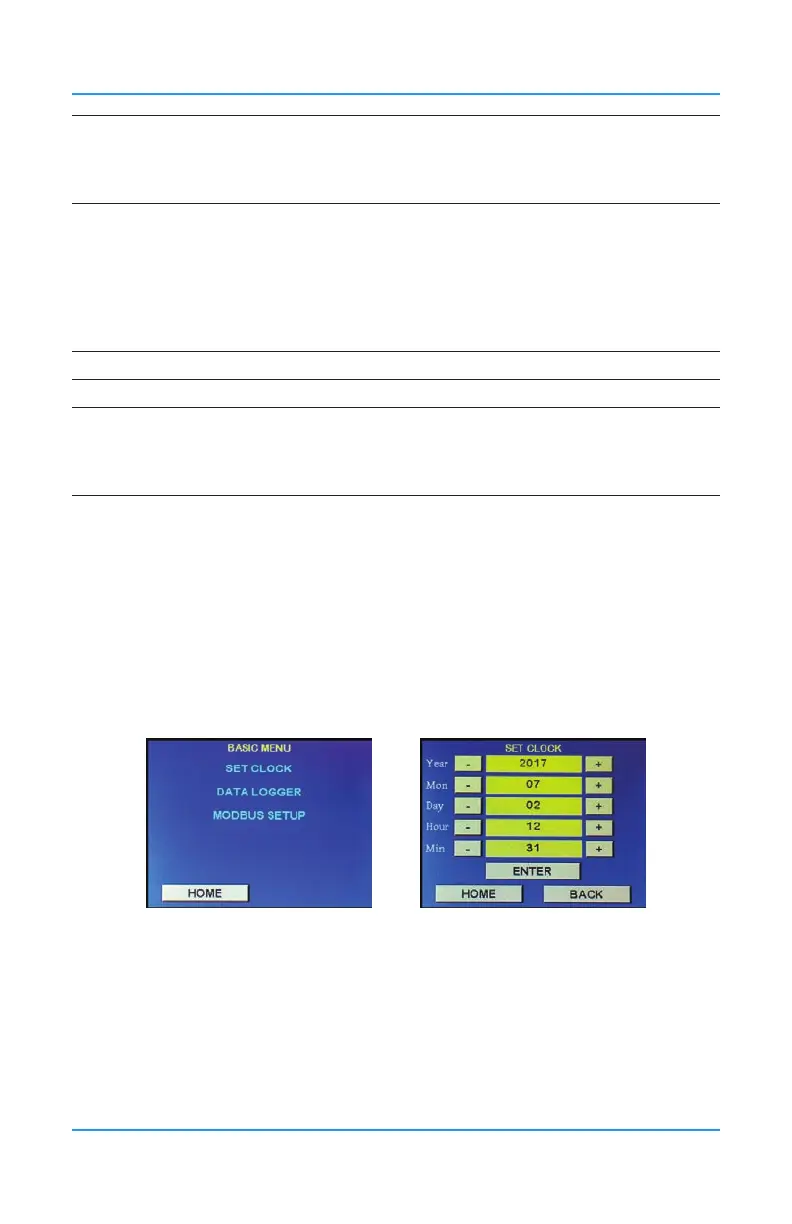
8.2 Set Clock
Allows you to set the correct date and time.
This is a 24 hour clock (ie. 9am = 09 and 1pm = 13).
Press Menu and enter passcode “1001” to enter the Basic menu and select Set Clock. Use
the + or - buttons to increase or decrease the numbers or press the yellow elds and use the
keypad to match the current Year, Month, Day, Hour and Minute. Press Enter to save.
8.3 How to Enable / Disable Data Logging and Change Logging Interval
NOTE: The correct time and date should be set prior to enabling data logging. Refer to
Section 8.2 Set Clock for more information.
Data logging includes internal logging memory that will store over one year’s worth of
readings (when set at a rate of logging once per minute). Data is saved in a format and can
be extracted from the unit with a standard USB connection. Once the data is downloaded,
copy the le to a name that has an extension of .csv. Users can then analyze and graph data


 To Next Page