© 2021 All rights reserved. Data subject to change without notice. 53
Rev. C | 2021.12 FCS - Installation Manual
information. Choose from 0 to 63 seconds. For line scroll, a scroll rate of 2 is a
suggestion. For a page scroll, a scroll rate of 5 is a suggestion.
Press Enter to save.
NOTE: Only the channels being displayed by the RDM Remote Display can trigger the buzzer
or strobe connected to the RDM. Only the channels being displayed by the RDM can be
silenced.
NOTE: If the display mode is changed in the eld and the channels being displayed are
not showing as expected, a restart of the FCS is required for the changes to take effect.
Push and hold the button on the FCS circuit board until the buzzer chirps (approximately a
count of 10), let go and the FCS will do a restart. Restarting the FCS only resets the FCS, the
transmitters and peripherals are not affected.
For more information on the RDM, see the RDM Remote Display Operation Manual. For more
information on how to congure the RDM to display selected channels (ie. one specic gas
channel or selection of channels), see the FCS Operation Manual.
8.6 Enable / Disable Channels
If a channel is disabled, it will show on the Channel Status details display with a “d” at the
end of the line. While disabled, the gas readings provided by that channel will not be used
to control the relays and/or alarms. Data logging entries will not be recorded for a disabled
channel.
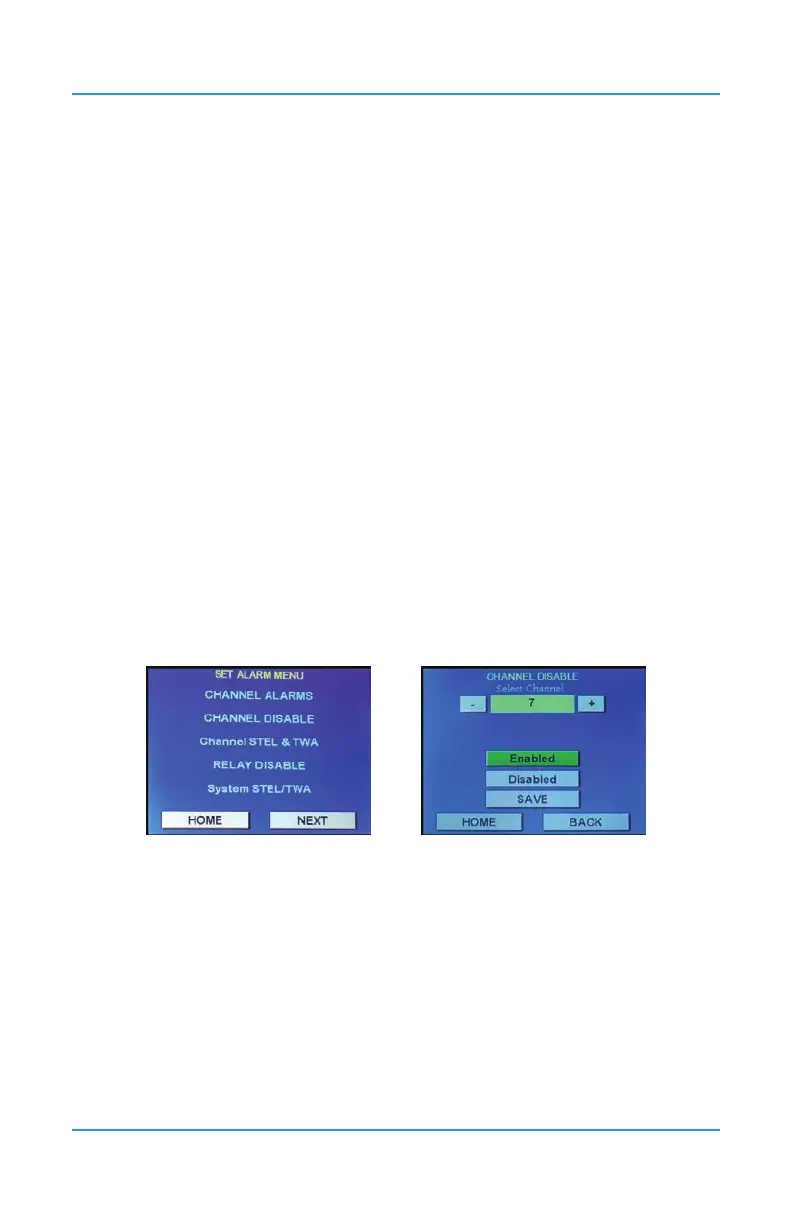
Press Menu and enter passcode “2012” to enter the Set Alarm menu and select Channel
Disable.
Use the + or - button or enter the specic channel number by pressing the yellow eld and
using the keypad to choose the desired channel. Press Enabled or Disabled for that channel.
The Save button will turn green after a change has been made.
If you are going through more channels on the same screen, the system will auto save when
you press the + or - to proceed or return to the next channel number. If you press Home or
Back, the change will not be saved. You can choose to press Save if in doubt.


 To Next Page