© 2014 Cygnus Automotive Limited
7
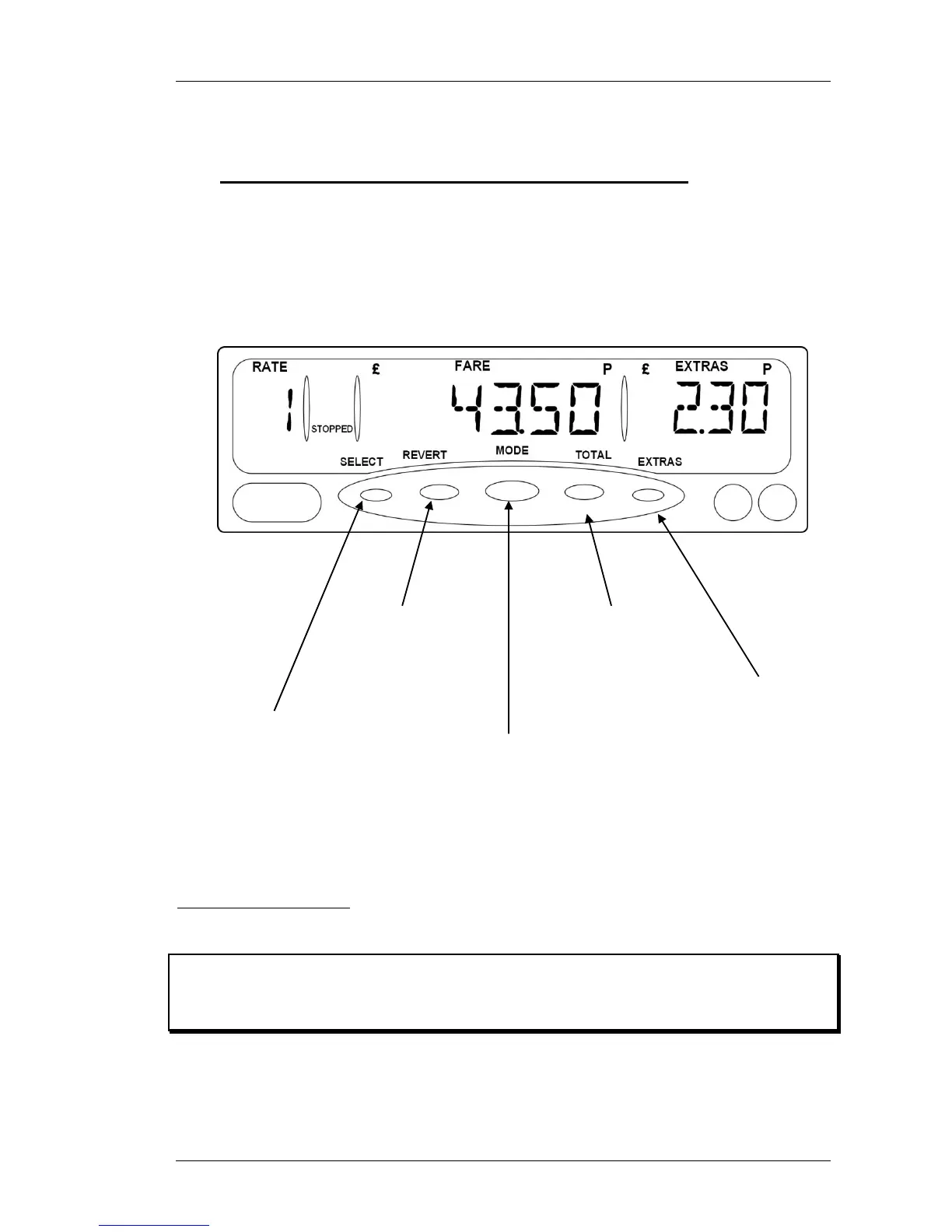
2.7 “STOPPED” Mode – At the end of the journey
At the end of the journey, select “STOPPED” mode. The MR400 will now no
longer increase the fare due to time. However, it may increase it due to
distance travelled. In “STOPPED” mode you can also add the fare and extras
together to show a Total Fare.
Figure 6: Stopped Mode
❢ “STOPPED” mode can be used by authorities to test the meter, as it
calculates the fare based on distance alone. It is not appropriate to use
HIRED mode for this purpose.
Press “REVERT”
to go back to
“HIRED” mode
to continue the
journey if
allowed.
Press “MODE” to
end the journey and
go back to “FOR
HIRE” mode.
Press “TOTAL”
to add the fare
and extras
together.
Press “SELECT”
to change the rate
being charged.
Press “EXTRAS”
to add extras.
(See section 8.1
for alternatives)


 To Next Page