48 EZ-USB Development Kit User Guide, Doc. # 001-66390 Rev. *D
Cypress USB Drivers for EZ-USB Kits
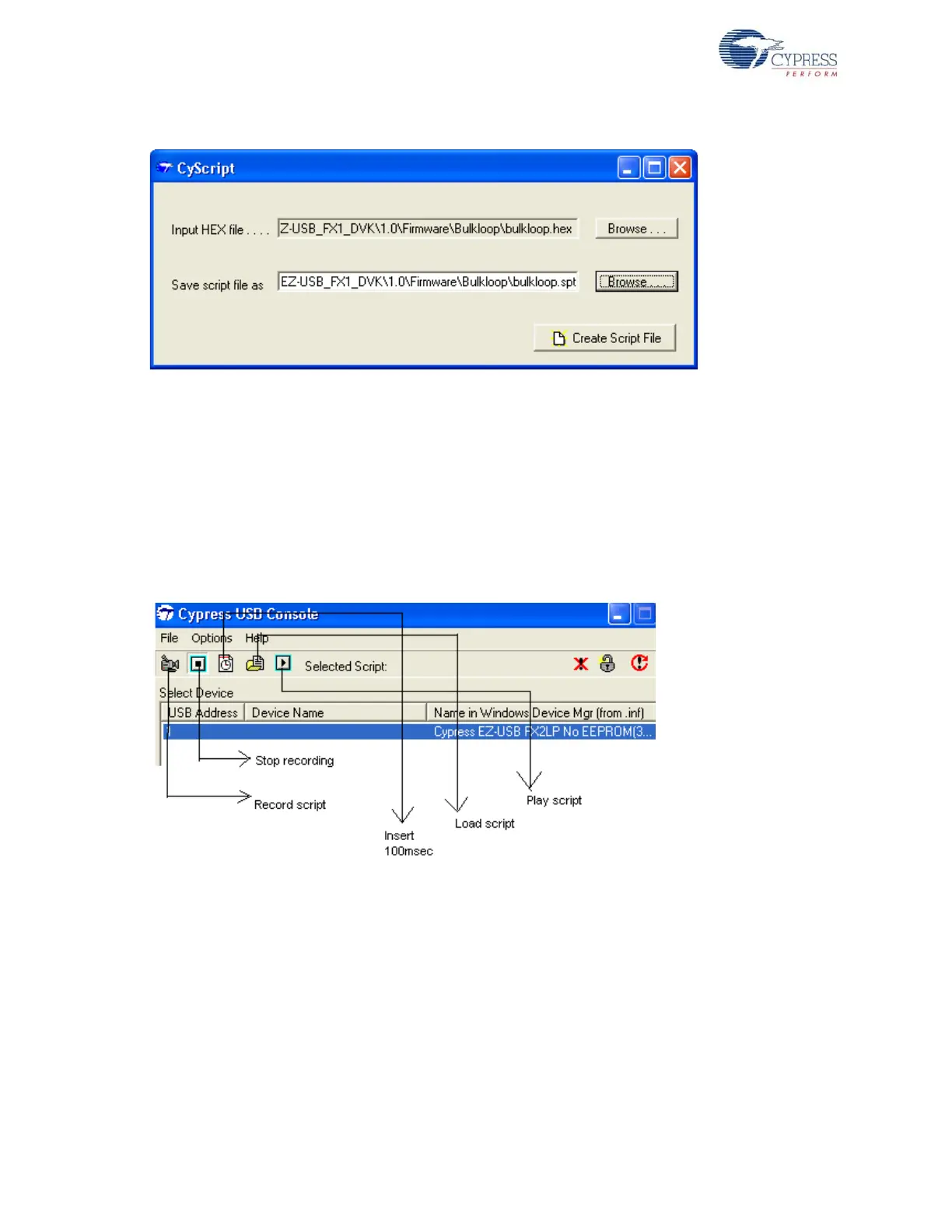
Verify if the xx.spt file is located in the destination directory. This tool can only generate a script but
cannot play the script. Using Cyconsole or Controlcenter, the generated script file can be loaded
and played to download the firmware inside the script.
6.3.1.2 Script File Generation and Play using CyConsole
Open the Cyconsole tool located at C:\Cypress\Cypress Suite USB 3.4.7\CyConsole.
Click on C:\Cypress\Cypress Suite USB 3.4.7\CyConsole. Alternately, the tool can be
accessed at Windows Start > All Programs > Cypress > Cypress SuiteUSB 3.4.7. Follow these
steps to generate and play the script.
Figure 6-5. Script Generation and Download Option in Cyconsole
1.Connect a USB A-to-B cable between the Windows PC USB Host port and the EZ-USB FX1/
FX2LP board J1 connector. The board should have switch SW2 with the NO EEPROM option
selected.
2.The EZ-USB FX1/FX2LP enumerates with the default Fuse ROM VID/PID.
3.Select the Record Script button
4.In the options menu, select EZ-USB Interface. Select Download in the new pop-up window and
browse to Bulkloop.hex at <Installed_directory>\<Version>\Firmware\Bulkloop



 To Next Page