92 EZ-USB Development Kit User Guide, Doc. # 001-66390 Rev. *D
EZ-USB Development Kit Firmware Examples
Located at <Installed_directory>\<version\Firmware/vend_ax and observe the vendor
commands implemented in the C routine - DR_VendorCmnd (void). Following are the vendor com-
mands defined in the vend_ax.c file:
The example is compiled using the Keil IDE similar to previous examples and corresponding images
for RAM (vend_ax.hex) and EEPROM (vend_ax.iic) can be generated. Both the images are located
at <Installed_directory>\<version>\vend_ax. Using CyConsole/CyControlCenter
the images can be downloaded as outlined in Method to Download Firmware Image to EZ-USB
Internal RAM Memory on page 69 and Method to Download Firmware Image to External I2C
EEPROM on page 69.
8.13.1 Testing the vend_ax Example
1. 0xA2 command-Read/Write to EEPROM
As mentioned in Table 8-5, this command is used to read and write contents to small EEPROM.
a. Test using CyConsole
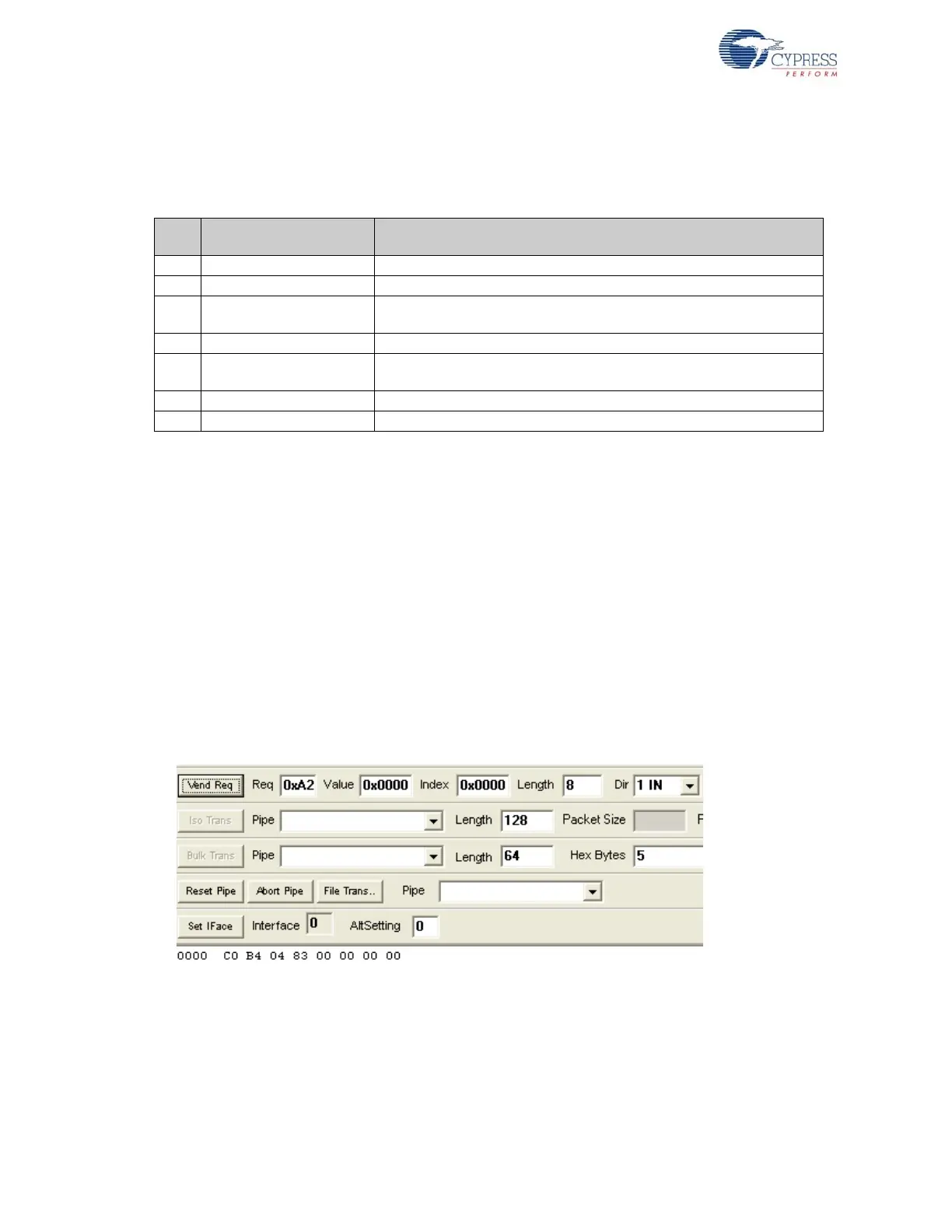
To read the contents of small EEPROM, select Req = 0xA2, wValue = 0, wIndex = 0, Length = 8
bytes (data to read), and direction IN for reading the data on the control endpoint. Click on Vend
Req. The following figure summarizes the entire operation.
Figure 8-10. A2 Vendor Command Read Operation using Cyconsole
Observe the contents read from the small EEPROM
To write the contents to small EEPROM, select Req = 0xA2, wValue = 0, wIndex = 0, Length = 8
bytes (data to read), and direction OUT for sending data on control endpoint. The small EEPROM
content’s first valid byte is always 0xC0 and additional bytes contain new VID/PID information.
Type the data C0 B4 04 84 00 01 00 00 in the Hex Bytes box. Click on Vend Req. The following
figure summarizes the entire operation.
Table 8-5. Vendor Command Definitions in vend_ax Example
S.No
Vendor Command/Macro
Definition
Function
1 0xA2/VR_EEPROM Downloads data to a small EEPROM
2 0xA3/ VR_RAM Downloads data to internal or external RAM memory
3
0xA6/
VR_GET_CHIP_REV
The command retrieves the current revision of EZ-USB(FX1/FX2LP)/
MOBL-USB FX2LP18 IC
4 0xA8/VR_RENUM The EZ-USB device disconnects and re-connect again.
5 0xA9/VR_DB_FX
The Commands selects double byte addressed large EEPROM-U5 and
the contents can be uploaded or downloaded to EEPROM
6 0xAA/VR_I2C_100 Sets the I2C interface to 100 kHz
7 0xAB/VR_I2C_400 Sets the I2C interface to 400 kHz



 To Next Page