39D-Link D-ViewCam User Manual
Section 3 - Conguration
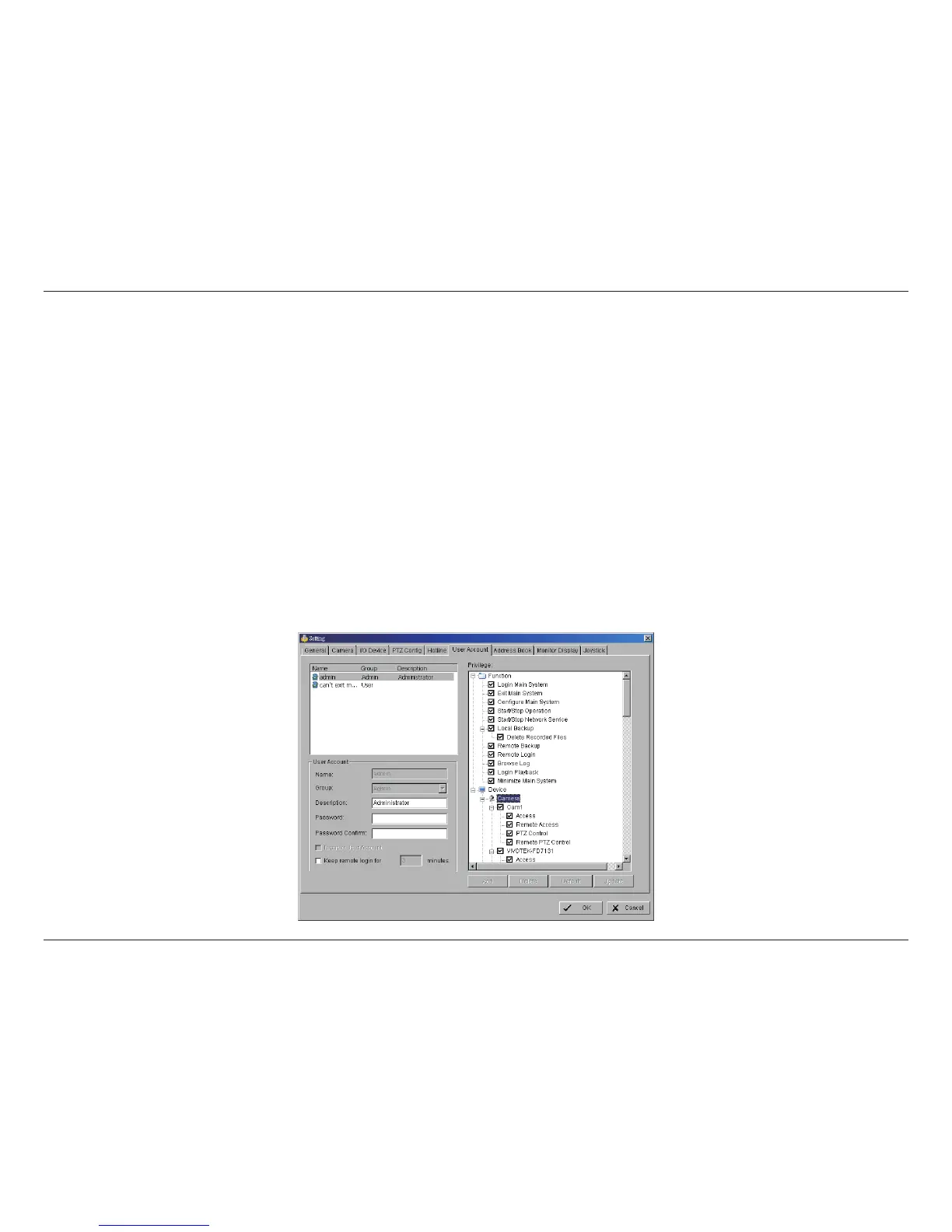
User Account Setting
Only the default admin account can manage user accounts. From the list on this tab, highlight each account and modify the privilege
setting.
Note: When entering into this page, the system will display one of the account group’s default privilege proles rst. End users can insert
Name and Password to create a new account, or click an existed account to modify his/ her privilege.
There are 3 default privilege proles of account groups:
Admin: Have privileges to all system functions and devices, except add/delete/update privileges of other users.
Power User: Have limited privileges of system functions and complete privileges of assigned devices.
User: All the privileges of system functions are forbidden, user can only manage assigned devices.
Add: Click it to create a new account after inserting related information. The Add button is only enabled when lled a
new account.
Delete: Click it to delete the indicated account.
Default: Click it to go back to default privilege settings of related user group.
Upgrade: Click it to save the modications of each account.


 To Next Page