xStack
®
DGS-3600 Series Layer 3 Managed Gigabit Ethernet Switch
NOTE: The Switch's factory default IP address is 10.90.90.90 with a
subnet mask of 255.0.0.0 and a default gateway of 0.0.0.0.
IPv6 Interface Settings
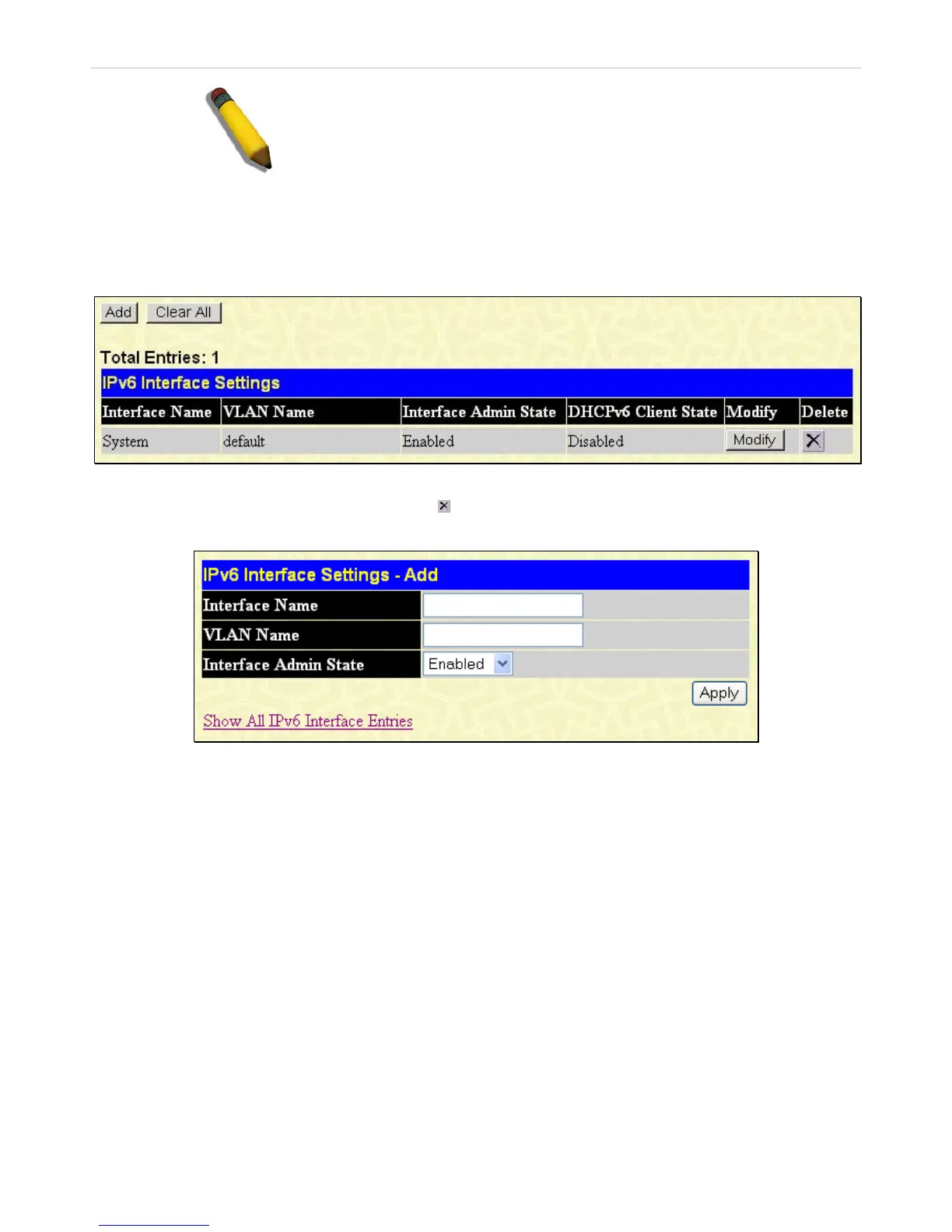
The following window is used to setup IPv6 interfaces and addresses for the switch.
To view this window, click L3 Features > Interface Settings > IPv6 Interfaces Settings, as shown below:
Figure 4- 4. IPv6 Interface Settings window
To remove an entry from the table, click its corresponding
under the Delete heading.
To add a new IPv6 interface, click the Add button, which will display the following window.
Figure 4- 5. IPv6 Interface Settings – Add window
To add an Interface, enter an Interface Name in the field provided, along with a corresponding VLAN Name, set the Interface
Admin. State to Enabled and click Apply. Newly created interfaces will appear in the IPv6 Interface Settings window.
To change the settings for a configured Interface, click the corresponding Modify button, which will display the following
window for the user to configure.
175












 To Next Page