39D-Link DNR-322L User Manual
Section 3 - Conguration
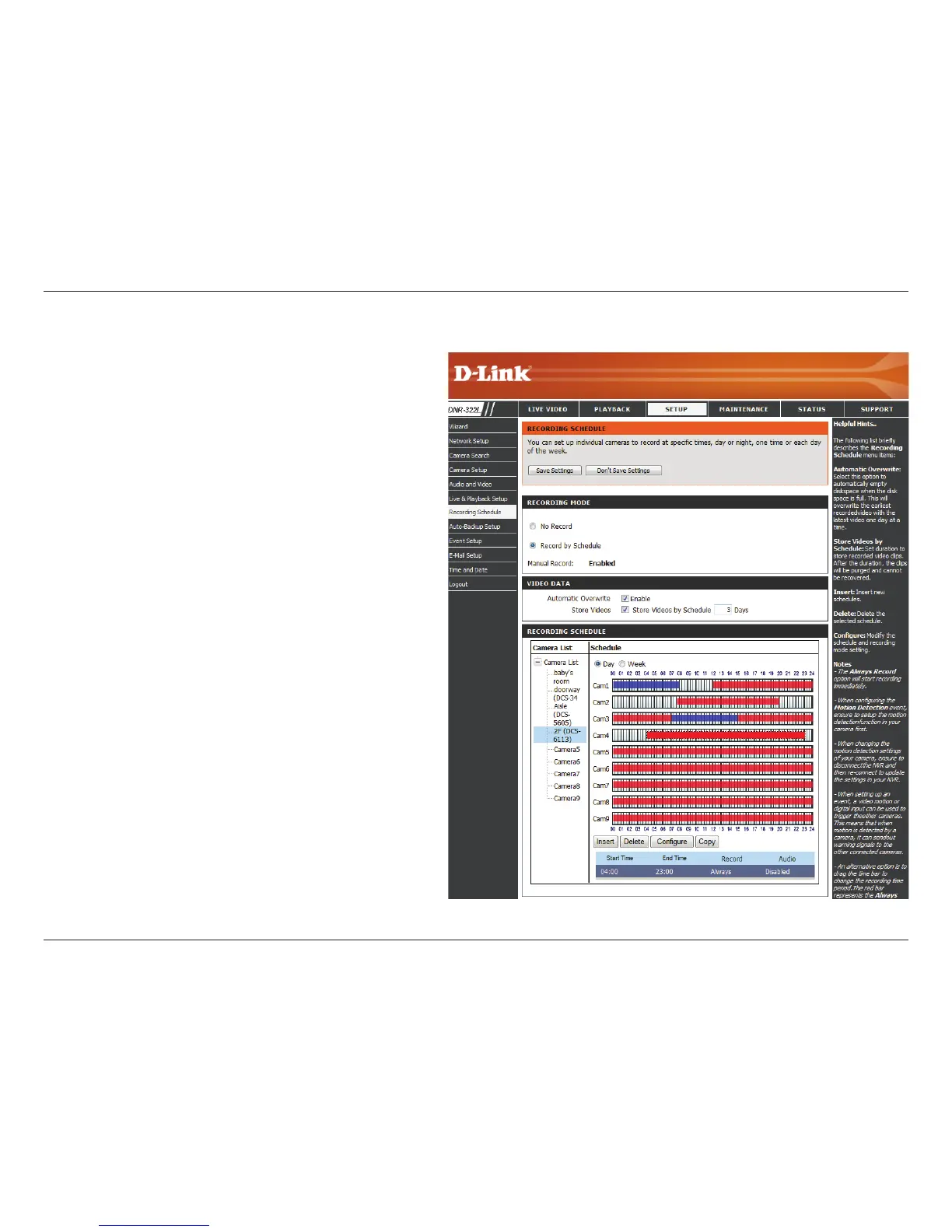
Set Recording Schedule
Day:
Week:
Setup the
Schedule:
Insert:
Delete:
Congure:
Copy:
Schedule the cameras to turn the recorder on
and o at the same time every day according to
your preference.
Schedule the cameras dierently for each day
of the week.
Step 1: Click the schedule of the camera which
needs to be modied.
Step 2: Click the column at the bottom of the
page.
Step 3: The default recording schedule is from
00:00 to 24:00. If you would like to modify the
time slot, click the Congure button to modify
the default settings rst.
Insert new schedules.
Delete the selected schedule.
Modify the schedule and recording mode setting.
Copy current Day Schedule to other channel(s);
copy current Week Schedule to other day(s) of a
week or to other channel(s).
Set Recording Schedule


 To Next Page
 Loading...