User's Manual
256
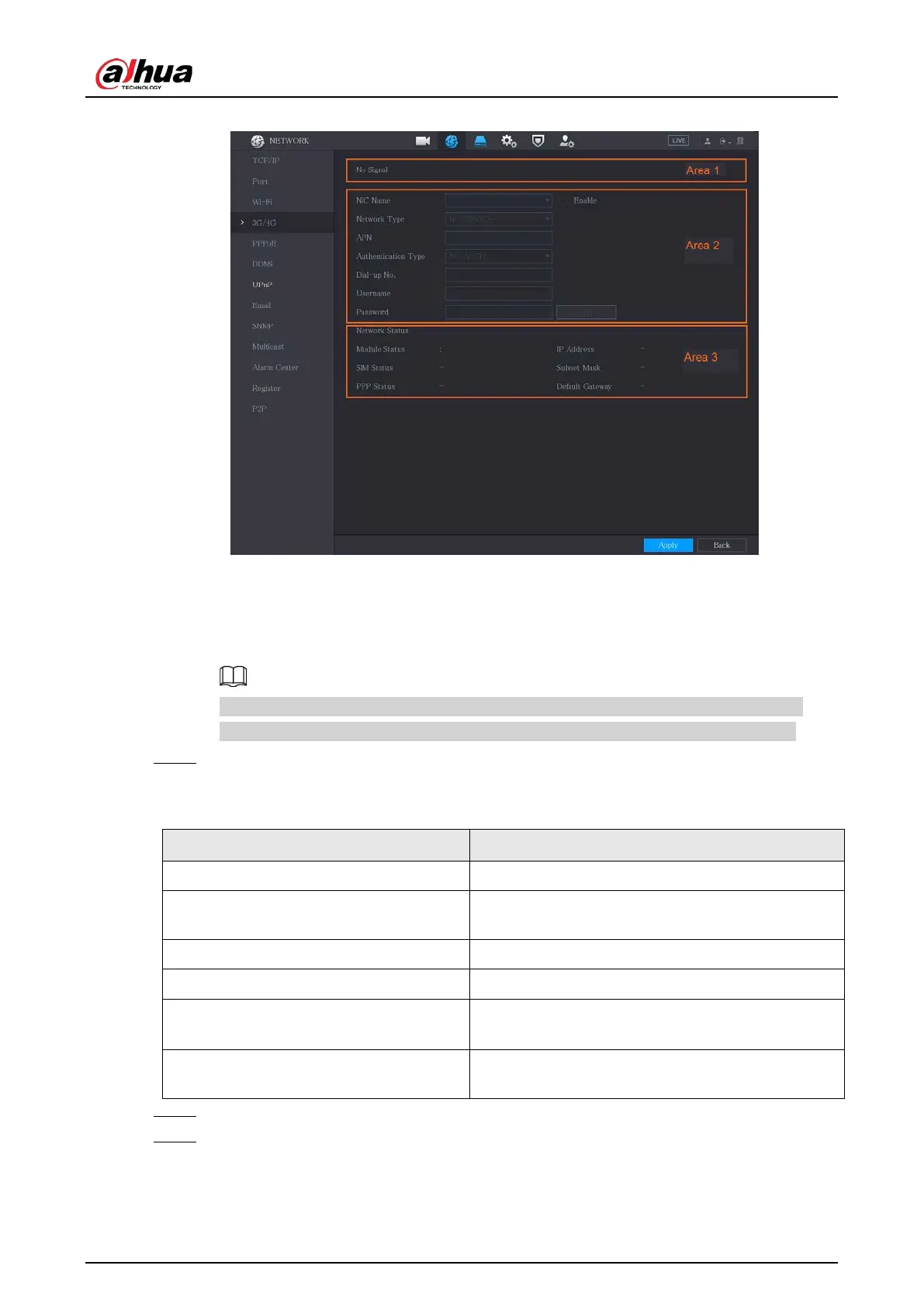
Figure 5-219 3G/4G
The 3G/4G page consists of three areas:
●
Area 1: Displays the signal strength.
●
Area 2: Displays the module configurations.
●
Area 3: Displays the connection state.
The information of Area 2 will display after the 3G/4G module is connected; while the
information of Area 1 and Area 3 will display only after the 3G/4G function is enabled.
Step 3 The Device starts identifying the wireless module and displays the recognized information
for the parameters in Area 2.
Table 5-58 Recognized information
Parameter Description
NIC Name Displays the name of Ethernet card.
Network Type
Displays the network type. Different type represents
different supplier.
APN Displays the default APN number.
Dial-up No. Displays the default dial No.
Authentication Type
Authentication mode. You can select
PAP
,
CHAP
, or
NO_AUTH
.
Username, Password
Enter the username and password for
authentication.
Step 4 Select the
Enable
checkbox.
Step 5 Click
Dial
to start connecting.
After the connection is established, the result is displayed in the
Wireless Network
area.


 To Next Page
 Loading...
