User's Manual
26
No. Port Name Function
11 Ground terminal.
3.2.3 DH-XVR52xxA-I2/DH-XVR52xxA-I3/DH-XVR52xxA-4KL-I2/DH-
XVR52xxA-4KL-I3/DHXVR42xxAN-I/DH-XVR42xxAN-I(V2.0)/DH-
XVR52xxAN-I2/DH-XVR52xxAN-I3/DH-XVR52xxAN-4KL-I2/DH-
XVR52xxAN-4KL-I3/DH-XVR72xxA-4K-I2/DH-XVR72xxA-4K-I3/DH-
XVR72xxA-4KL-I/DH-XVR72xxAN-4K-I2/DH-XVR72xxAN-4K-I3
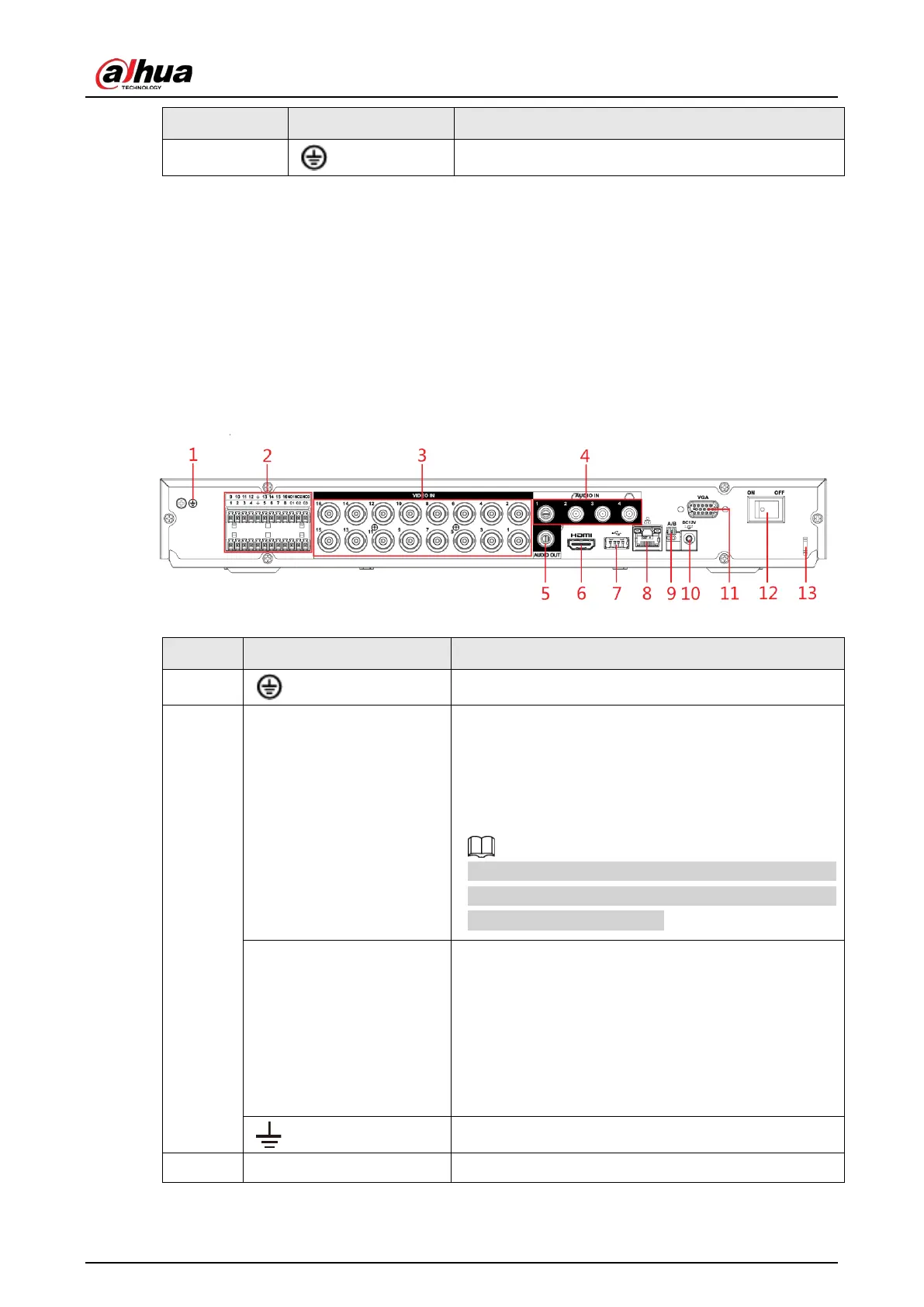
Figure 3-14 Rear panel
Table 3-13 Rear panel description
No. Port Name Function
1 Ground terminal.
2
Alarm input port 1–16
Four groups of alarm input ports (Group 1: port 1 to
port 4; Group 2: port 5 to port 8; Group 3: port 9 to port
12; Group 4: port 13 to port 16). These ports receive
the signal from the external alarm source. There are
two types: NO (Normally Open) and NC (Normally
Closed).
When your alarm input device is using external power,
please make sure the alarm input device and the DVR
connect to the same ground.
Alarm output port 1–3
(NO1–NO3;C1–C3)
●
Three groups of alarm output ports. (Group 1: port
NO1–C1, Group 2: port NO2–C2, Group 3: port
NO3–C3). These ports output alarm signal to the
alarm device. Please make sure power supply to
the external alarm device.
●
NO: Normally open alarm output port.
●
C: Alarm output public end.
Ground.
3 Video input port Connects to analog camera to input video signal.


 To Next Page
 Loading...
