38 Installation Manual 3P291714-7H
DCM601B51 intelligent Touch Manager
English
NOTE
The parameter number cannot be changed to “
00” when the intelligent Touch Manager
is not powered on.
Power on the intelligent Touch Manager and wait for a while before trying to operate the
remote controller. You cannot change the parameter number to “00” also when the intel-
ligent Touch Manager is not communicating with the indoor units normally. Make sure
that the cables are connected correctly.
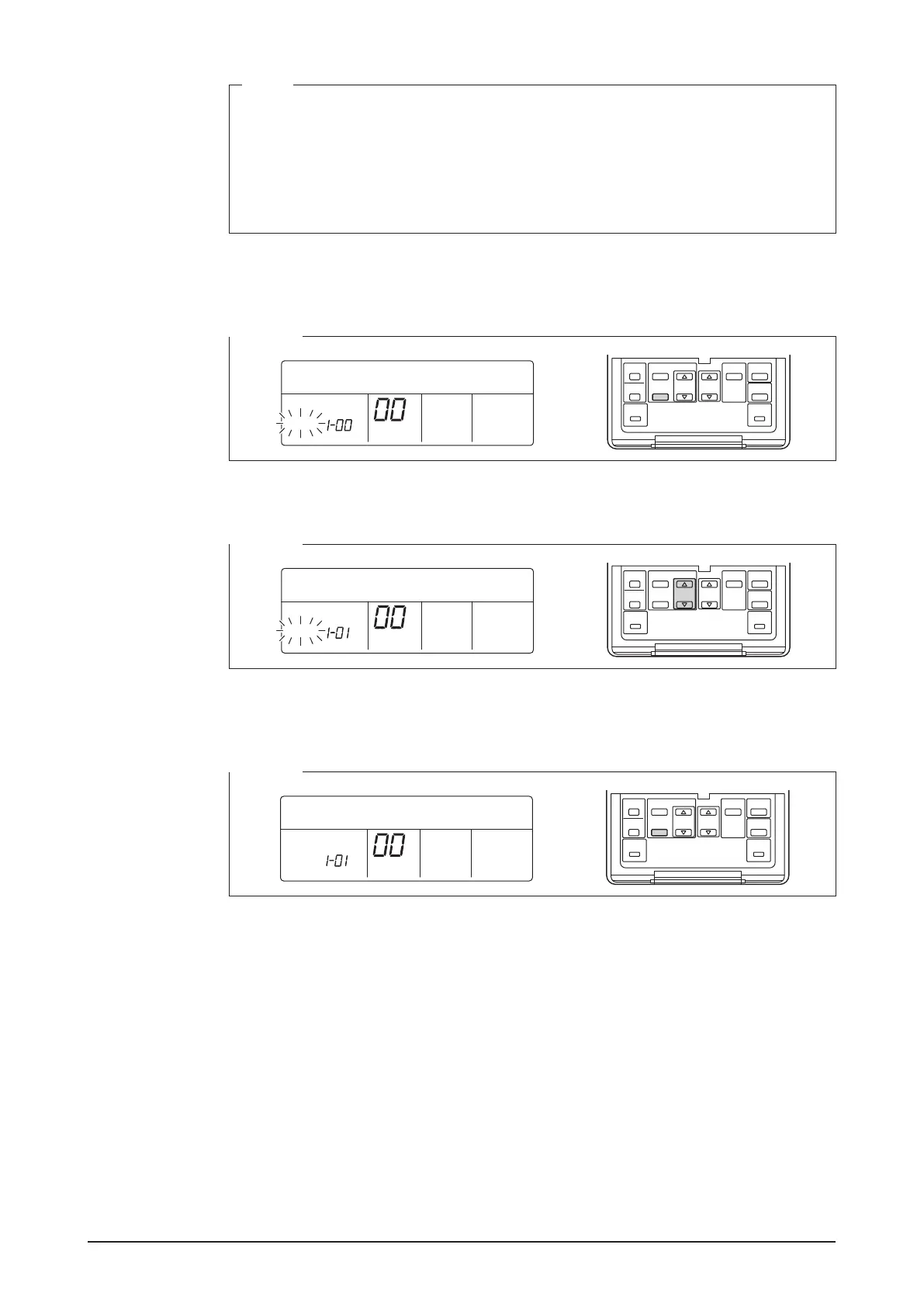
3. Press the Timer ON/OFF button to make the “GROUP” indicator blink.
You are now ready to change the DIII-NET address.
<Step 3>
SETTING
GROUP
4. Using the Programming time buttons, select the address you want to set.
<Step 4>
SETTING
GROUP
5. Press the Timer ON/OFF button to make the “GROUP” indicator stay lit.
The DIII-NET address has been set.
<Step 5>
SETTING
GROUP










 To Next Page