Installation Manual 3P291714-7H
DCM601B51 intelligent Touch Manager
39English
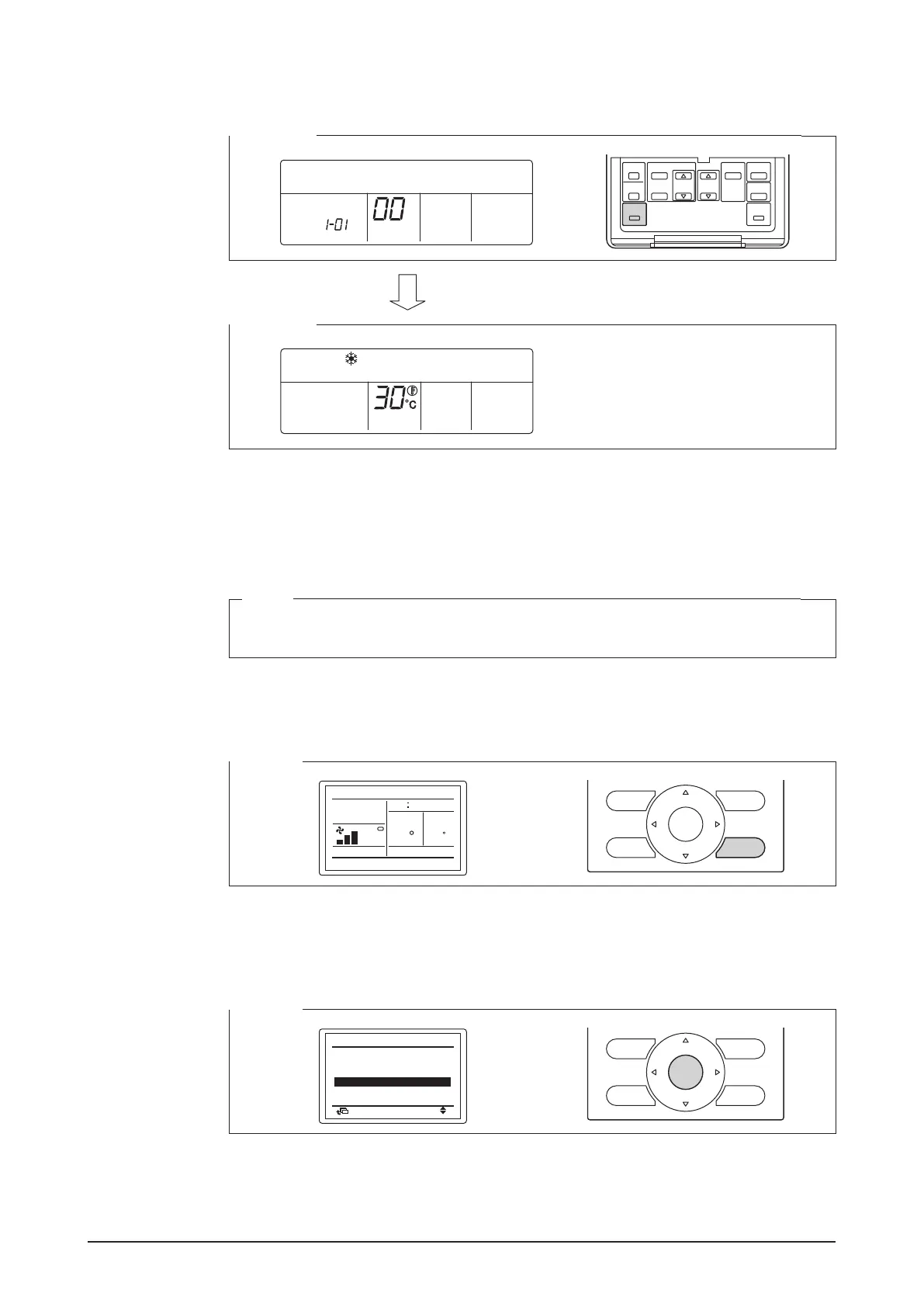
6. Press the Inspection/Test Operation button.
You are now brought back to the screen shown in Step 6-2.
<Step 6-1>
SETTING
GROUP
<Step 6-2>
HH
4.8.3 Procedure for a navigation remote controller
The following describes how to assign a DIII-NET address when a navigation remote
controller is installed.
NOTE
You cannot perform the following procedure when the display backlight is off. In this
case, press any key to turn on the backlight before starting the procedure.
1. Press and hold the Cancel button for 4 seconds or more.
The “Field setting” menu is displayed.
<Step 1>
Cool
Set temp
0000
30
30
C
Room
C
2. Using the Up/Down buttons, select “Group No. setting” and press the Menu/Enter but-
ton.
The “Group No. setting” menu is displayed.
<Step 2>
Test operation
Register Service Contract
Error record
Return
Setting
Field setting
Field setting list
Indoor unit Airnet No. set
Group No.
setting
1/2
ON/OFF










 To Next Page