EasyManua.ls Logo

Datavideo TVS-2000A - Control Panel Overview

Datavideo TVS-2000A
73 pages
Print Icon
To Next Page IconTo Next Page
To Previous Page IconTo Previous Page
Loading...
13
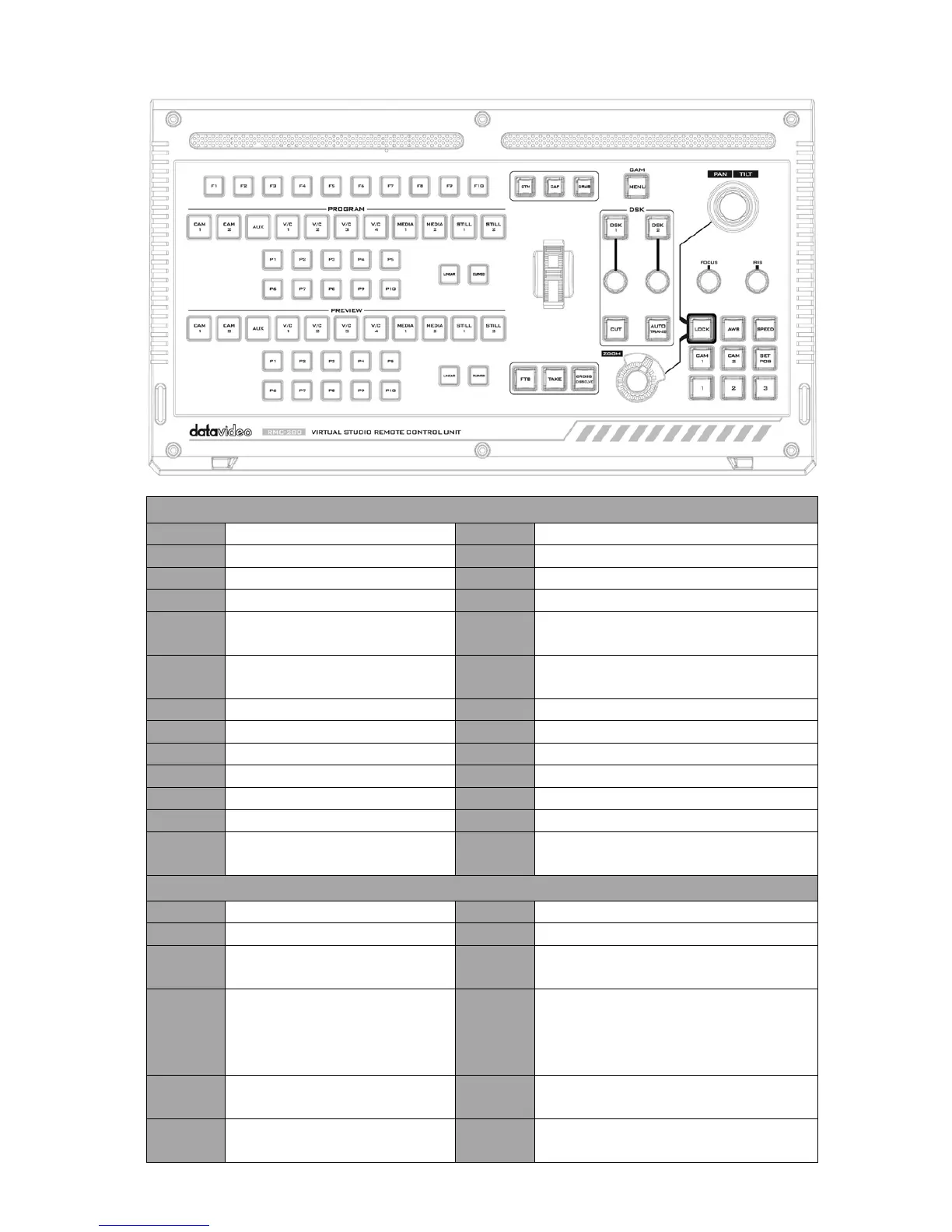
Control Panel Overview
TVS-2000A Virtual Studio Control Panel
F1-F10
Function Keys F1 F10
Curved
Curved camera movement
CAM 1
Camera 1 view
P1-P10
Selection of position
CAM 2
Camera 2 view
FTB
Fade PGM to Black
AUX
AUX view
Take
Switch between PVW and PGM
V/C 1 V/C 1 view selection
Cross
Dissolve
Cross dissolve transition effect
V/C 2 V/C 2 view selection
Rolling
Wheel
Manual Transition
V/C 3
V/C 3 view selection
STM
Program Streaming
V/C 4
V/C 4 view selection
CAP
Video Recording
Media 1
Media 1 Video
Grab
Still Picture Grab
Media 2
Media 2 Video
DSK 1
DSK 1 and source assignment knob
Still 1
Still Picture 1
DSK 2
DSK 2 and source assignment knob
Still 2
Still Picture 2
CUT
Placement of DSK on Program
Linear Linear camera movement
AUTO
TRANS
Auto transition of the DSK to the
program view.
PTC-150 PTZ Camera Control Panel
Joystick
Camera panning and tilting
AWB
Automatic white balance
MENU
Opens the camera menu
Speed
Enable lens movement speed setting
FOCUS
Knob
Camera focus adjustment SET POS
Save current position into Lens
position 1 / 2 / 3
IRIS
Knob
Camera iris adjustment
While in the camera menu,
pressing the Knob selects or
confirms a selection.
CAM 1 Selection of Camera 1
Zoom
Knob
Camera zoom adjustment CAM 2 Selection of Camera 2
LOCK
Lock and Unlock PAN/TILT
joystick and ZOOM knob
1 / 2 / 3 Lens positions 1 / 2 / 3


Table of Contents

Related product manuals