Connection of the workstation to a computer network
Input/Output Card Options
With both display and virtu SDI cards installed, it is thus possible to achieve different
combinations of views on the monitors. For more information, please refer to Configuration –
Layout section.
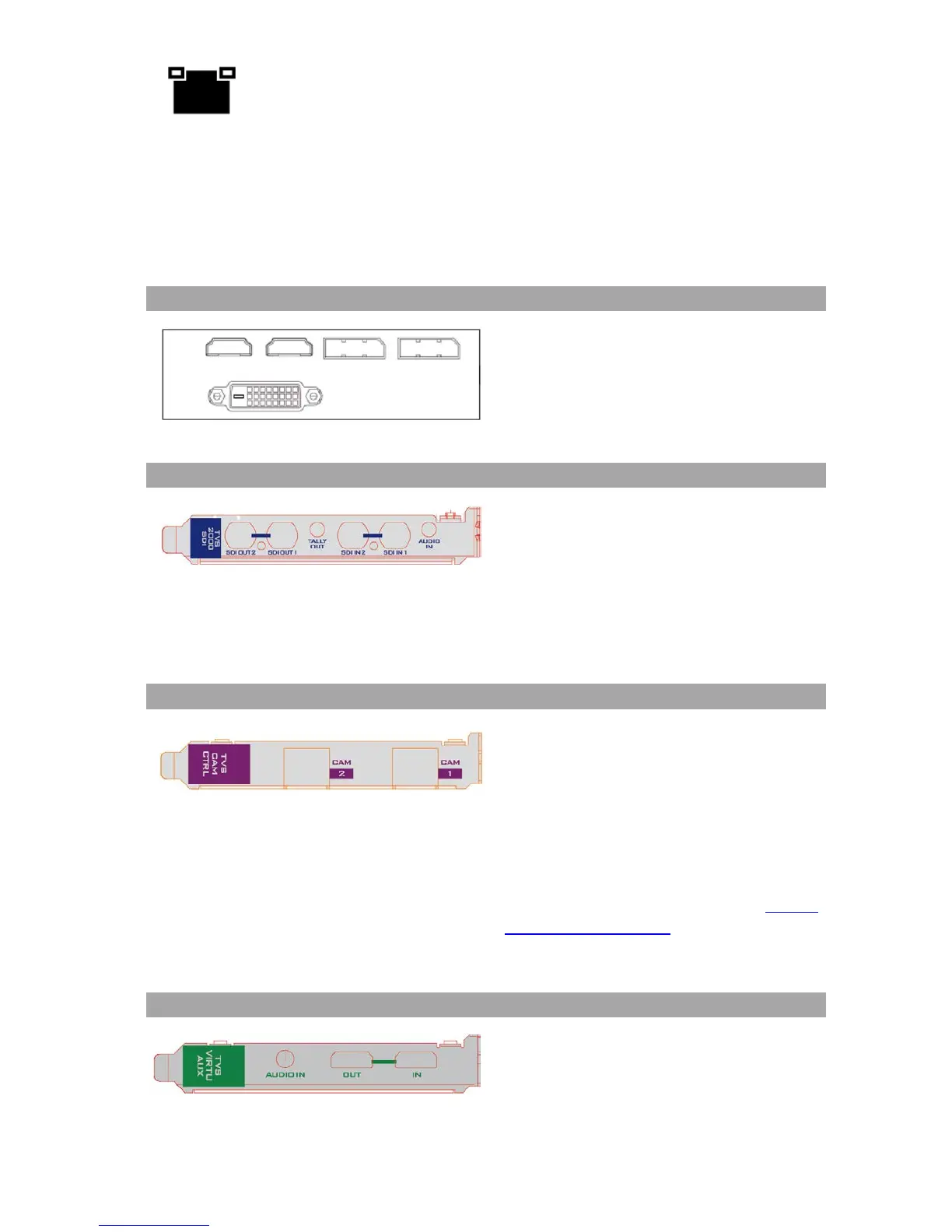
Display card allows connection of two DVI-D
ports, two HDMI output ports and one
DisplayPort.
Note
: It is recommended to connect
production window (Monitor 1)
TVS-2000A SDI Card (Blue)
SDI card allows connection of
two SDI input/output pairs, a mini phone
jack for audio input and a tally output to
the TVS-2000A.
Note: Please connect any SDI cameras to
use the TVS-2000A as a trackless Virtual
Studio System.
Tracking Camera Control Card (Purple)
Camera Control card allows connection of
two PTC-150 cameras to the TVS-2000A via
RJ-45 ports such that they can also be
controlled on the RMC-280 Virtual Studio
Remote Control Unit.
Note: Please connect PTC-150 HDMI
cameras to use the TVS-
tracking Virtual Studio System. See Section
4.11 Tracking Cameras to find out how you
can set up tracking cameras for your TVS-
2000A System.
The Virtu AUX Card provides an extra
connection of HDMI input/output pair and
a mini phone jack for audio input.



 To Next Page