• The "АП" active jamming indicator is displayed when electronic countermeasures are
detected in the fighter radar scan zone.
Vertical Scanning - Close Combat Mode
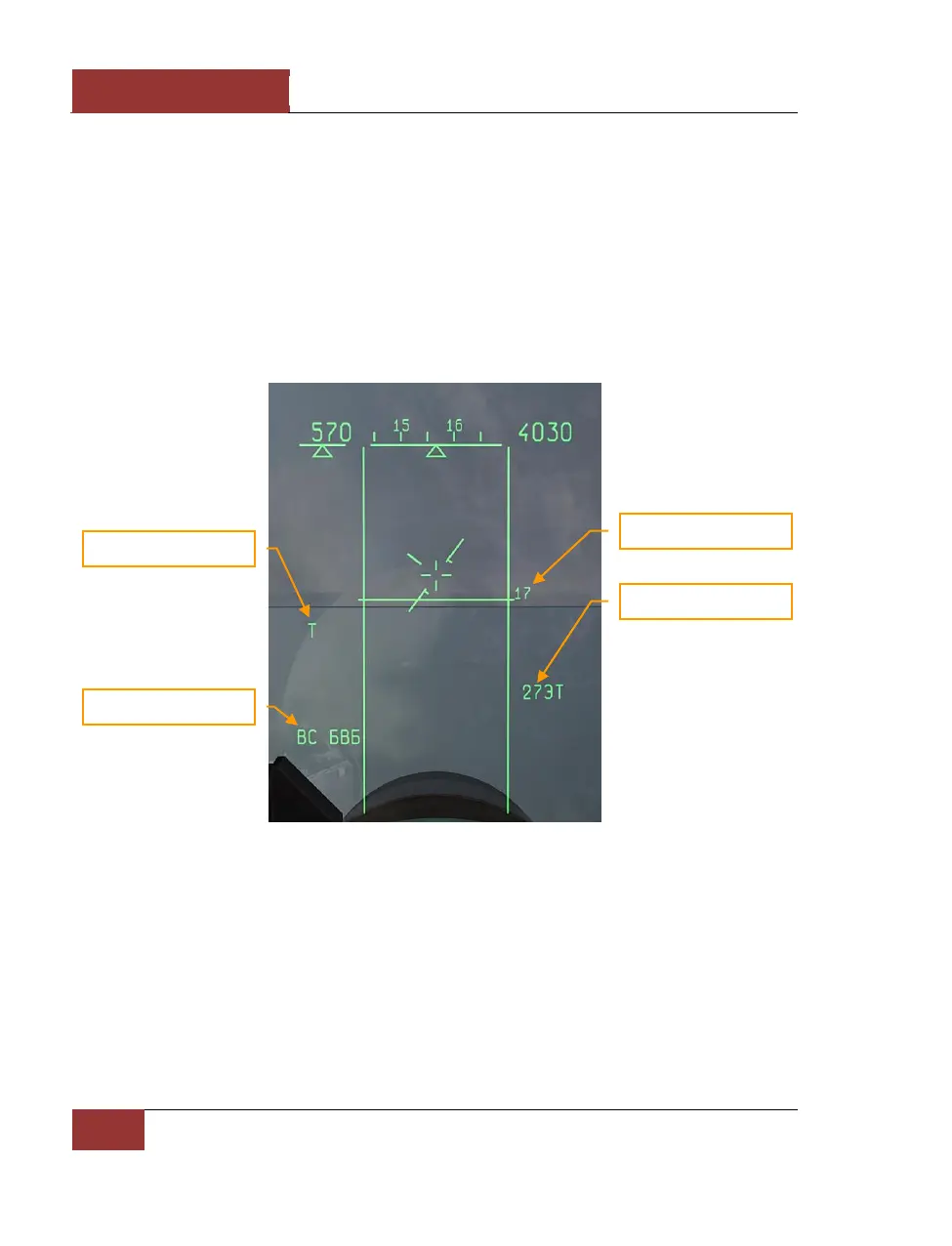
This Vertical Scanning sub-mode [3] is the most frequently used mode in close maneuvering air
combat. In this sub-mode, the radar or IRST scan pattern is a vertical bar that is -10+50 degrees
wide in elevation. The HUD displays two vertical lines denoting the boundaries of the scan zone.
Lock-on is possible when a target is inside the scan zone, which starts at the lower edge of the HUD
and extends above it by about two more HUD lengths. To lock-on a maneuvering fighter, fly to place
the target in the scan zone and press the lock-on [Enter] key. If the [Enter] key is not pressed, the
lock-on will not take place.
Figure 56: VS MODE
Lock-on occurs within 1 – 3 seconds of the target entering the scan zone with [Enter] pressed. After
the target is locked, the display on the HUD changes to the Attack (STT) mode.
Vertical Scan mode selects the IRST sensor by default. The default weapon is the IR missile. In
order to launch missiles with radar instead, the radar is first activated with the [I] key, and then the
desired missile is selected with the [D] key.



 To Next Page